

Every email platform offers click tracking. And all of them, including GMass, have always done it the same way.
You include a link in your email… we rewrite it to make it trackable… and then, when someone clicks, it’s tracked and they’re forwarded along to the original link.
But it’s inelegant. And worse than that — the industry-standard tracked links aren’t very clickable.
When someone mouses over a link in your email, they expect to see a link. Instead, they might see http://ec25226.whateverurl.net/x/d/?c=3432sfsd&l=asbas3df-34da&r=asdeas3413adskb-qw4wnas-s.
Even if you’re using a custom tracking domain, they’d still see https://link.yourcompany.com/x/d?c=46asf3cs730&l=7fcqsadf-46ea-9cfa-7d9abbsas2ada9f&r=d049-4b46-aea2-fa4asddee.
Neither of those is especially clickable. People are suspicious of clicking mysterious URLs. And even if they’re not suspicious of you, they still want to check out a link (and where it’s taking them) before they click it.
So we’ve fixed all that.
Introducing friendlier click tracking links in GMass: Links that actually look like real links and don’t hide their destination. Links that might just improve your click-through rate — and help your deliverability.
Here’s how to use them.
Friendlier Click Tracking Links: Table of Contents
- How to Turn On Friendlier Click Tracking Links
- What Friendly Click-Tracked Links Look Like
- Which Links Get the Friendly Format?
- Will Friendly Click-Tracked Links Have Any Effect on My Deliverability?
- Our Goal: Making GMass’s Tracking the Best in the Industry
How to Turn On Friendlier Click Tracking Links
Friendly click tracking links are an account-level setting, which means you set them up in the dashboard.
When you do, they’ll be applied on all future campaigns where you’re using click tracking. (You can always turn off click tracking for a specific campaign in the campaign settings box.)
Head to the GMass dashboard, open Settings, and click the Tracking section.
Then check the box for Use friendly click-tracked links.
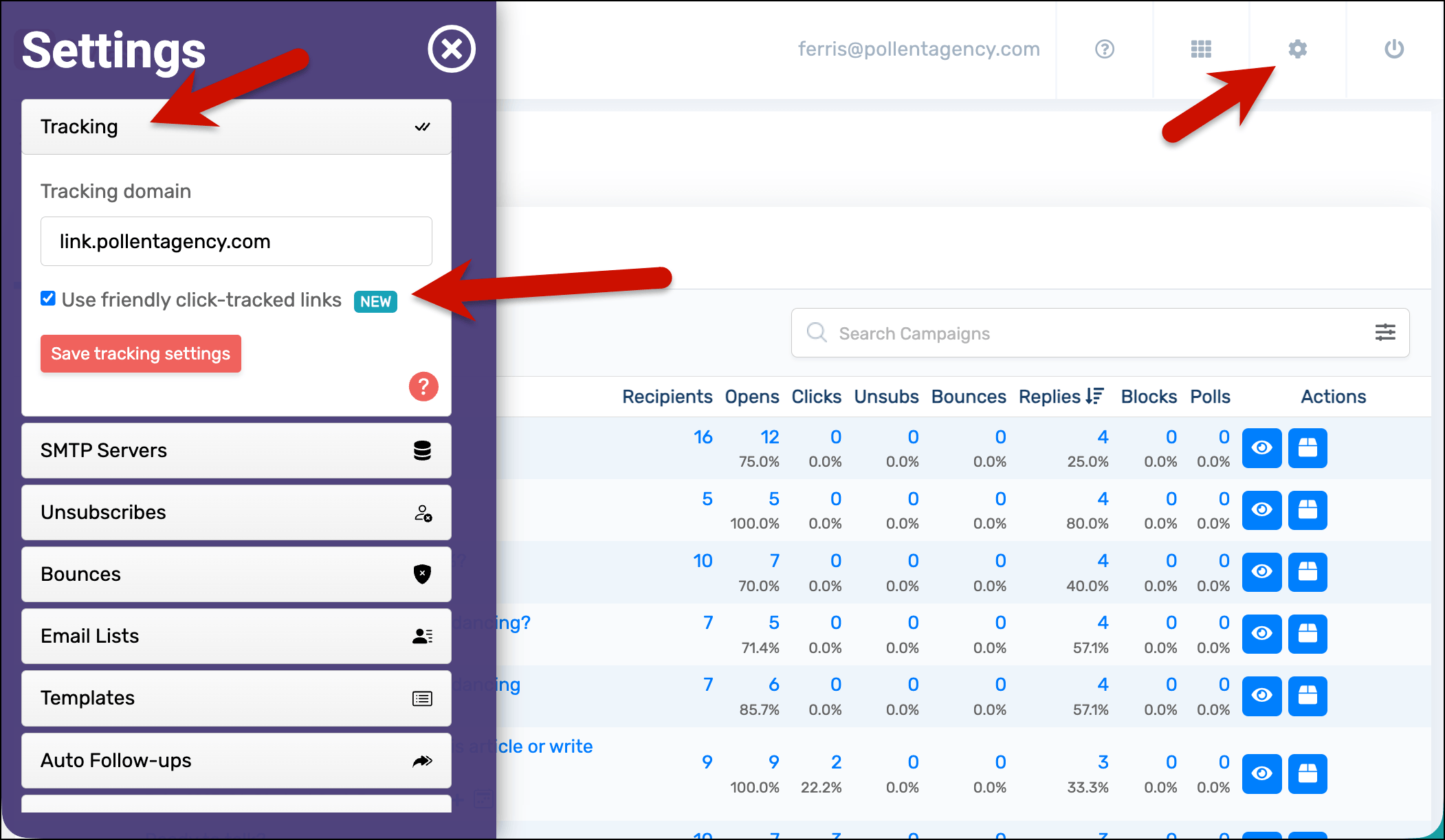
Save the tracking settings to lock this in.
(FYI: New GMass accounts will default to the friendlier format. But if you’ve been with us a while, the setting may be off until you switch it on.)
What Friendly Click-Tracked Links Look Like
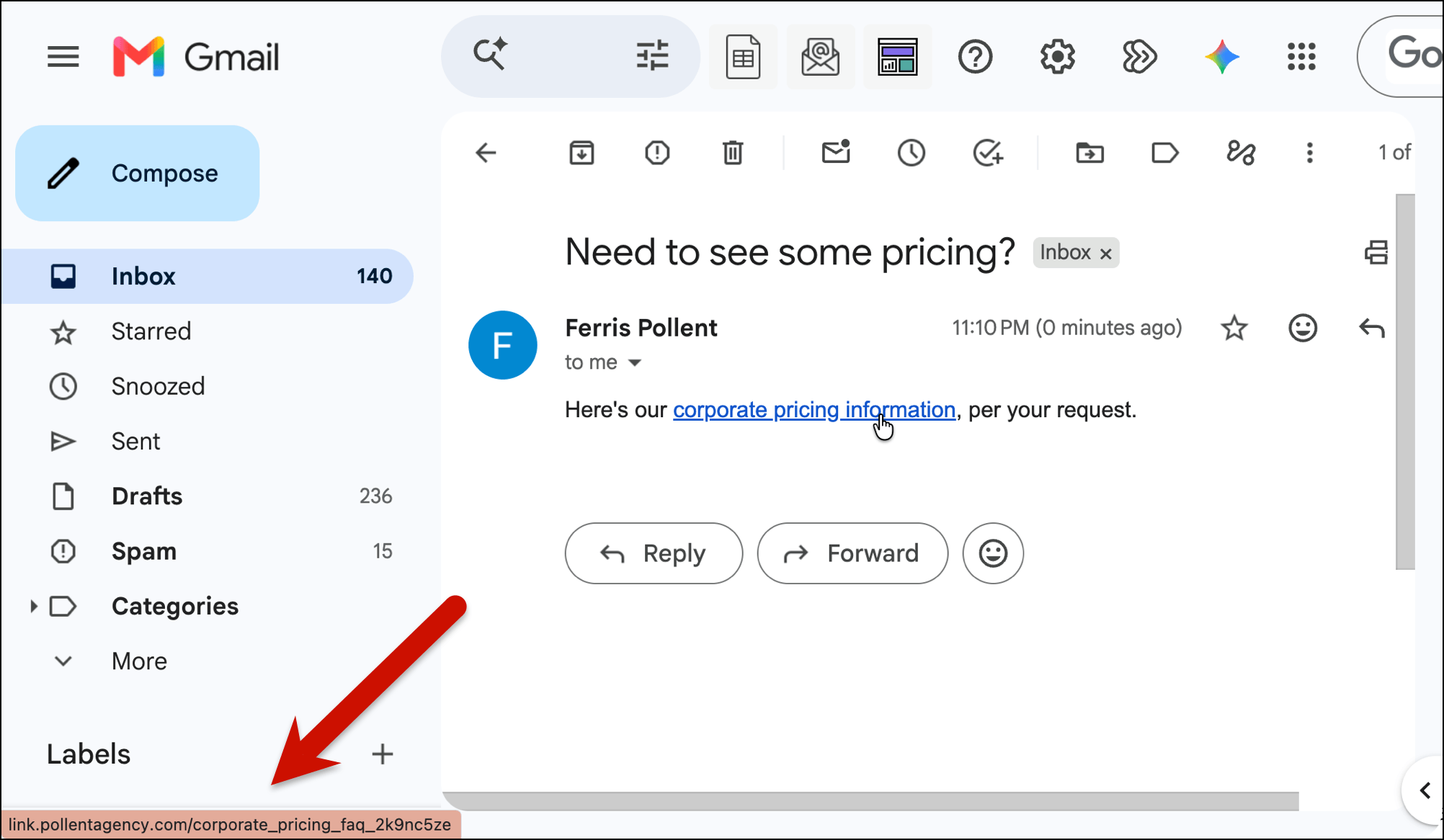
Here’s what your friendly links will look like when a recipient mouses over them (or long presses one on mobile).
In both cases, GMass is aiming to make the tracked link look as similar to the actual destination’s link as possible.
If you’re using a custom tracking domain…
Here at GMass, we’ve been recommending everyone use custom tracking domains for years now. YEARS.
(The 15-second refresher: By default, you share a tracking domain with other senders — so their reputation can actually affect your emails. If you take five minutes to set up a custom tracking domain, now only you affect your reputation. It’s a big deliverability move.)
With friendly click tracking links, GMass pulls the page name from the link you’re tracking and uses that with your custom tracking domain.
For instance, if your custom tracking domain is link.pollentagency.com and the link you’re click tracking is pollentagency.com/corporate-pricing-faq, the friendly click-tracking link would be…
https://link.pollentagency.com/corporate_pricing_faq_2k9nc5ze
What’s that “2k9nc5ze” on the end? We actually do need that for the tracking. But it’s buried at the end so it’s no longer making the tracking part replace your entire link.
If you’re using a shared tracking domain…
If you don’t know what a custom tracking domain is or you’ve never set one up, then you’re on a shared tracking domain.
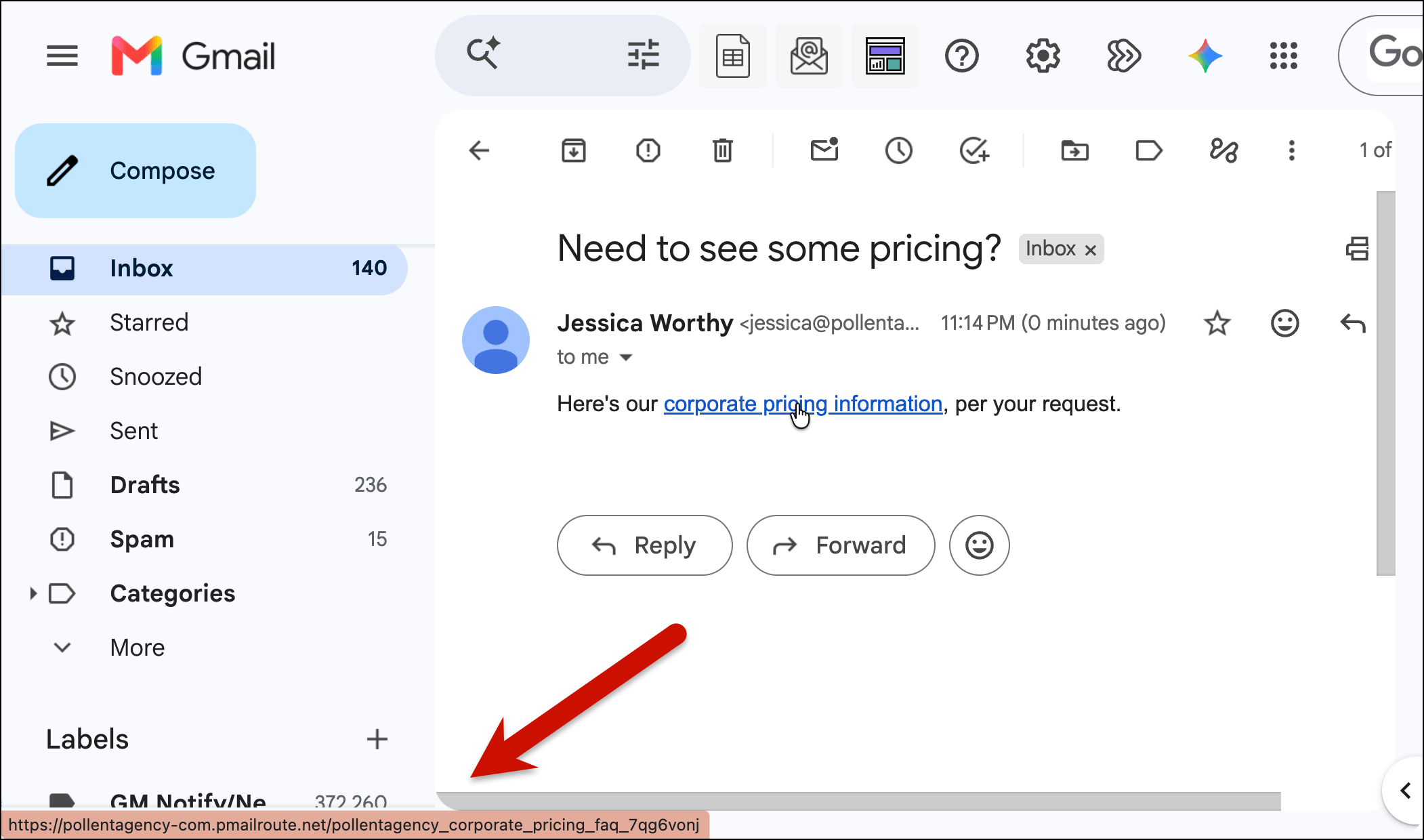
In this case, GMass will pull from both the domain name and the page slug to create the custom tracking link. We’ll also add your domain to the front of the shared tracking domain to make it even more clickable.
So if you’re sending to pollentagency.com/corporate-pricing-faq, then the friendly shared click-tracking link would be…
https://pollentagency-com.pmairoute.net/pollentagency_corporate_pricing_faq_7qg6vonj
If you’re sending from a free Gmail.com account, we’ll use your Gmail handle as part of the URL.
Once again, the goal here is to make the tracked link look as close to the actual URL as possible.
Which Links Get the Friendly Format?
Here’s where links will get the friendly format treatment.
Yes: Campaigns, sequences, triggered emails, recurring campaigns, and transactional emails
In other words: If you’re tracking links in any spot in your GMass campaigns, GMass will apply the friendlier tracking links.
(And yes, this includes the transactional emails you send through the GMass transactional API or the SMTP relay. If you want to turn off click tracking in those emails, that’s an account-level change in the GMass dashboard, at Settings > Transactional Platform.)
No: Straight URLs
GMass can only track clicks on hyperlinked text, not on raw URLs. That was true before friendly links and it’s true now.
Here’s why. If you paste a straight URL into your email (for instance, you just drop in https://www.yourwebsite.com), GMass won’t track it. That’s because it’s a massive spam flag to Google if a URL shows one website but leads to another website.
(Here’s more on making sure your campaign is fully tracked).
Otherwise, GMass tracks hyperlinked text, e.g., Check out my website. (Here’s how to disable tracking for one specific link in a campaign.)
No: Links in campaigns you’ve already sent
Campaigns already out in the world keep redirecting and keep recording clicks exactly as they did before. Barring the invention of time travel, we can’t change those links to friendly URLs.
The setting only affects links generated after you switch it on. If you enable it partway through a drip sequence, the earlier messages keep their original format and keep tracking normally.
Will Friendly Click-Tracked Links Have Any Effect on My Deliverability?
Directly: No, these will not have a positive or negative effect.
Indirectly: Possibly.
See… one of the best deliverability signals you can send to Google and the other email clients is engagement. When people open your emails, reply, and, yes, click — those are all serious signs that you’re not sending spam and you’re sending inbox-worthy messages.
Friendly click-tracked links are designed to be more clickable. They aren’t mystery meat links — they show recipients what they’re clicking.
So while we can’t (of course) guarantee that these links will improve your click-through rates and have an effect on deliverability as a result — they could.
No promises… but optimism.
(But really, if you want the best deliverability boost around click tracking, set up your custom tracking domain while you’re enabling friendly click tracking. We even automatically get an SSL certificate for it to serve it securely which is another potential little deliverability boost.)
Our Goal: Making GMass’s Tracking the Best in the Industry
Friendly click tracking links are the latest feature we’ve developed as we continue to push toward the absolute best tracking in the industry.
We’ve gone hard on open rates, with everything from splitting out likely false opens in your analytics to making sure you don’t trigger your own open pixel.
We’ve created instant reply and bounce detection.
And now, we’ve made links more clickable — which has the potential to increase CTRs and deliverability.
If you’re already a GMass subscriber, friendly click tracking is already available in your plan. Just head to the dashboard to enable it.
Not a GMass subscriber yet? Give it a try for free (no credit card required). Install the Chrome extension and you’ll be up and running in a matter of minutes.