

I talk to a lot of people every month hunting for Mailmeteor alternatives, and the main reason is: They’re trying to figure out exactly what Mailmeteor can and can’t do.
I get it. On the website, Mailmeteor promises a robust feature set, one that’s comparable to the big names and leaders in the email world. But on the pricing page… it’s priced suspiciously low, at the same level as the ultra-cheap tools.
So what gives?
In this article, I’m going to help you understand exactly what Mailmeteor is and isn’t, so you can figure out if it does meet your needs… or whether you need a more powerful and contemporary email sending platform.
Mailmeteor Alternatives: Table of Contents
- What Mailmeteor Actually Is
- Where Mailmeteor Falls Short
- 1. GMass — The Best Mailmeteor Alternative Overall
- 2. YAMM — The Equally Cheap Way to Do Basic Mail Merge
- 3. Mailsuite — If Tracking Is the Priority
- 4. Instantly — If You’d Rather Leave Gmail for a Hardcore Cold Email Platform
- 5. MailerLite — If You Want a Single-Purpose Newsletter Tool
- So… Which Mailmeteor Alternative Is Right for You?
What Mailmeteor Actually Is
Mailmeteor is a mail merge tool. You run it from inside Google Sheets (mainly) or from the interface on their website, and it sends each person a personalized email through your own Gmail or Outlook account.
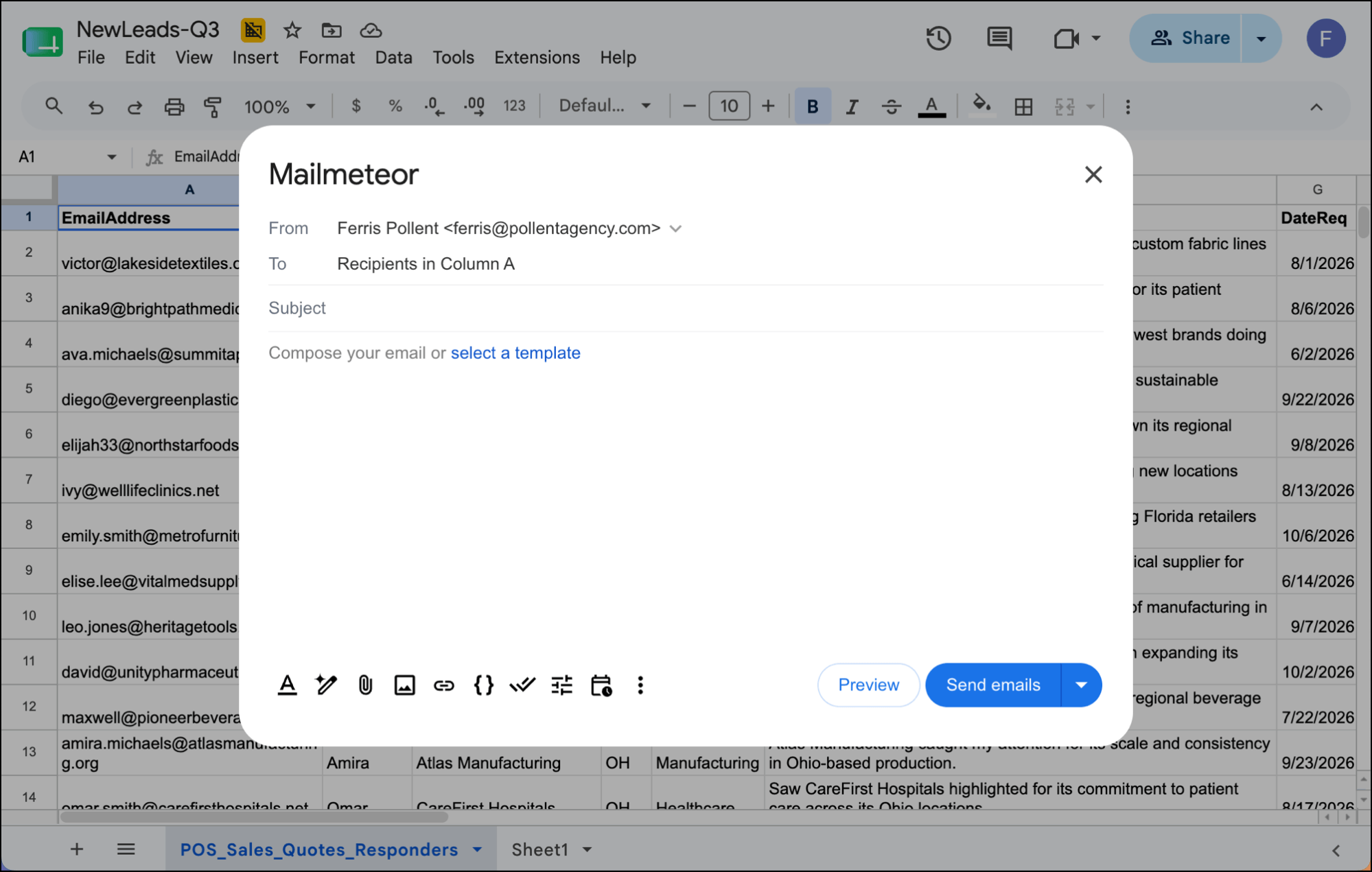
That’s really the extent of what it is. It’s not a full cold outreach or sales platform; it’s way under-featured and under-powered for that (plenty more on that later). It’s not an opt-in email marketing or newsletter platform; it can’t send the volume for that.
It’s really just made for sending mail merges through your email account.
But, again, Mailmeteor doesn’t sell itself that way. It positions itself as a weirdly inexpensive platform that goes toe-to-toe with the bigger players across all customer segments. It includes things like listing segmentation, CRM integration, and automation on its features list.

However……… when you dig into what those features do, you find a basic mail merge tool wearing a platform’s feature list.
For light, personal sending or occasional mail merges, Mailmeteor is perfectly fine. As a replacement for a real sending platform, the seams start showing as soon as you try to send larger campaigns.
Where Mailmeteor Falls Short
Mailmeteor handles the basics of personalized sending well regardless of what tool you’re using (they offer add-ons for Google Sheets, Google Docs, and Microsoft Excel).
Beyond that? Here’s what you’ll find…
1. It puts hard limits on how many emails you can send — and offers NO way to break past them
There are two things limiting how many messages you can send daily and monthly through Mailmeteor:
- Google and Outlook’s daily sending caps
- Mailmeteor’s self-imposed sending caps on your account
As for the built-in sending limits, that’s up to 500/day on a gmail.com account and up to 2,000/day on a paid Google Workspace account. For Microsoft, the limits are more convoluted (they cap on daily recipients, recipients per campaign, and new vs. prior recipients) but the limits also come out to about 500 per campaign per day.
Mailmeteor’s sending limits stack on top of that.
- Mailmeteor’s free plan limits you to 50 emails/day and 500/month.
- The Starter plan is 250 emails/day and 5,000/month.
- The Premium plan is 1,000 emails/day and 30,000/month.
- And the Professional plan is 2,000 emails/day and 60,000/month.
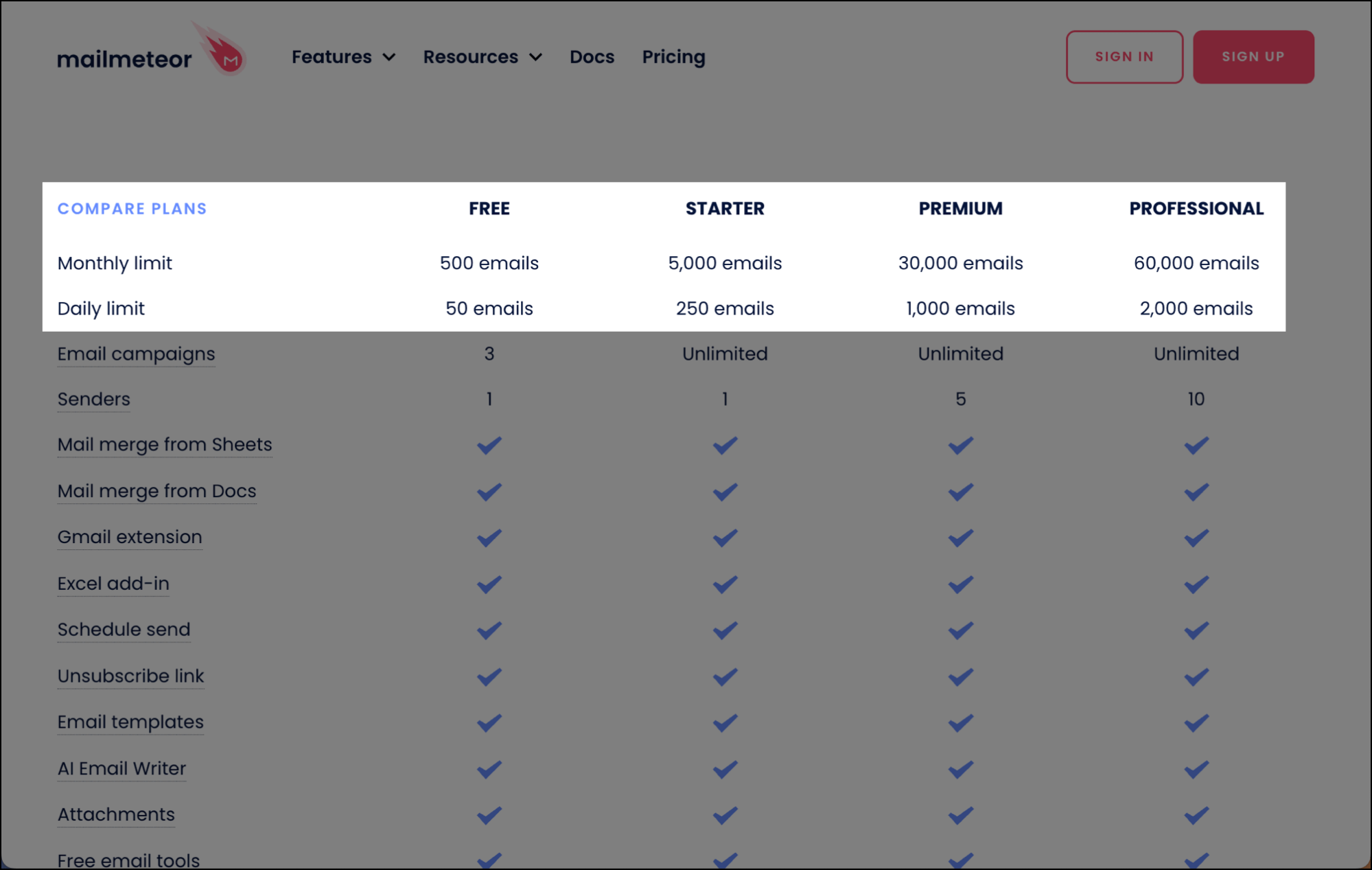
There’s no way to exceed those limits. Other services that I’ll cover in this article give you options to break Gmail’s limits or send through other servers altogether.
With Mailmeteor, you’re double capped (by them and then by your email client) and that’s it. In their documentation they even make it clear there’s no recourse to their caps.
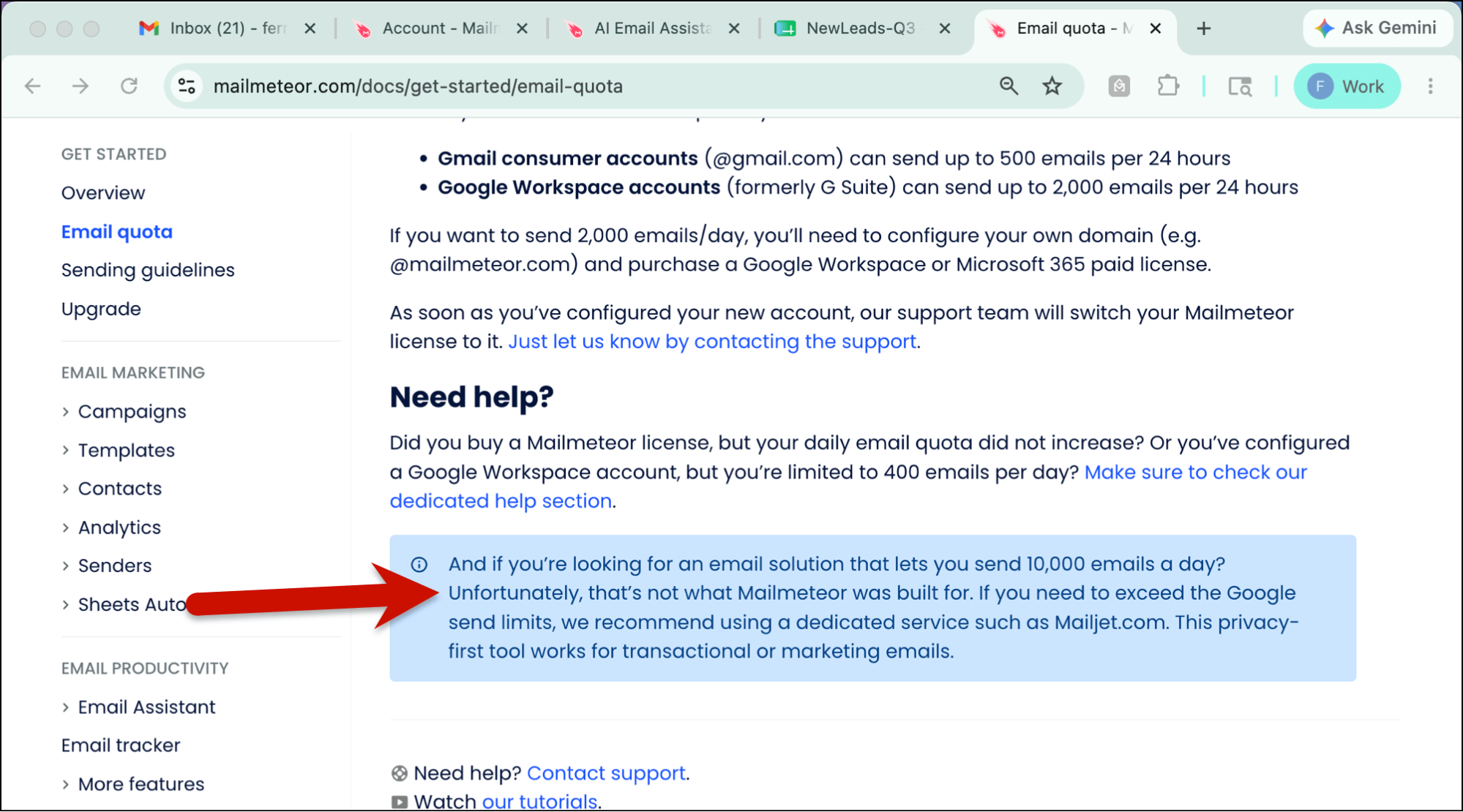
Which is the biggest reason why I said before and I’ll say again that this isn’t a tool for pros sending emails at any sort of scale.
2. Their deliverability tools are lacking
Mailmeteor has some deliverability features, like an IMAP-based warmup in their more expensive plans and email verification included in their paid plans.
But beyond that… there’s really nothing sophisticated here to help you avoid the spam folder and get to the inbox.
Their “Spam Checker” is actually just a tool that scans your text for the famed spam-trigger words. That’s a deeply antiquated technique for spam prevention.
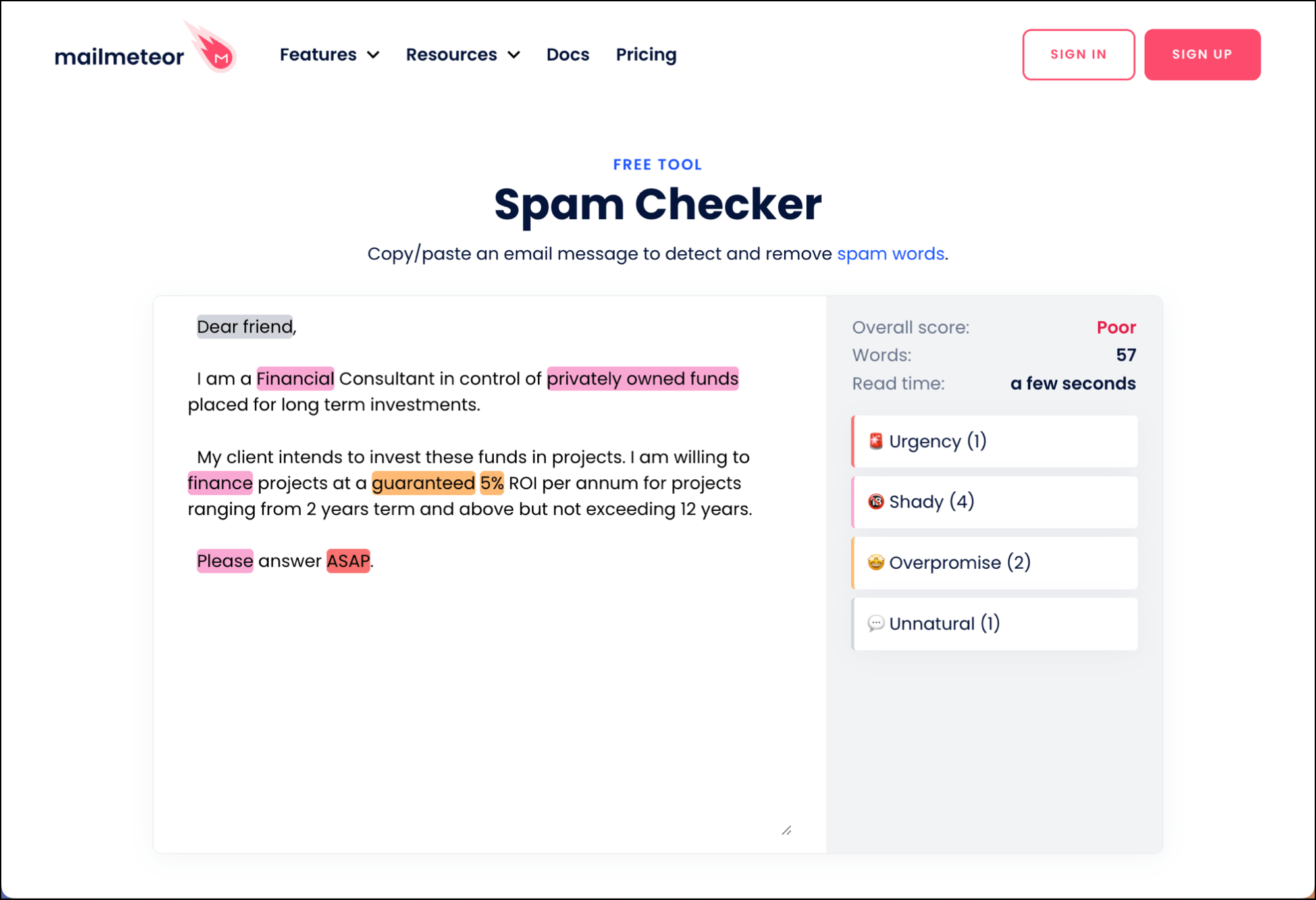
As you’ll see in the alternatives later, other email sending platforms have far more sophisticated spam prevention measures — including the ability to actually test your emails before you send to see where you’ll wind up (and fix them if the verdict is “spam”).
Mailmeteor doesn’t offer any deliverability tools close to that level.
3. Its advanced features are thinner than the names suggest
Mailmeteor’s feature list shows “segmentation,” “CRM integration,” and “autopilot to time your emails for peak engagement.” On paper, that reads like a full platform.
But, in practice:
- “Segmentation” means using a Google Sheets filter on your rows.
- “CRM integration” is adding your CRM’s BCC address to your emails.
- “Autopilot” is a fancy word for scheduling days and times.
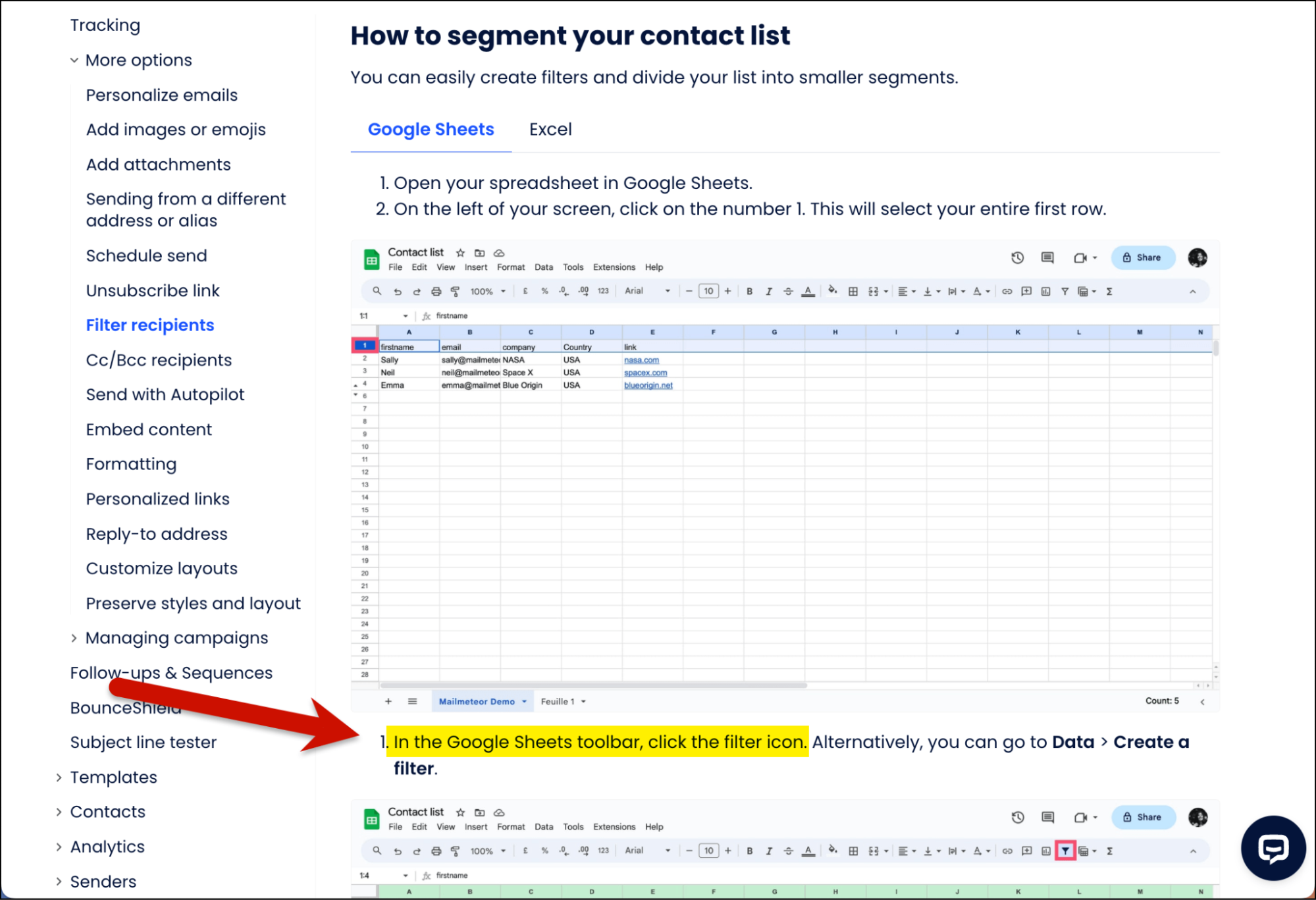
That’s consistent with the “Spam Checker” being a word-scanning tool; all of these are features that sound fancy but are too underpowered to meet your needs when you actually try them in practice.
4. It’s not as cheap as it looks if you want to use it for any professional reasons
There’s a free forever plan! And the entry-level paid plan is just $5.99 a month. (Or $4.99/month annually.)
But the features you’ll need if you’re using this in a non-hobby or non-personal way (automated follow-ups, custom tracking domain, automations, inbox rotation, higher sending limits, higher contact limits, team features, and more) don’t unlock until the Premium plan at $15.99/month or even Professional at $35.99/month.
And by that point, you’re paying the same amount as you are for plans on more full-featured platforms.
So, quickly: Mailmeteor’s entry price buys a severely stripped-down version of the tool.
5. The “privacy-first” pitch doesn’t match the permissions it requests
Privacy is one of Mailmeteor’s headline selling points: it advertises minimal permissions and not reading your inbox. If you look at the comparisons they’ve written between Mailmeteor and other tools, privacy is always included.
But… the permissions that Mailmeteor actually requests belie the “privacy” pitch.
You can see that initially installing the add-in requires these permissions:
- See, edit, create, and delete every Google Sheets spreadsheet in your account (not just the one you’re emailing from)
- Run as a Gmail add-on
- Send email on your behalf
- Run when you’re not present
- Display third-party content inside Google’s interface
- Connect to outside services
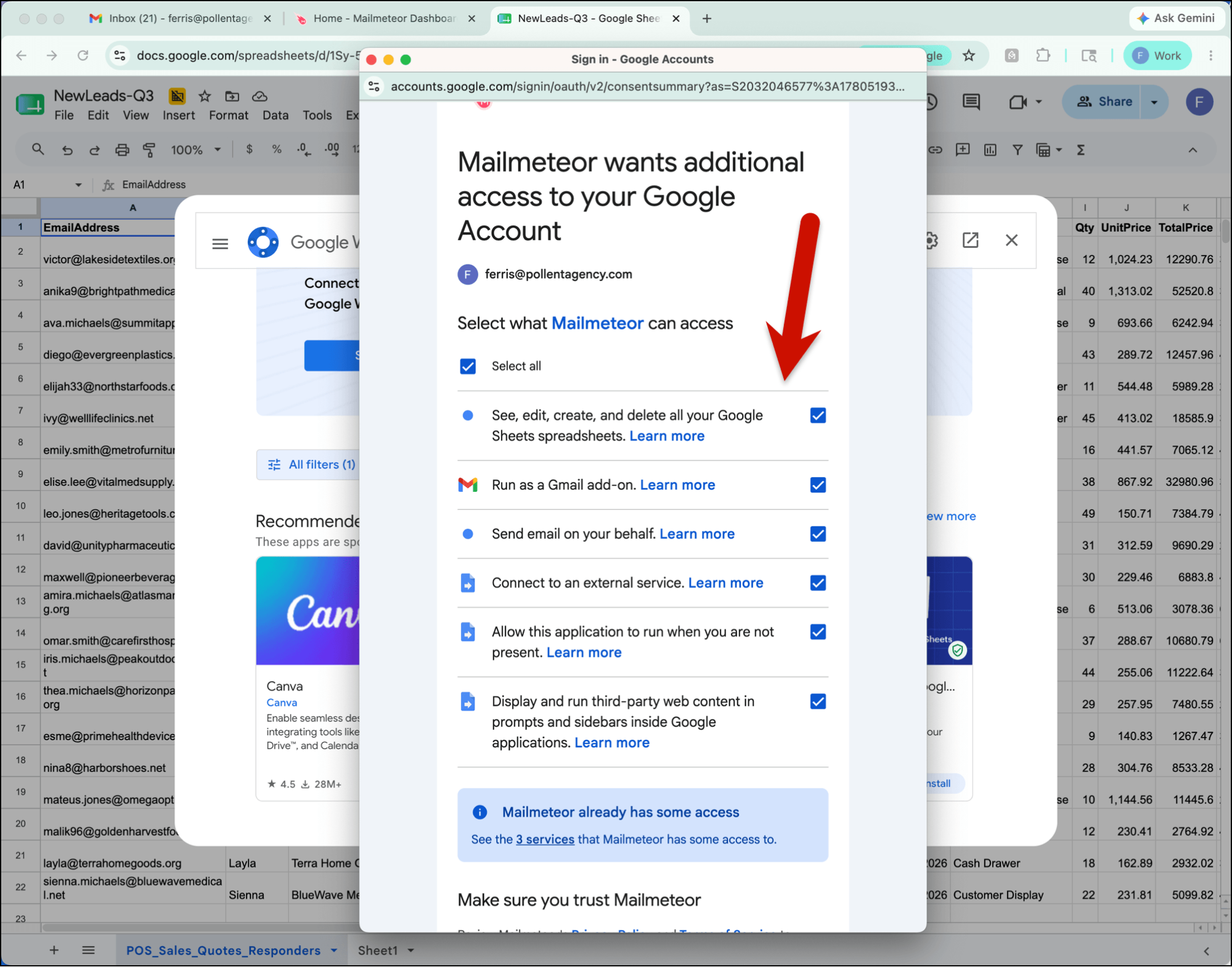
And no, that doesn’t include reading your inbox. But… if you use their features like auto follow-ups or AI inbox assistance, then they DO require the permission to read your emails.

That alone isn’t a problem. All platforms that send through your Gmail need broad access. Mailmeteor’s problem is that it markets itself as the one platform that doesn’t ask for access… while eventually asking for it anyway.
So… what are the best Mailmeteor alternatives out there?
Here are our five picks.
1. GMass — The Best Mailmeteor Alternative Overall
GMass is the alternative when you need to send professional email campaigns from your Gmail/Google Workspace account.
Like Mailmeteor, it does personalized mail merge. But that’s about where the comparison stops.
GMass actually runs right inside Gmail, not in a popup in Google Sheets, because GMass transforms Gmail into your sending platform.
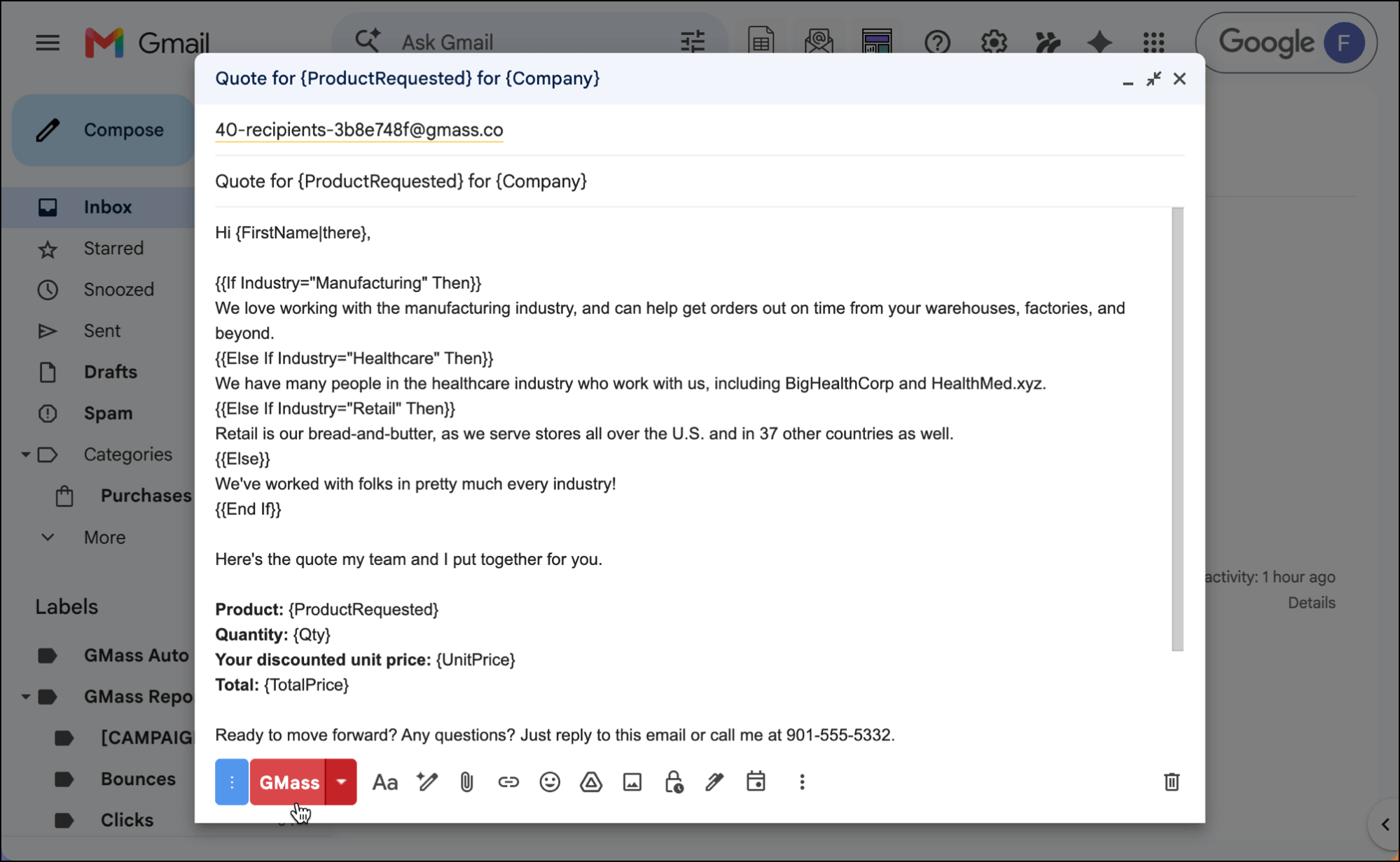
And I do mean “sending platform.” You can send any volume and any type of campaign without running into the low-fi roadblocks from Mailmeteor.
| GMass | Mailmeteor | |
| Sending volume | Unlimited on every plan | Capped by tier (500–60,000/month) |
| Contacts | Unlimited on every plan | Capped by tier (5,000-1m) |
| Break Gmail’s daily limit | Yes, through a variety of methods for all technical levels | No, bound by your mailbox’s limit and Mailmeteor’s limits |
| Inbox-placement testing | Spam Solver (seed-inbox test) | Spam-word checker only |
| A/B testing | Yes | No |
| Email verification | Yes | Yes |
| Email warm-up | No | Yes, 1 inbox (Premium and up) |
| Follow-up sequences | Yes | Yes |
| Works in | Gmail | Google Sheets, Docs, Excel, dashboard |
| Starting price | From $29.95 monthly or $20/month annually | Free; paid from $5.99 monthly or $4.99/month annually |
Unlimited sending, with ways past Gmail’s ceiling
Every GMass plan includes unlimited emails with no daily or monthly cap.
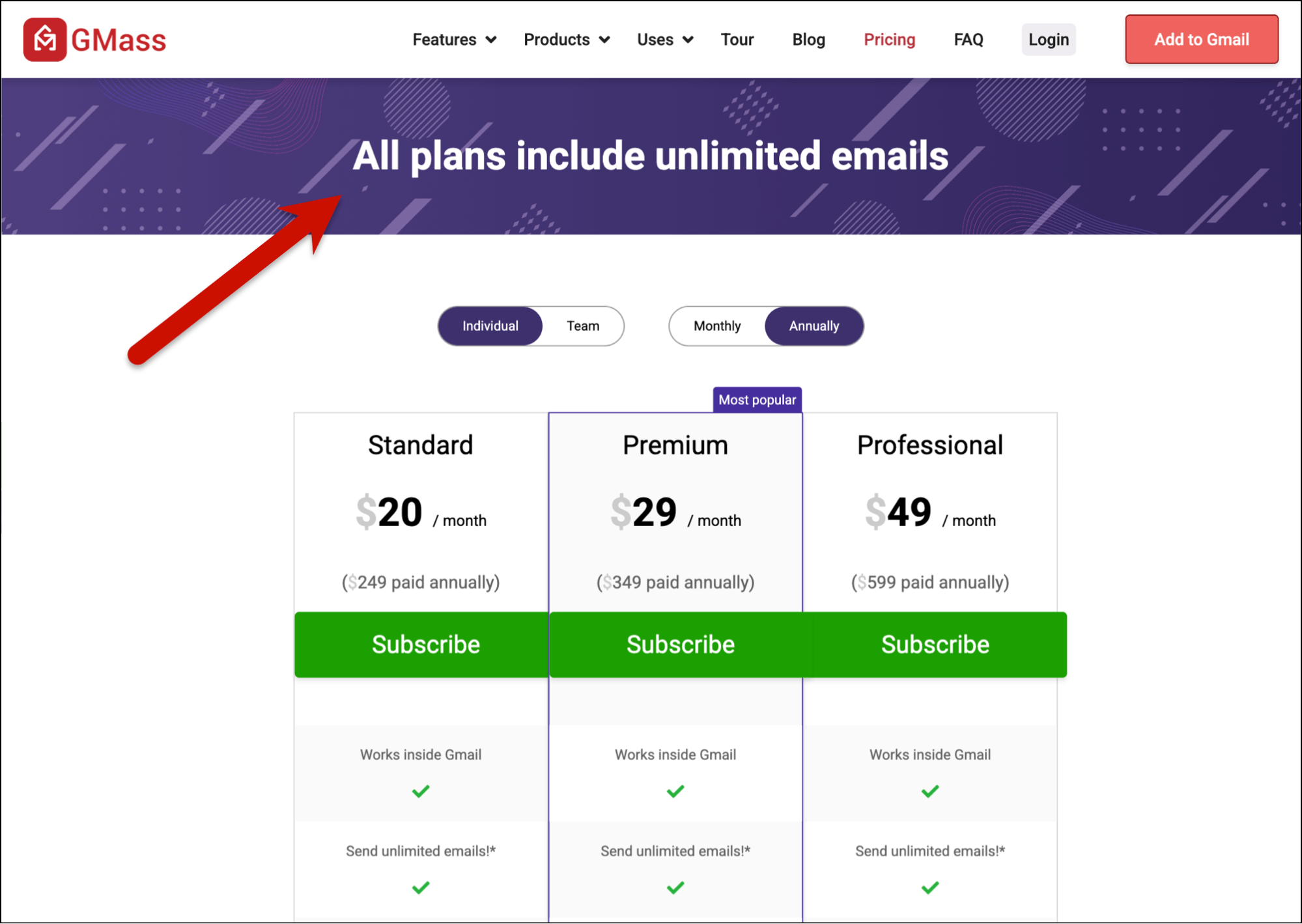
And where Mailmeteor is stuck behind your mailbox’s daily limit and their self-imposed caps, GMass gives you three ways to break right through Gmail’s limits (completely legally under their terms-of-service, mind you):
- Send through GMass’s own dedicated servers for opt-in mail and cold outreach
- Connect any third-party SMTP server
- Use MultiSend inbox rotation to distribute a campaign across multiple sending accounts
Mailmeteor’s own docs send you elsewhere for this. GMass does it in-house.
And beyond that, GMass also has no caps on contacts or campaigns.
You can spam test before you send
GMass’s Spam Solver tests your campaign by sending it to a group of inboxes, shows you where it lands (inbox, promotions, or spam), and suggests custom fixes until you’re hitting the inbox like you want.
Mailmeteor doesn’t have anything close to this.
A real advanced feature set
As I covered earlier, Mailmeteor’s advanced features often come down to things like Google Sheet filtering.
GMass has the real features behind the names:
- A/B testing
- Multi-step follow-up sequences and triggered emails
- A unified inbox for replies
- Built-in AI: SpinMax spintax, an AI template builder, and ChatGPT-assisted campaign writing
- Conditional content for super advanced personalization
- More advanced analytics
- Email polls
- Transactional emails
- And a whole lot more.
What Mailmeteor does better
A fair comparison names where Mailmeteor wins:
- It works in more places. Mailmeteor runs from Google Sheets, Google Docs, Excel, and its own dashboard; and works in Gmail and Outlook. GMass is Gmail-only. If you work in Microsoft tools or want to send from inside a Google Doc, Mailmeteor goes where GMass won’t. GMass sends Gmail from Gmail.
- It’s cheaper to start and has a free plan. For light, occasional personalized sending, Mailmeteor costs less (and a full platform would be overkill).
- It includes email warm-up. GMass sends through the Gmail API, and GMass’s relationship there with Google prohibits them from offering automated warmup. Mailmeteor skirts this by offering warmup through IMAP. The jury is out on whether automated warmup is still valuable and viable in 2026, but if this is something you want to use, you’ll get it on one inbox from Mailmeteor.
Pricing
GMass’s plans all include unlimited emails, contacts, campaigns, and email verification.
The Standard plan is $29.95 monthly or $20/month annually. The Premium plan, which adds sequences, API access, A/B testing, and triggered emails, is $39.95 monthly or $29/month annually. And the Professional plan, which adds inbox rotation and high-priority support, is $59.95 monthly or $49/month annually.
Team plans start at $175/month.
Mailmeteor starts with a limited free plan, capped at 50 emails/day and 500/month — and the emails you send all include Mailmeteor branding.
Then, the Mailmeteor Starter Plan is $5.99 monthly or $4.99/month annually and includes 5,000 emails/month and removes the branding. The Premium plan is $15.99 monthly or $12.99/month annually and goes to 30,000 emails/month and includes follow-ups and some inbox assistant features. The Professional plan is $35.99 monthly or $29.99/month annually and goes to 60,000 emails/month and adds inbox rotation.
So yes, GMass costs more than Mailmeteor’s entry tiers… because, really, these are different tools doing different things.
Mailmeteor is a discount option for basic mail merges and hobby projects. For volume, cold outreach, or anything professional, GMass is built for the job.
Getting started
You can try GMass free, with no credit card, by installing the Chrome extension and following the quickstart guide.
2. YAMM — The Equally Cheap Way to Do Basic Mail Merge
YAMM (Yet Another Mail Merge) is a Google Sheets mail merge add-on in the same family as Mailmeteor. It’s a mail merge-only tool that works inside Google Sheets and sends through your email account.
It also equals Mailmeteor’s rock bottom pricing. (But it actually acknowledges that it has the entry-level feature set to match the price.)
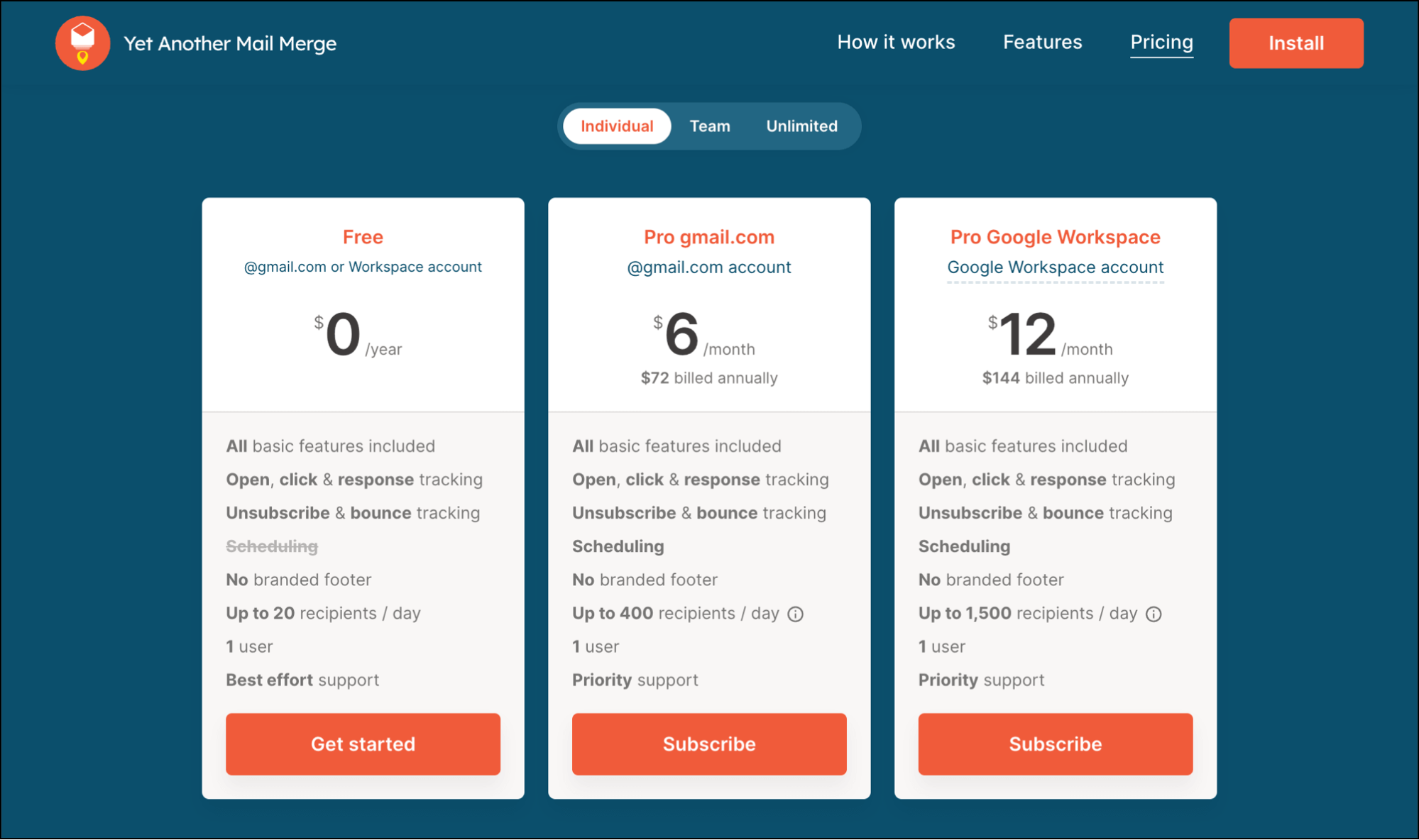
Like Mailmeteor, it sends through your own Gmail and can’t exceed Gmail’s limits. Its free plan caps at 20 recipients a day; paid plans at 400 (personal Gmail) or 1,500 (Workspace).
It’s a more basic tool overall: follow-up campaigns but no automated sequencing, limited analytics, and limited sending features.
If spending as little as possible on simple merges is the goal, this is the choice. But if Mailmeteor already feels too limited, YAMM will feel more so.
| Mailmeteor | YAMM | |
| What it is | Gmail/Sheets mail merge | Gmail/Sheets mail merge |
| Free plan | 50 emails/day (500/month) | 20 recipients/day |
| Paid daily limit | Varies by plan; never exceeds 2,000/day | 400/day (personal), 1,500/day (Workspace) |
| Automated follow-ups | Yes (Premium+) | No |
| Starting price | From $5.99 monthly or $4.99/month annually | From $6/month annually (no monthly option) |
Get started with YAMM / low-cost annual plans
3. Mailsuite — If Tracking Is the Priority
Mailsuite (formerly Mailtrack) began as a Gmail read-receipt and tracking tool and added mail merge on top.
It’s the pick if detailed open and click tracking matters more to you than sending power, because tracking is really its focus; mail merge only appears on its “Advanced” tier, and is the 7th out of 8 features listed.

Like Mailmeteor, it sends through your own Gmail and doesn’t scale past Gmail’s limits.
| Mailmeteor | Mailsuite | |
| What it is | Gmail/Sheets mail merge | Gmail tracking tool (ex-Mailtrack) |
| Core strength | Personalized bulk sending | Open/click tracking |
| Mail merge | Built in | Top “Advanced” tier only (to 10,000 recipients) |
| Sends through | Your Gmail or Outlook | Your Gmail |
| Starting price (for mail merge) | Free; from $5.99 monthly or $4.99/month annually | From ~$11.99 monthly or $9.99/month annually |
Get started with Mailsuite / free plan; mail merge from ~$11.99/month
4. Instantly — If You’d Rather Leave Gmail for a Hardcore Cold Email Platform
If you want to run cold outreach on a platform made by hardcore cold emailers for hardcore cold emailers — and no one else — Instantly is one of the leading options.
Inbox rotation is standard. So is bringing in all sorts of other email sending infrastructure, which I can’t even begin to get into here. Every feature is based around a tactic that the people who live and breathe cold email are using for now until it stops working.
As you can see from this screenshot, it’s got a LOT of tentacles.

But check the plan limits before you buy. The “unlimited” applies to connected inboxes, not sending — the entry-level $47/month Growth plan caps you at 5,000 emails a month and roughly 1,000 contacts. Real volume means jumping to pricier tiers. (Also, most of those other features and services require their own separate payment.)
Want to make cold email your lifestyle? You’ll find lots of similar folks using Instantly.
| Mailmeteor | Instantly | |
| What it is | Gmail/Sheets mail merge | Hardcore cold-email platform |
| Runs in | Inside Google Sheets | Its own dashboard |
| Inboxes | Your mailbox | Unlimited connected mailboxes |
| Sending cap | Varies by plan; never exceeds 2,000/day | Varies by plan, anywhere from 5,000/month to 500k/month |
| Starting price | Free; from $5.99 monthly or $4.99/month annually | From $47 monthly or $37.60/month annually |
Get started with Instantly / from $47/month
5. MailerLite — If You Want a Single-Purpose Newsletter Tool
You may reach for Mailmeteor to send a newsletter. That’s really not what a basic mail merge tool is built for.
MailerLite is not a mail merge platform. It’s an email marketing platform: a drag-and-drop email designer, signup forms, landing pages, and automation, sending through its own servers rather than your Gmail.
Its free plan covers up to 500 subscribers (down from 1,000 in 2025) with paid plans from $10 monthly or $9/month annually.
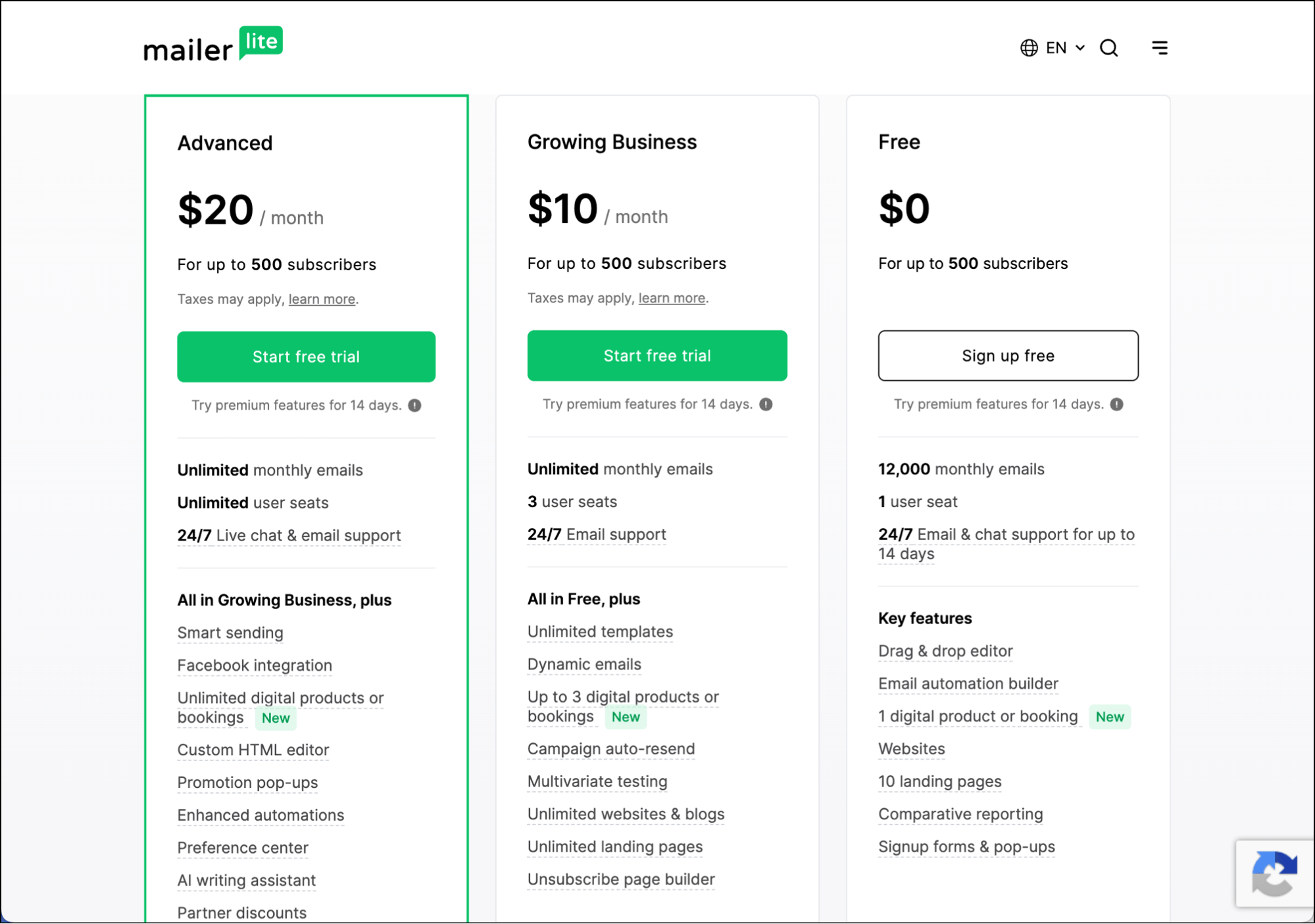
Note: the free tier puts MailerLite’s branding on every email you send and doesn’t include pre-built templates.
The paid tiers fit one job: a designed newsletter to an opt-in list. For one-to-one personalized sending or cold outreach, it’s the wrong tool.
| Mailmeteor | MailerLite | |
| What it is | Google Sheets mail merge | Newsletter / email-marketing platform |
| Sends through | Your Gmail or Outlook account | MailerLite’s own servers |
| Built for | One-to-one personalized email | Designed newsletters to a subscriber list |
| Audience tools | A spreadsheet | Signup forms, landing pages, lists, automation |
| Starting price | Free; from $5.99 monthly or $4.99/month annually | Free (≤500 subs, with branding); from $10 monthly or $9/month annually |
Get started with MailerLite / free up to 500 subscribers; from $10/mo
So… Which Mailmeteor Alternative Is Right for You?
Mailmeteor is a totally acceptable entry level mail merge tool.
If you send the occasional personalized batch from a spreadsheet, and your volume fits inside their limits, and you’re looking to keep costs down, Mailmeteor is simple, inexpensive, and works inside your Google and Microsoft documents.
But if you’re looking to send more professional campaigns — or even more sophisticated mail merge campaigns — you’ll outgrow Mailmeteor almost immediately.
It can’t send past Gmail’s limits, it can’t help with deliverability, and its feature set is far more lacking than you’d think from glancing at its website.
That’s why the best alternative is GMass. It does the same personalized sending inside Gmail — then keeps going:
- Unlimited volume, with SMTP, MultiSend, and its own server to get past Gmail’s ceiling
- Unlimited contacts
- Real inbox-placement testing with Spam Solver
- A/B testing and triggered sequences, built in
- Cold outreach tools when you need to run sales campaigns alone or with your team
- Email marketing tools for your opt-in newsletters, announcements, and communications
The reason GMass costs more than Mailmeteor is because GMass is a different class of tool than Mailmeteor.
If you’ll only ever need simple merges, Mailmeteor is a good tool for your price point. If you’ve outgrown that or you’re sending professionally, move to GMass.
Want to see it in action? You can try it free, no credit card required, and see all its features right inside of your Gmail account.