
We’ve just launched a new feature which automatically organizes replies to your Gmail email marketing campaigns. Bounces, replies, block-notifications, and other types of replies received after you send a mass email campaign with GMass will now be categorized for you under the “GMass Reports” label. This means that you no longer have to sift through countless bounces and replies trying to determine which responses are the important ones you need to see.
You’ll notice two new sub-Labels under “GMass Reports”: “Bounces” and “Replies”. Based on your particular email campaigns, you may also notice the sub-Labels “Blocks”, “Delays”, and “Over Limit”.
Here are the details on each reply management category:
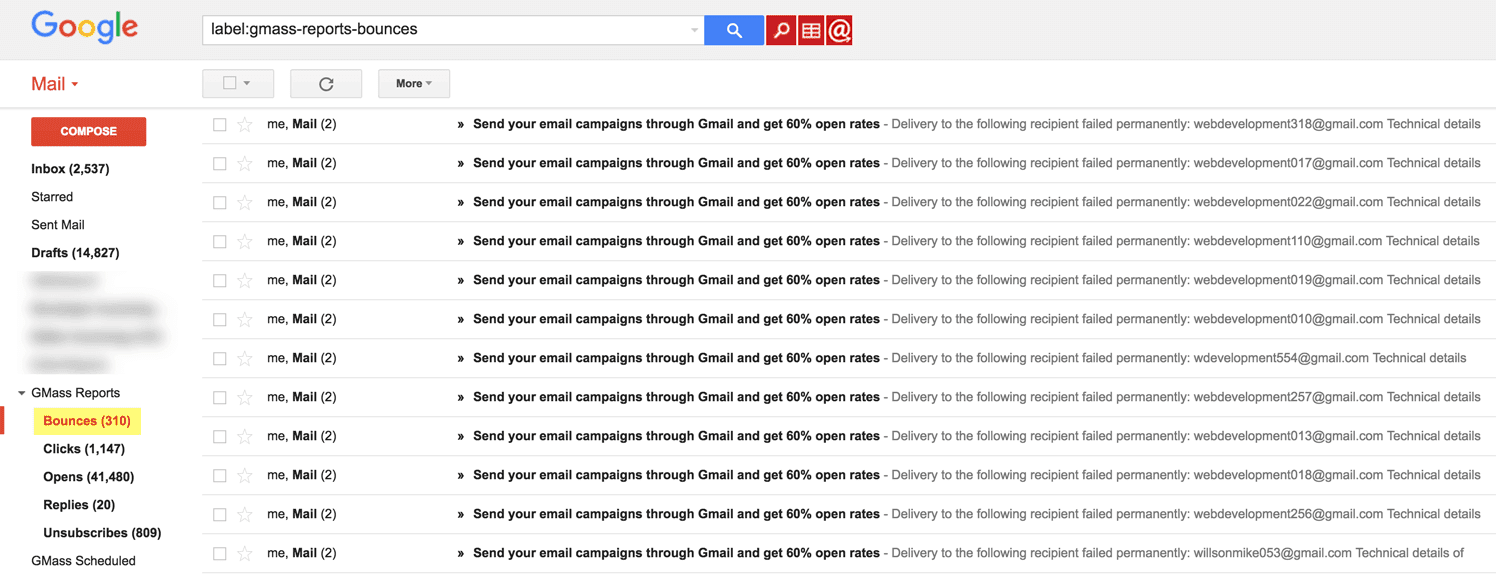
Bounces: Bounce notifications indicating that an email address you sent to is invalid. These are removed from your Inbox and placed under the Bounces Label. Additionally, the bounced address is added to your account’s bounce list, and further attempts to send to this email address will be suppressed by GMass. This means that you no longer have to manually extract bounces from your Gmail account. (If you click the regular Gmail “Send” button, however, you can still send to bounced addresses.) You also have granular control over your account’s bounce list. See this post on how to manage your account’s bounce list or have your account ignore bounces.
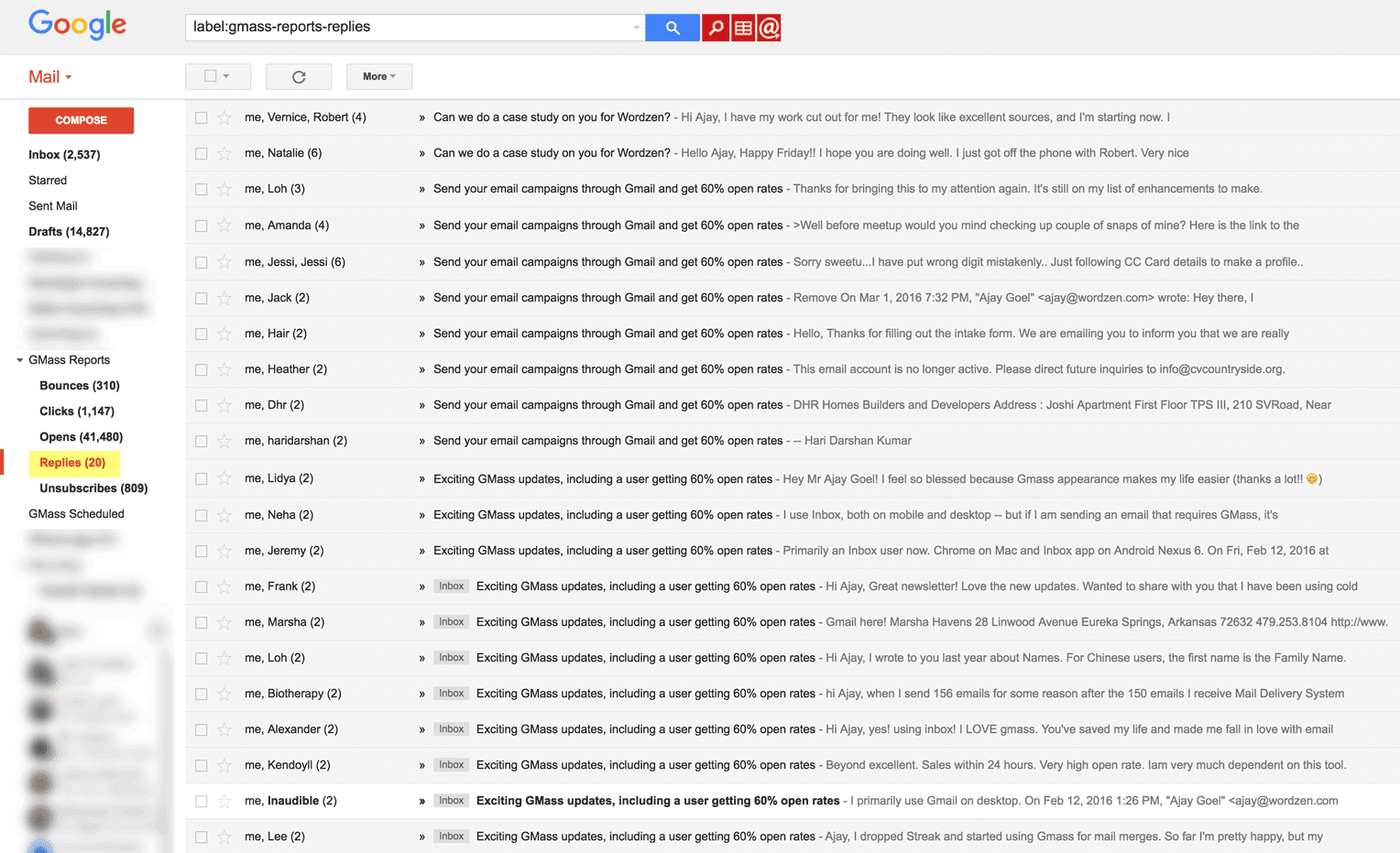
Replies: Human-based replies where a person clicked the “Reply” button and sent an email in response to your email marketing campaign. Replies remain in your Inbox and are also tagged with the Replies Label.
Delays: Delays are a type of soft-bounce that occurs when Google is unable to transmit an email message but will attempt to later on. Usually “delay” bounces are received if the email server for your recipient is temporarily down. Delay notifications are removed from your Inbox and placed under the Delays Label.
Blocks: Blocks are a special type of bounce indicating that your email was rejected because the receiving email server determined it contained spam like content. Block notifications will be rare since emails sent with GMass almost always land in the Inbox. Block notifications remain in your Inbox and are also tagged with the Blocks Label. If you notice blocks after sending an email campaign, contact our Support team so we can determine what is causing the block and how to resolve it.
Over Limit: These are special types of bounces generated by Gmail indicating that an email wasn’t sent because your Gmail account has exceeded its daily quota. GMass attempts to prevent you from exceeding your limits to begin with, but in some cases your account may still generate these notificaitons. Over Limit emails are removed from the Inbox and placed under the Over Limit Label.
Other points to note about automatic reply filtering:
- GMass’s reply management system only works on replies/bounces sitting in your Inbox. If you manually move these from your Inbox and into a separate Gmail Label, or if you delete them before the GMass reply scanner processes them, then they will not be categorized for you.
- Thanks to GMass’s instant reply and bounce detection, introduced in August 2023, these labels should appear almost immediately.
- This was a difficult feature to build, and I’m especially proud of the algorithm I derived and the computational efficiencies I achieved when writing the code for this feature. GMass already excels as the most powerful email marketing platform for Gmail and Google Apps, but now GMass is the only Gmail-based email marketing solution that can automatically manage replies.
And now, you can use GMass’s tool The Reply Project to write ultra quick responses to the replies to your campaign.
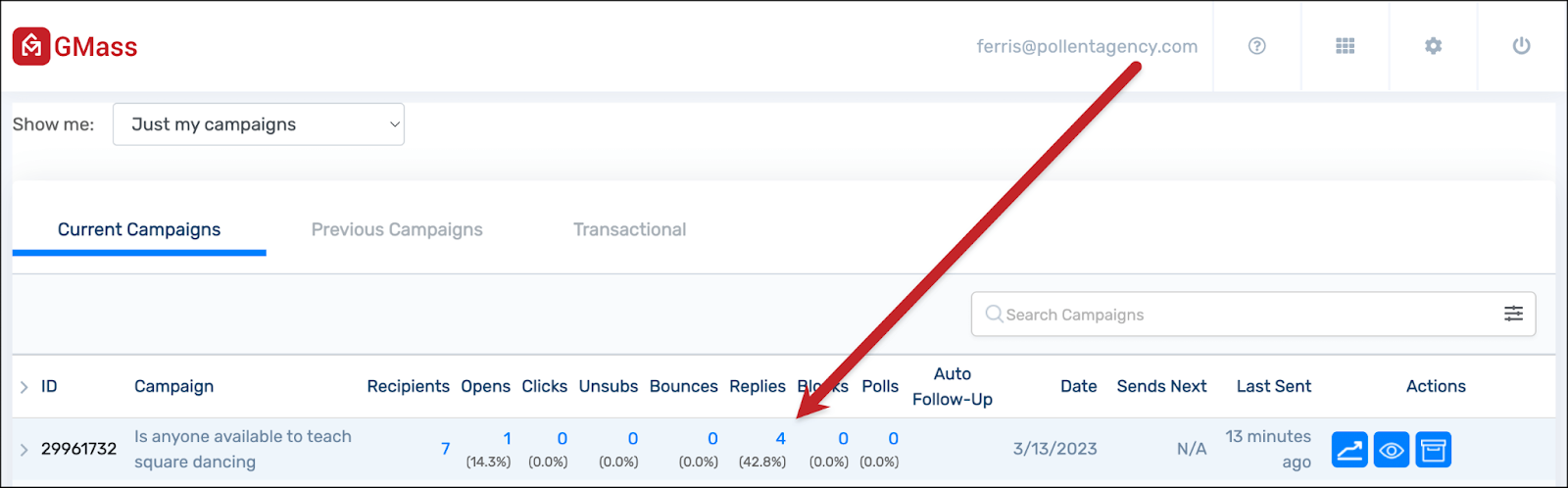
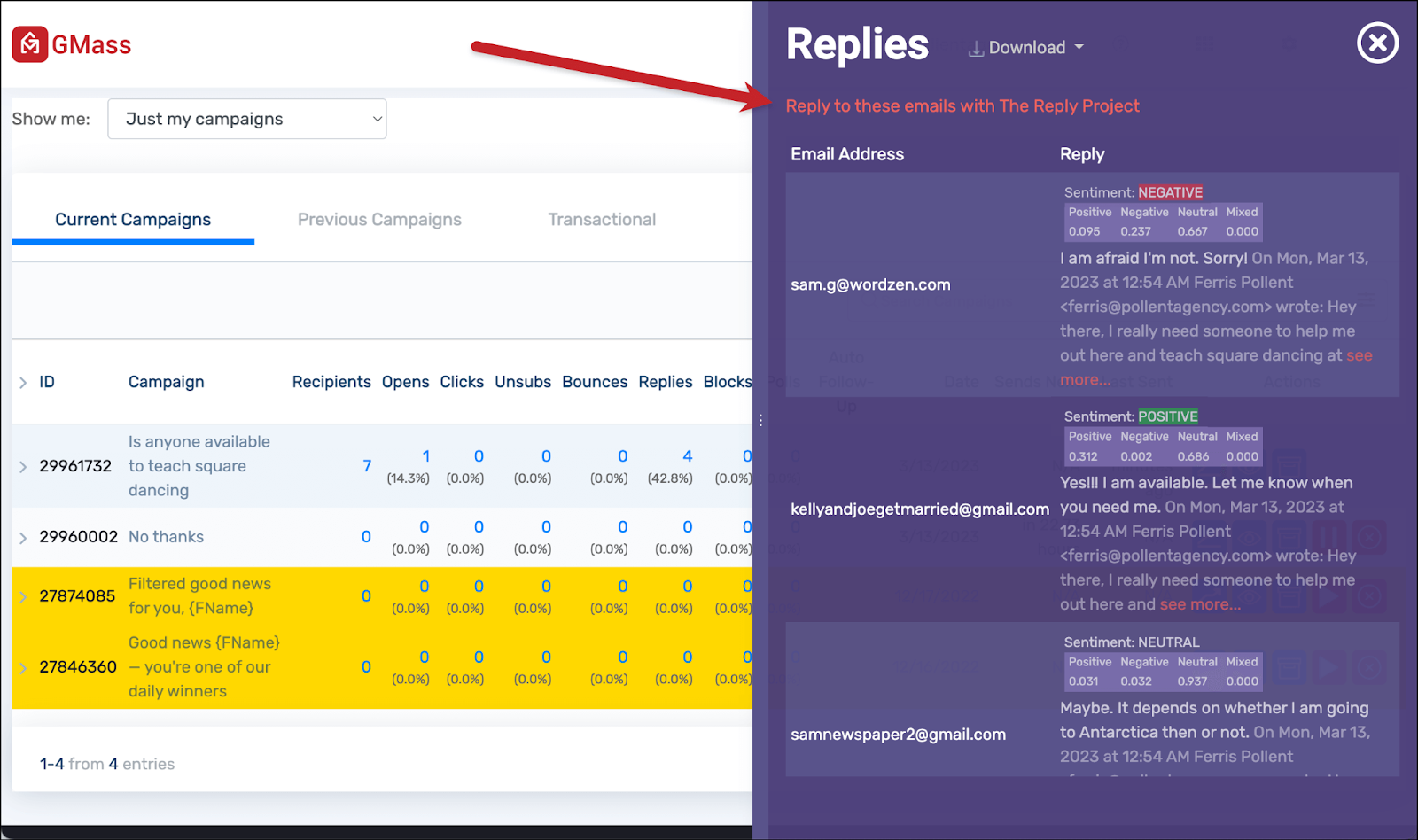
Just head to the GMass dashboard and click on the number of replies to your campaign…
 …or click on the number of replies in the web-based campaign report.
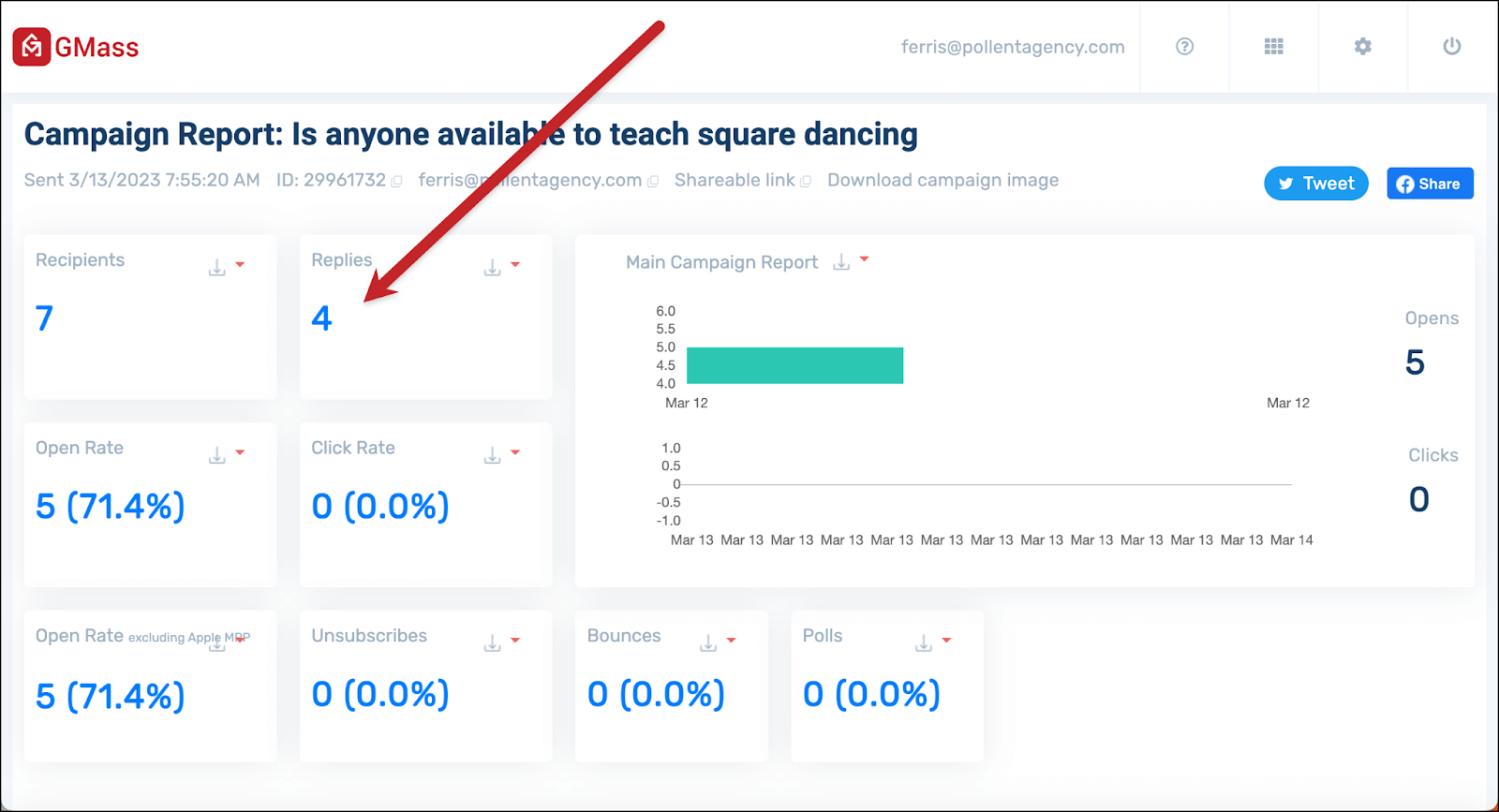
In both cases, you’ll see a flyout panel on the right showing you the replies to the campaign (along with sentiment analysis on those replies). You’ll also see a link to Reply to these emails with The Reply Project.
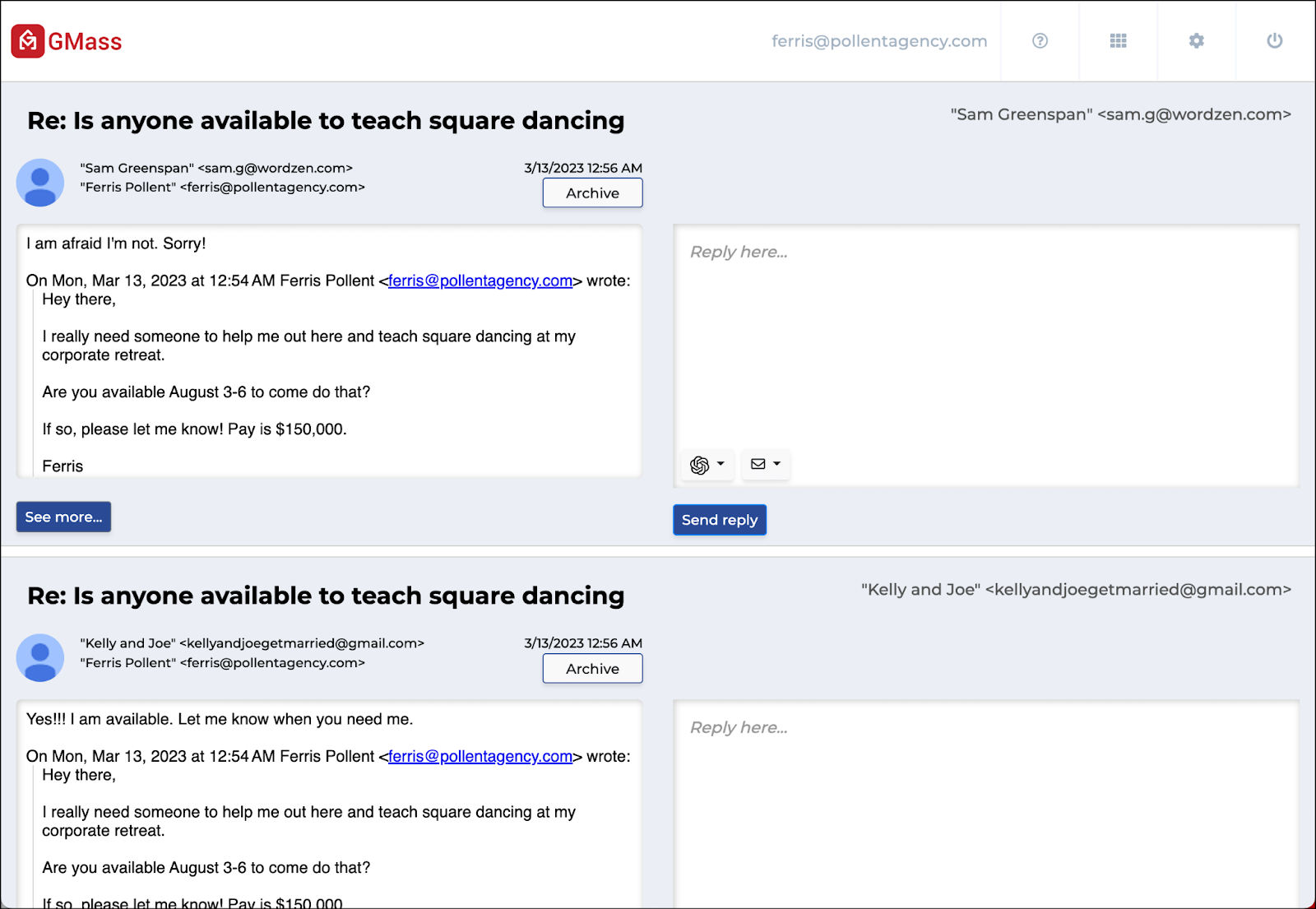
That will open all the replies on one screen. You can type quick responses, or use templates or ChatGPT for even faster responses.
With these features GMass continues to make it faster and easier to find replies to your campaign and quickly respond — making sure nothing slips through the cracks in the process.
Hello,
I want to do some outreach, so evry mail will be some way personalized, I can't send in bulk. But after I send it I want to mark it to send an automated followup if they don't respond in 7 days. How I can do that?
Thanks,
magneticcooky@gmail.com
it is really great enhancement .
Right now, there's no way to send an automated follow-up, but that feature is coming. Give me about a month or so.
Can't wait!
Ajay, this is great! In the followup campaign enhancement I would love to see the option to send to campaign recipients that "did not open"
how to send mass email in gmass without showing addresses?
Thanks!
Just put your addresses in the To field and hit the GMass button.
Mark – this is already an option. See screen shot here: https://www.dropbox.com/s/7hroshb8uebwagp/Screenshot%202016-04-13%2015.43.36.png?dl=0
Is there any way to stop a gmass email once it's been sent please? I sent one to 5,000 people in increments of 1900, but gmail has put a hold on my account for sending out more than 100 at a time. It's causing me problems. Thanks.
Yes, follow the instructions here: http://blog.gmass.co/2016/01/how-to-stop-scheduled-mail-merge.html
nice
please add another function subscriptions.
connect google-forms and Gmass or more ..
that I could place on my site.
Hello,
yesterday I started using GMass. So far, I am pretty excited of all the options it offers.
But I also ran into trouble already :).
1) I sent a campaign to my customers
2) The majority of the emails returned from my SMTP due to overload (which is fine, I should have spreaded out the campaign a little)
3) all those addresses went to "Bounces" category
4) now I am not able to contact these via GMass again
Can I somehow manage my "account's bounce list"? At least clearing it and starting over would be fine.
Thanks, regards,
Svatik
The functions which really cause issue at the perform from mentioned above. You can obtain details how to learn effectively with these functions if you take some professional help. https://drive.google.com/open?id=0B0kZrnZTkuR_eTVKSmp4bTZoQW8
The reply detection seems to have a problem. I’ve received a few replies in the inbox from my campaign (including the one I sent from my other email, just for testing), but in the reports I still see 0 replies. Then, when I try to create a follow-up campaign, in the selection for the “Behaviors” I also see “Replies: 0”.
PLEASE HELP! (I’m a Premium paying customer)
Bounces are being returned to my inbox, not the Gmass Bounce folder, and they are not being processed by Gmass (at least, they are still in the inbox, hundreds of them).
How can we correct this procedure?
Bounces go to your inbox so that you’re aware you’re getting them. You can set a filter to have them skip the inbox if you prefer not to get them.
Hi, something is off with this Replies statistics. It shows in report that were over 30 replies, but there are nowhere to be seen. Not even in the Replies folder.
How is that? Is gmail blocking emails or is just some auto-confirmation that the user received the e-mail, but it shows as reply in gmass.
Regards
Hi Blaz,
Please contact our support team through http://gmass.co/g/support with the campaign ID of the campaign that you’re experiencing these issues with.
I simply wanted to jot down a note to say thanks to you for those pleasant strategies you are sharing at this site. My long internet look up has at the end of the day been compensated with beneficial know-how to talk about with my co-workers. I would believe that many of us site visitors actually are quite fortunate to live in a really good website with many brilliant people with very helpful basics. I feel truly blessed to have used the website page and look forward to many more pleasurable moments reading here. Thanks once again for a lot of things.
After reading your question, I assume the employee is leaving temporarily. If that is the scenario, there is a way to set up an “Out of the Office” automatic reply.
With the folders created, how then do I stop the massive amounts of gmass emails going into my inbox? These emails are duplicated, not so? One in the inbox and the same one transferred to a folder.
Hi Eve,
Emails will automatically be moved to their corresponding labels without any further actions from you.
hellow sir,
we have gmass plan and we send email campaign then bounce rate high why ?
mail id naturalmarbles2021@gmail.com
I bought the paid version of GMass but my Gmail inbox was a mess. The campaign emails are all mixed up with my routine emails. I need help to solve this problem. Otherwise, the tool is excellent, but this point left me unsatisfied.
Hi,
I would like to know is there a folder for unopened mails? or category that can be seen same as opened mail.
fantastic points altogether, you just gained emblem reader. What could you suggest in regards to your post that you simply made some days ago? Any positive?
Many thanks for creating the effort to talk about this, I feel strongly about this and like learning a great deal more on this matter. If possible, as you gain expertise, would you mind updating your website with a great deal more information? It’s very useful for me.
I believe one of your commercials caused my internet browser to resize, you may well want to put that on your blacklist.
It’s always good to see it from a different perspective My experience confirms that. I have to think about it some more. Can you expand on this?
That is the right weblog for anyone who wants to find out about this topic. You understand so much its almost laborious to argue with you (not that I truly would want…HaHa). You definitely put a brand new spin on a subject thats been written about for years. Great stuff, just nice!
Thank you for the good writeup. It in fact was a amusement account it. Look advanced to far added agreeable from you! However, how can we communicate?
I’m impressed, I have to admit. Truly rarely will i encounter a weblog that’s both educative and entertaining, and let me tell you, you may have hit the nail on the head. Your notion is outstanding; the catch is something that too little persons are speaking intelligently about. I’m happy we found this within my seek out some thing in regards to this.
Can I just say what a relief to find someone who really knows what theyre talking about on the internet. You definitely know the way to carry a difficulty to mild and make it important. More people must read this and perceive this aspect of the story. I cant imagine youre not more common since you definitely have the gift.
I will right away snatch your rss as I can not in finding your e-mail subscription link or e-newsletter service. Do you have any? Kindly allow me understand so that I may just subscribe. Thanks.
Hi gmass.co owner, Keep up the great work!
I’d have to check with you here. Which just isn’t something I commonly do! I enjoy reading a post that may make men and women feel. Also, thanks for allowing me to comment!
Hi there just wanted to give you a quick heads up. The words in your post seem to be running off the screen in Firefox. I’m not sure if this is a format issue or something to do with internet browser compatibility but I figured I’d post to let you know. The design and style look great though! Hope you get the problem fixed soon. Thanks
I’ve been using it for a year for portfolio tracking, and the clear transparency stands out.
When I originally commented I clicked the “Notify me when new comments are added” checkbox and now each time a comment is added I get four emails with the same comment. Is there any way you can remove me from that service? Cheers!
I’m impressed by the wide token selection. I’ll definitely continue using it. The updates are frequent and clear.