
You can now send GIANT email campaigns with zero technical setup or complexity, straight from your Gmail account.
No one else but GMass makes this possible.
Here’s how…
Instant Approvals on GMass’s SMTP Server: Table of Contents
- Break Gmail’s Limits with GMass’s Sending Server — Now Without Delay
- How These Instant Approvals Work
- Great News: No More Rejections Over Technical Issues (and No Technical Knowledge Required)
- Why GMass Is the Leader in Sending Big Campaigns Through Gmail
- Technical Documentation: How This Works If You Don’t Have DKIM Set Up
Break Gmail’s Limits with GMass’s Sending Server — Now Without Delay
GMass has offered its own SMTP server for many years now to help you break through Gmail’s limits.
If you were sending a large opt-in campaign and hit Gmail’s limits, you’d get a message giving you the option to ask GMass to push the rest of the campaign through our sending server.
You could also apply in advance to use our SMTP server, so it would be ready and waiting for your mass email campaigns.
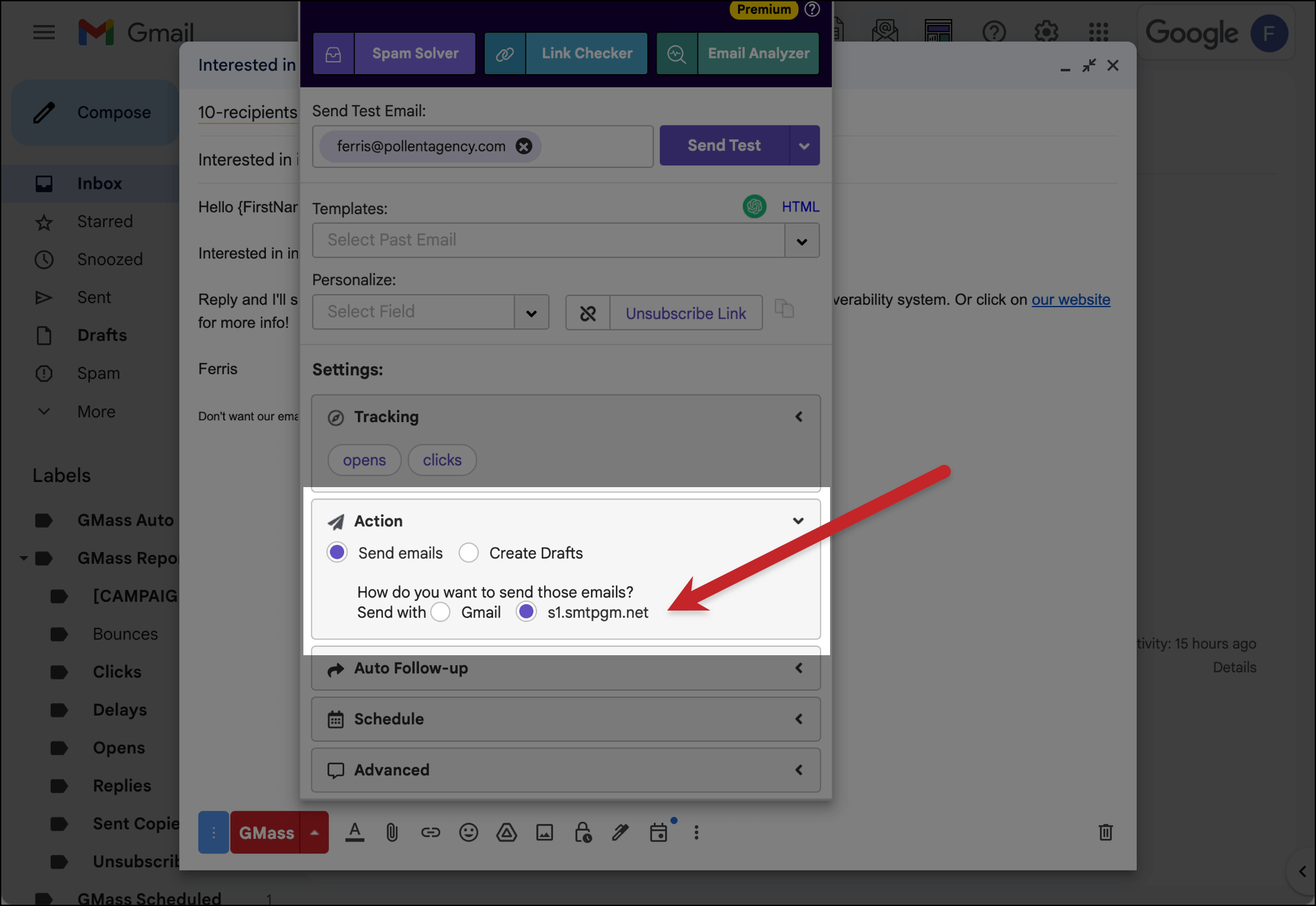
This has always been a great option for bulk email sending (in lieu of the expense and technical challenges of setting up your own third-party SMTP server).
However, there was one little issue.
The process required an application. After all, we couldn’t just let anyone onto the server, in case they suddenly decided to send spam or malicious emails and tank the deliverability for everyone.
And while we’d approve your application relatively quickly (assuming you were legit) — it wasn’t quick enough.
After all, when your campaign hits a limit, you don’t want to wait even a few hours to keep sending, you want to keep sending NOW.
Well… that’s all in the past.
As of today, you’ll get an instant decision when you apply to our SMTP server so you can keep your campaign going immediately.
How These Instant Approvals Work
Now, when you hit Gmail’s limits (up to 500 emails/day for free Gmail accounts and up to 2,000 emails/day for paid Workspace accounts), you’ll get an instant decision on whether you can keep sending the campaign.
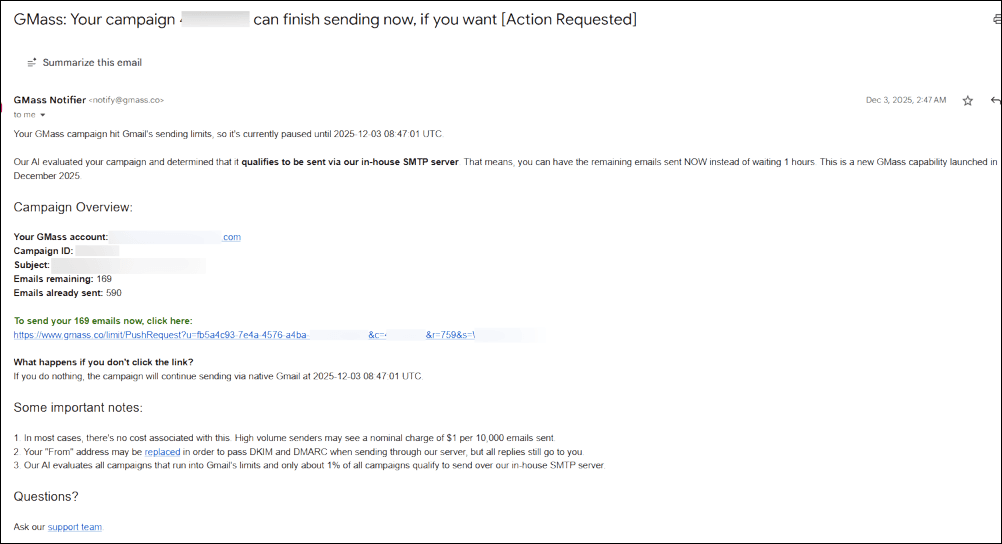 That’s because our new AI system has analyzed your account sending history and your campaign in real time.
If you have a history of sending opt-in emails with good engagement and this campaign is an opt-in campaign, you can get instant approval to keep sending over GMass’s SMTP server.

Note: SMTP sending, even through GMass’s server, does have a small extra cost of 40 cents USD per 1,000 emails sent over SMTP.
If you’re rejected, you’ll get the exact reason why you’ve been rejected.
The instant decisions are also available if you apply in advance to send through our SMTP server. Fill out the brief application form and you’ll get your decision immediately.
Note: You can only apply once every 24 hours to get on our SMTP server long-term.
What if you set a lower daily limit on your campaign to leave some “sending room” in Gmail?
You may not want to max out your Gmail account when you send a campaign. For instance, you might set your campaign’s sending limit at 1,500/day so you have room for your regular emailing or follow-ups from past campaigns.
No problem. In those cases, once you hit your preset threshold, we’ll still evaluate your campaign so you can send the rest over our in-house server.
What if you’re rejected for sending cold email?
If our system believes you’re sending cold email, not opt-in email, it will reject your instant application.
Someone on our team will manually review it. If we shouldn’t have rejected you, they’ll rectify that and approve you.
But… if you are, in fact, sending cold outreach messages that’s not the end of the road. As long as you have a solid track record of sending campaigns that perform well, you can then apply to ColdSMTP, our cold email sending server, instead.
Great News: No More Rejections Over Technical Issues (and No Technical Knowledge Required)
In the past, one of the reasons we’d often have to reject someone from sending through our SMTP server was they didn’t have DKIM set up for their domain.
We know that for many folks, when you start hearing acronyms like “DKIM” getting thrown around, you’re OUT.
So, great news: We’ve now made it so you won’t get rejected from sending your campaign over those technical issues.
Now, we can push out your large campaign over our SMTP server even if you don’t have DKIM set up.
This applies to folks using free Gmail addresses (where you literally can’t set up DKIM) or people using Google Workspace accounts (where you could set up DKIM, but don’t want to deal with any technical complexity.)
We’re able to now circumvent this technical setup step by using the “from” address replacement technique we invented in 2024 for Gmail senders.
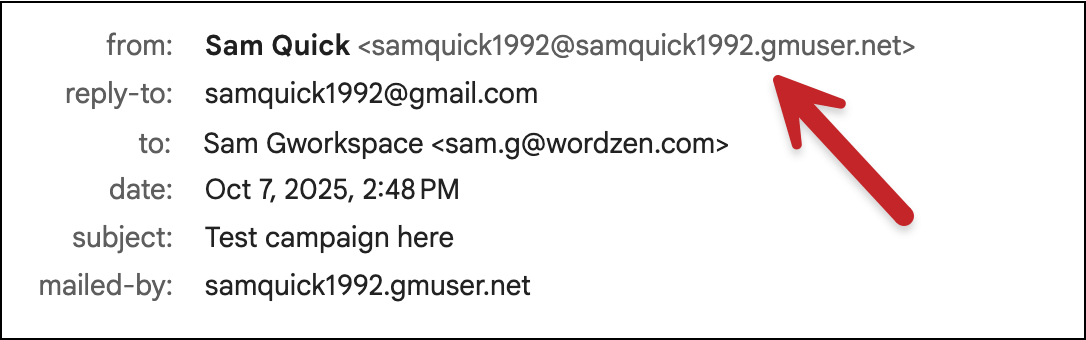
Note: When you use this system, your emails will come from a slightly different “from” address. Odds are no one on your list will notice. And if someone does notice, we can’t imagine they’d care. But be prepared to see your emails come from a domain that’s like yours but not quite yours. For example, if your email address is team@shippersinc.net, the from address would be team@shippersinc.gmuser.net. If your email address is shippersteam@gmail.com, the from address would be shippersteam@shippersteam.gmuser.net. Again, it’s unlikely anyone will notice.
If you want to know the nuts and bolts, and check out the options we’ll give you if you don’t have DKIM set up, skip down to the end of this article where I’ll get into the technical documentation for different scenarios.
But if you don’t want to know the nuts and bolts, just know we’ve got your back even if you don’t have DKIM in place.
Why GMass Is the Leader in Sending Big Campaigns Through Gmail
GMass was the first platform to figure out how to break Gmail’s limits.
And with our new instant decisions on sending through our SMTP server, we continue to be the leader in sending mass email campaigns through Gmail.
There’s NO other platform in the world that offers:
- No limit on the number of emails you send in a day/week/month.
- An in-house SMTP server to help you break Gmail’s limits.
- Instant decisions on whether you can use that server.
- No technical email authentication setup required to use our sending server.
And if you aren’t approved for our server, we also offer plenty of other ways for you to break Gmail’s limits, including:
- Our revolutionary cold email sending server.
- The ability to hook up your own SMTP servers.
- MultiSend inbox rotation to distribute your campaign across multiple sending addresses.
Plus, with GMass’s Spam Solver and other deliverability boosting tools, you can see why 99% of users report the best inbox rate they’ve ever had.
Want to give GMass a try? Just install the Chrome extension to get started.
There’s no credit card required, and you’ll quickly see why nearly 400,000 users rely on GMass to send their campaigns of all sizes through Gmail. And see why they give us an average of 4.8 out of 5 stars across tens of thousands of reviews.
Technical Documentation: How This Works If You Don’t Have DKIM Set Up
Here are the details of how it works when you’re approved to use our SMTP server but don’t have DKIM set up for your domain.
Want to know if you have DKIM set up? Use our email analyzer to find out.
Sending from a gmail.com address
If you’re sending from a gmail.com address, you can’t set up DKIM properly for bulk campaigns (since you’d need access to edit gmail.com’s DNS settings and, well, Google’s not going to let you do that).
Which means your “from” address will always be replaced to keep you DKIM compliant and in DMARC alignment.
This requires no action on your part.
As noted earlier, if your email address is shippersteam@gmail.com, the from address would be shippersteam@shippersteam.gmuser.net.
Not only is it unlikely people will notice… it might even look better this way because now people won’t see that you’re sending from a gmail.com address.
Sending from a Google Workspace account
The logic gets a little more complicated when you’re sending from a Google Workspace account based on some other factors.
Here’s how we figure out what sending options you’ll have when you’re approved to use our SMTP server.
You’ll get three sending options if…
- You don’t have DKIM set up
- And you don’t have DMARC set up OR you have DMARC set up with p=none set up
- And you’re not a Gmail bulk sender
- And you’re not using an alias address
Should you meet all those criteria, we’ll give you three options for how to send after you’ve been approved.
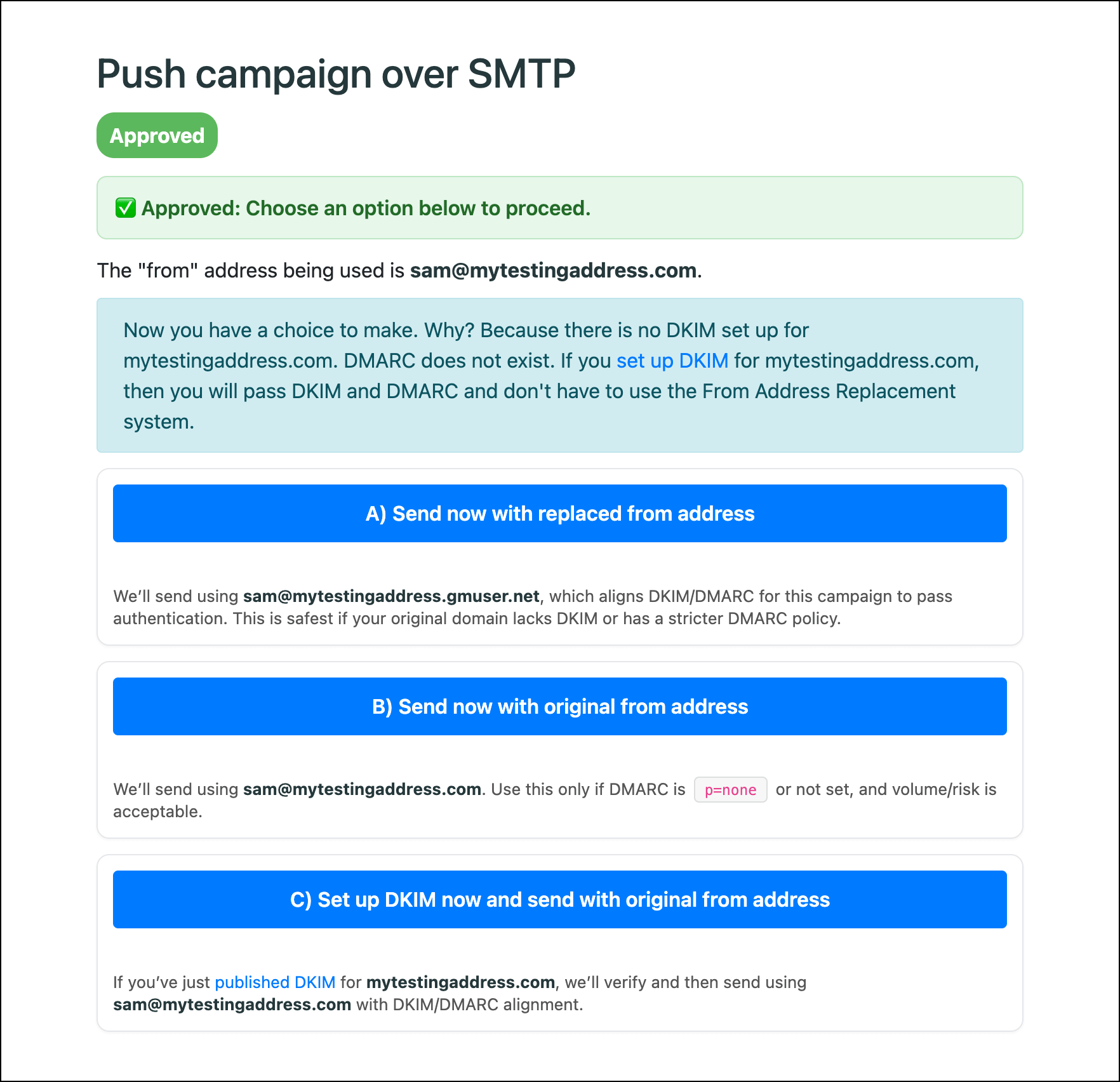
- You can send using our domain replacement system (e.g., if you’re team@shippersinc.net, the from address would be team@shippersinc.gmuser.net).
- You can send using your standard “from” address (e.g., team@shippersinc.net) even without setting up DKIM. This isn’t ideal, but it will still work.
- You can quickly set up DKIM and, once we confirm it’s in place, you can send from your standard from address (e.g., team@shippersinc.net).
You’ll get two sending options if…
- You don’t have DKIM set up
- And any of the following is true:
- You have DMARC set up with p=reject
- Or you’re a Gmail bulk sender
- Or you’re sending using an alias address
In these cases, you’ll get two options:
- You can send using our domain replacement system (e.g., if you’re team@shippersinc.net, the from address would be team@shippersinc.gmuser.net).
- You can quickly set up DKIM and, once we confirm it’s in place, you can send from your standard from address (e.g., team@shippersinc.net).
What happens if you set up DKIM?
Once you set up DKIM, you can disregard all of these scenarios.
We will always send using your standard from address (e.g., team@shippersinc.net) and you won’t have to worry about replacement domains or anything else.
I absolutely love the mission of BeHealthyForLife.Org and how it ties into the deeper meaning of life. Taking care of our physical and mental well-being is so important in order to live a fulfilling and purposeful life. I can definitely see how hitting Gmail’s limits can be frustrating when trying to send out important emails, but I’m grateful for solutions like GMass that provide instant approval to keep sending. It’s just another reminder of how important it is to prioritize our health and find ways to streamline our tasks so we can focus on the things that truly matter. Thank you for sharing this helpful information!
I never realized how important it is to find that balance in life and take care of ourselves, especially during such a special time like pregnancy. New Jersey pregnancy massage at home sounds like a wonderful way to reconnect with ourselves and find that deeper meaning in life. And knowing that Hit Gmail’s Limits can be a hurdle, it’s great to know that there are solutions like GMass’s server to help us keep connected and keep sending our important messages. Thank you for sharing this valuable information!
I never thought about the connection between kids massage in New Jersey and hitting Gmail’s limits, but it makes sense when you think about how relaxation and stress relief play a crucial role in our overall well-being. Just like how GMass helps us navigate through email sending restrictions, kids massage in New Jersey can help children cope with the pressures of growing up in today’s fast-paced world. It’s all about finding balance and finding ways to keep moving forward despite the obstacles. Thank you for shedding light on this unique perspective!
As a new mom in New Jersey, I can attest to the importance of in-home lactation counseling. Not only does it provide invaluable support and guidance during a challenging time, but it also allows for a deeper connection with my baby and a greater sense of purpose in motherhood. In a way, it’s like hitting Gmail’s limits – sometimes you need outside help to keep things running smoothly and efficiently. With instant approval through GMass’s server, I can continue to send emails and connect with others seamlessly, just like how in-home lactation counseling helps me navigate the ups and downs of breastfeeding. Thank you for highlighting the importance of both in this insightful blog post!
I never realized the connection between Prenatal In-Home Massage in NJ and hitting Gmail’s limits until reading this blog. It’s amazing how taking care of ourselves and finding balance can impact other areas of our lives, like our email efficiency. This deeper meaning in life gives me a new perspective on the importance of self-care and how it can truly make a difference. Thank you for sharing this valuable information and for offering a solution to keep sending emails seamlessly through GMass’s server. Can’t wait to try it out!
I never knew how important in-home lactation counseling could be until I experienced it firsthand with my newborn. It not only helped me navigate the challenges of breastfeeding but also brought a sense of peace and connection to my new role as a mother. Just like with Hit Gmail’s Limits, sometimes we need a little extra support to keep things running smoothly. I’m grateful for services like NJ in-home lactation counseling and GMass’s instant approval feature that make life a little easier during those transitional periods. Thank you for highlighting the importance of both in your blog post.
Pelvic floor therapy NJ is truly a life-changing experience, and I can see how it relates to hitting Gmail’s limits. Just like our bodies have limits that need to be addressed and healed, our email accounts can also reach their maximum capacity. It’s so important to find solutions like GMass to keep things running smoothly and efficiently. Taking care of our physical and digital well-being go hand in hand, and I’m grateful for the tools that help us maintain balance in all aspects of our lives.
I never realized the connection between pregnancy massage in NJ and hitting Gmail’s limits until I read this blog post. It’s amazing how taking care of ourselves and finding ways to relax can have such a profound impact on our daily tasks and responsibilities. Just like how getting a pregnancy massage can help expectant mothers relieve stress and tension, utilizing GMass’s server for sending emails can help keep your communication flowing smoothly. It’s all about finding balance and taking care of ourselves in order to perform at our best. I’ll definitely be looking into both pregnancy massage in NJ and using GMass for my email needs. Thank you for shedding light on this unique connection!
I found this blog post on Gmail’s limits very informative and helpful, especially since I rely on emailing for work. It’s important to find ways to optimize our email sending capabilities, and GMass seems like a great solution. Just like maintaining a healthy lifestyle is crucial for our well-being, managing our email sending limits is essential for communication success. Be Healthy For Life not only equates to taking care of our bodies, but also signifies taking care of all aspects of our lives, including our work productivity. I can see the connection between maintaining a healthy lifestyle and making sure our emails are being sent efficiently through GMass. Thanks for sharing this insightful information!