
Google Forms provides a fast and easy way to create online surveys, and used with auto follow-up emails from GMass, you can maximize the number of responses you get.
Additionally, because Google Forms plugs into the rest of the Google ecosystem, you can export the results to Google Sheets. That allows you to also follow up with respondents based on their responses to your survey questions.
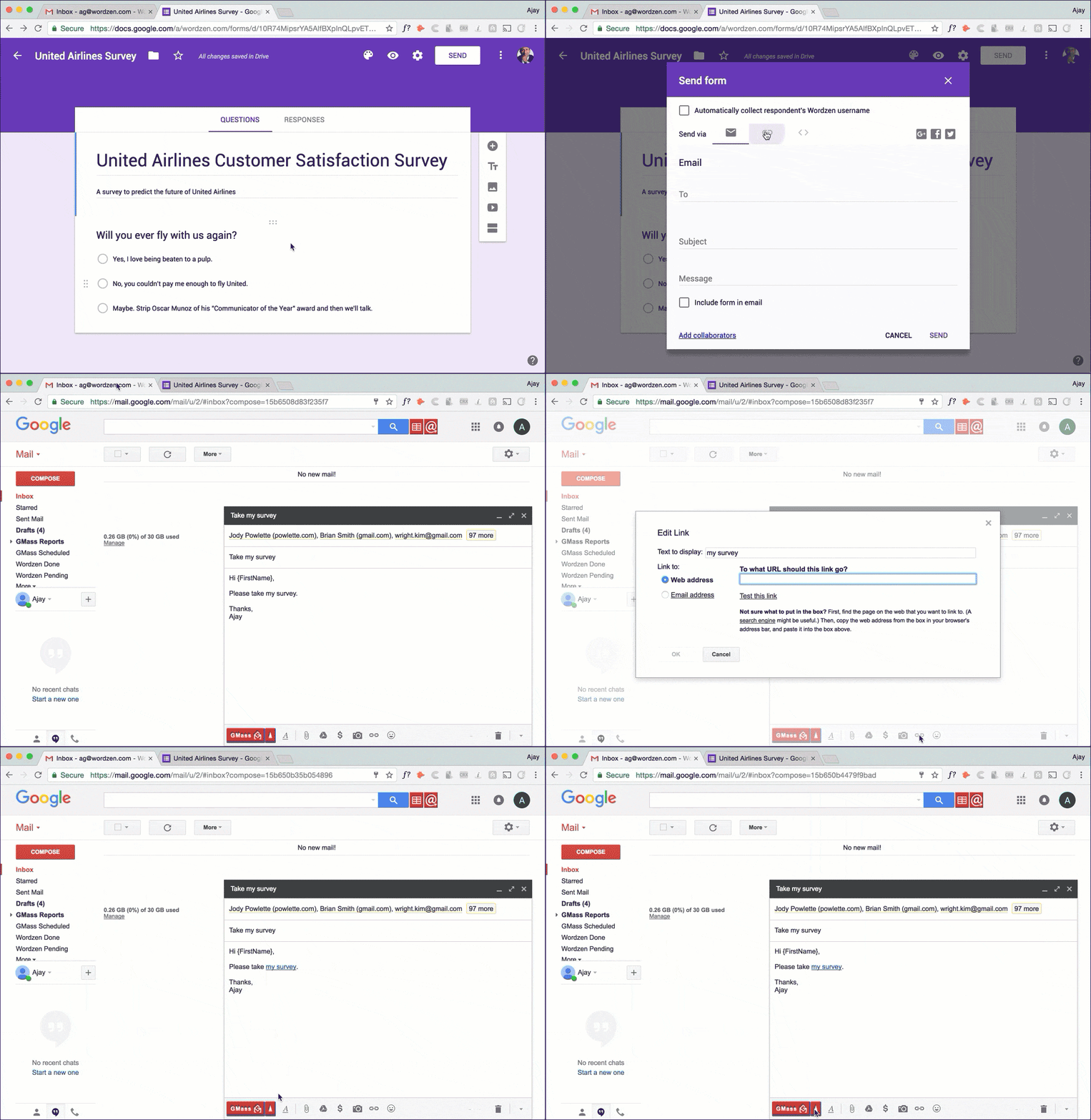 In this article, I will teach you how to:
- Create a customer survey using Google Forms to gather information from respondents and save answers in a Google Sheets spreadsheet.
- Email your survey to recipients using GMass, such that if they don’t take it, they’ll get an automatic reminder a couple days later. This is how you maximize your responses.
- Use GMass to follow-up to respondents based on their answers to survey questions, in an automated fashion.
First, create your survey with Google Forms
Google is big on simplicity, and Google Forms partakes in this tradition. You can create a survey using Google Forms in minutes and for free. Here are the steps to create a new online survey from your browser.
1. Launch Google Forms
Simply head over to the Google Forms homepage.
2. Set up your survey
Click the “New” button, or + sign, to create a new survey. Once you have created the survey, fill out the necessary parameters including the Title of your form and a short text description.
Also, under Settings (click the gear icon), select the option to “Collect email addresses”. This setting is important because it allows you to gather the email addresses of respondents.
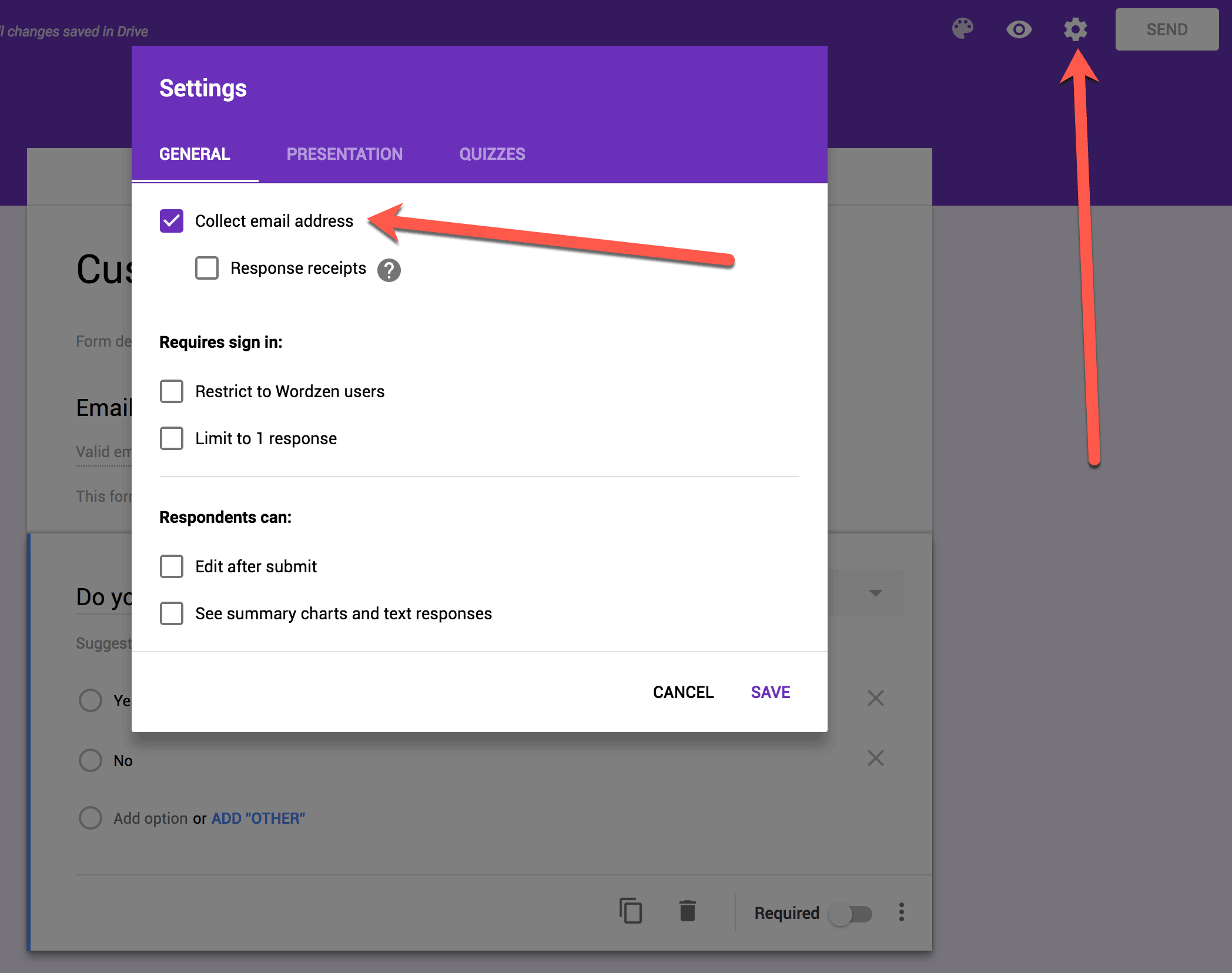 Technically you could add your own Short answer question to collect email addresses instead, but if you add the field yourself, then the email address won’t be validated to ensure it’s legitimate AND you’ll prevent the email address from being auto-filled if the respondent is already logged into his Google account, and most respondents likely will be.
3. Add your survey questions
Next, add questions to your survey. You get the option of 9 input styles for answers to your questions including text answers, multiple choice selections, drop-down menus, checkboxes, a linear scale, a multiple choice grid, as well as date and time options.
Feel free to use whatever question type suits your goal.
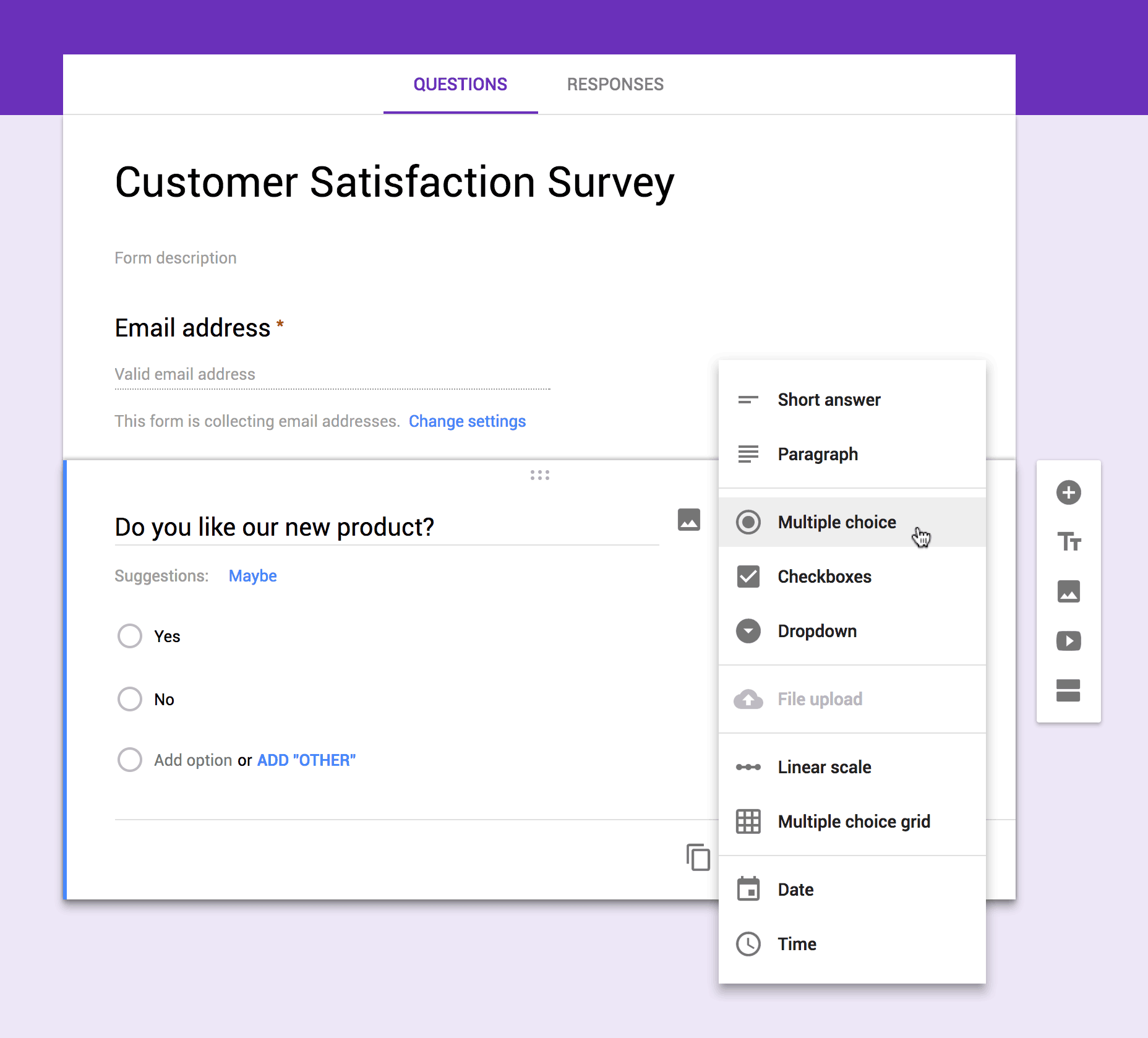 In this example, we’ll use a simple Yes/No Multiple choice question.
4. Set your survey responses to be collected in a Google Sheets spreadsheet
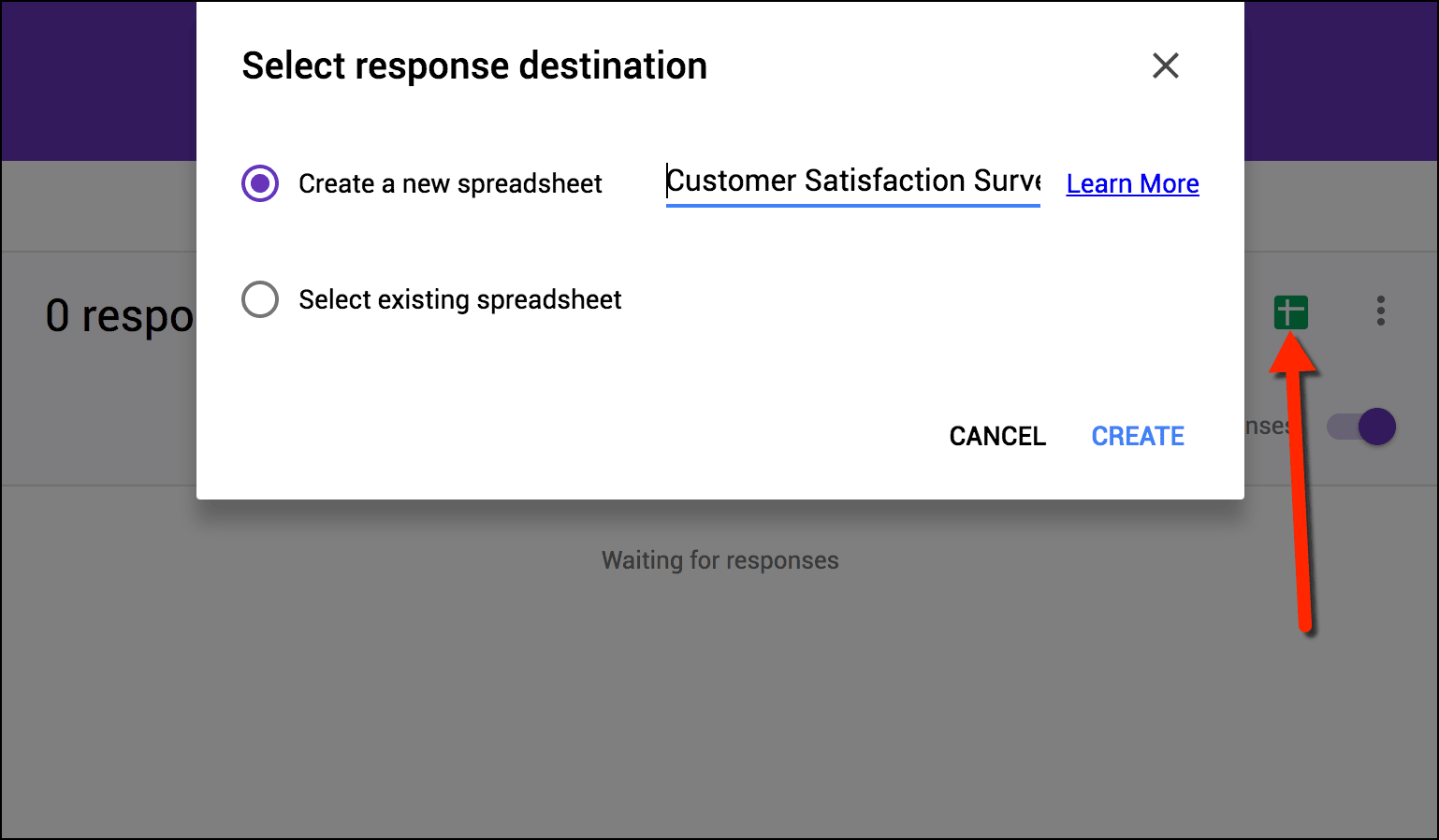
Click over to the Responses tab (instead of the Questions tab), and then click the green spreadsheet icon to set the spreadsheet to collect responses. Then click CREATE.
Next, send a mass personalized email with your survey link
After creating your survey in Google Forms, you should mass email the shareable link to the survey. To get the link, click on send from the survey page in Google Forms, then select the link button. You also get the ability to shorten the link for better readability.
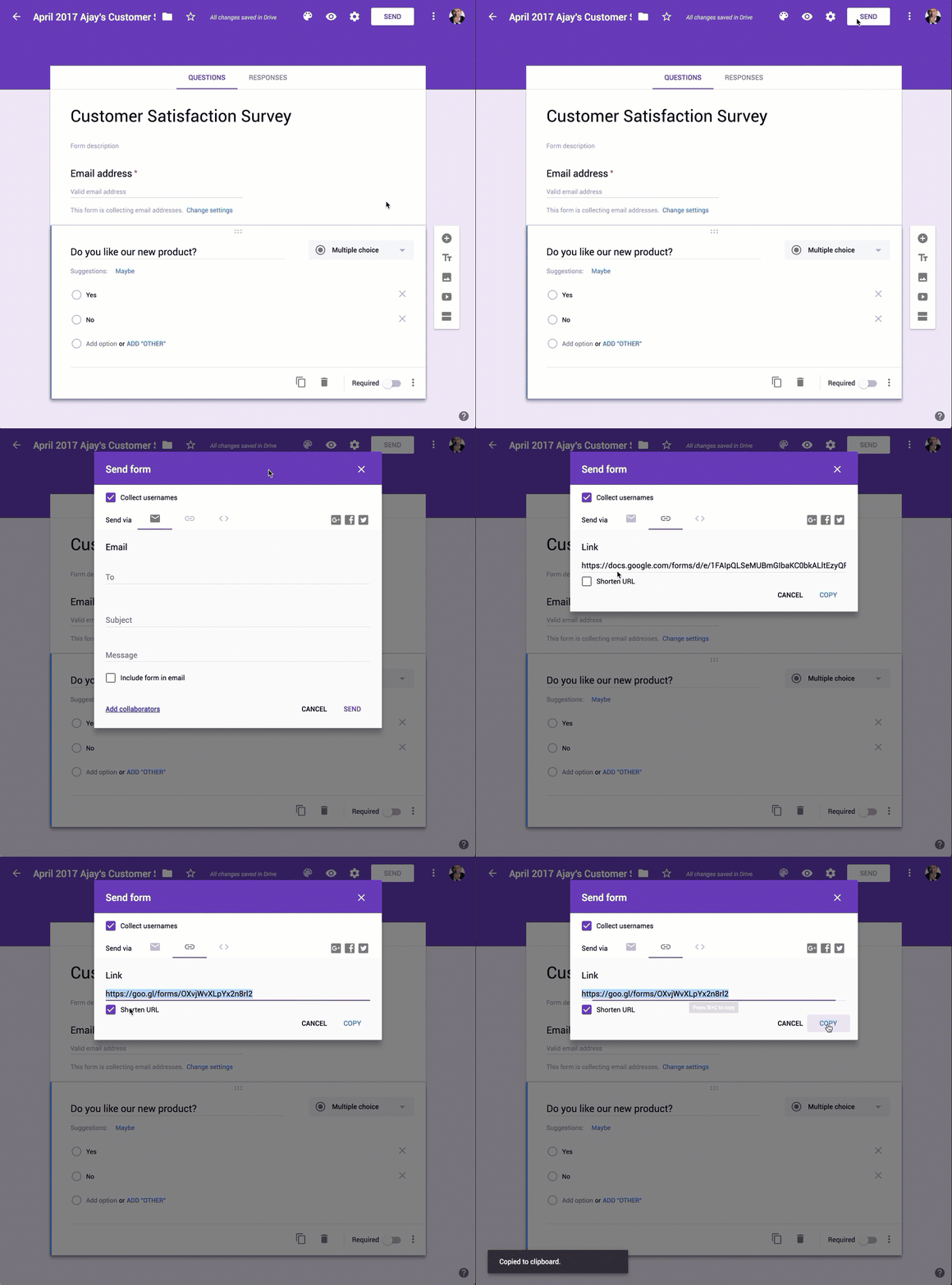
You can then send a personalized mass email with this link to your customers using GMass.
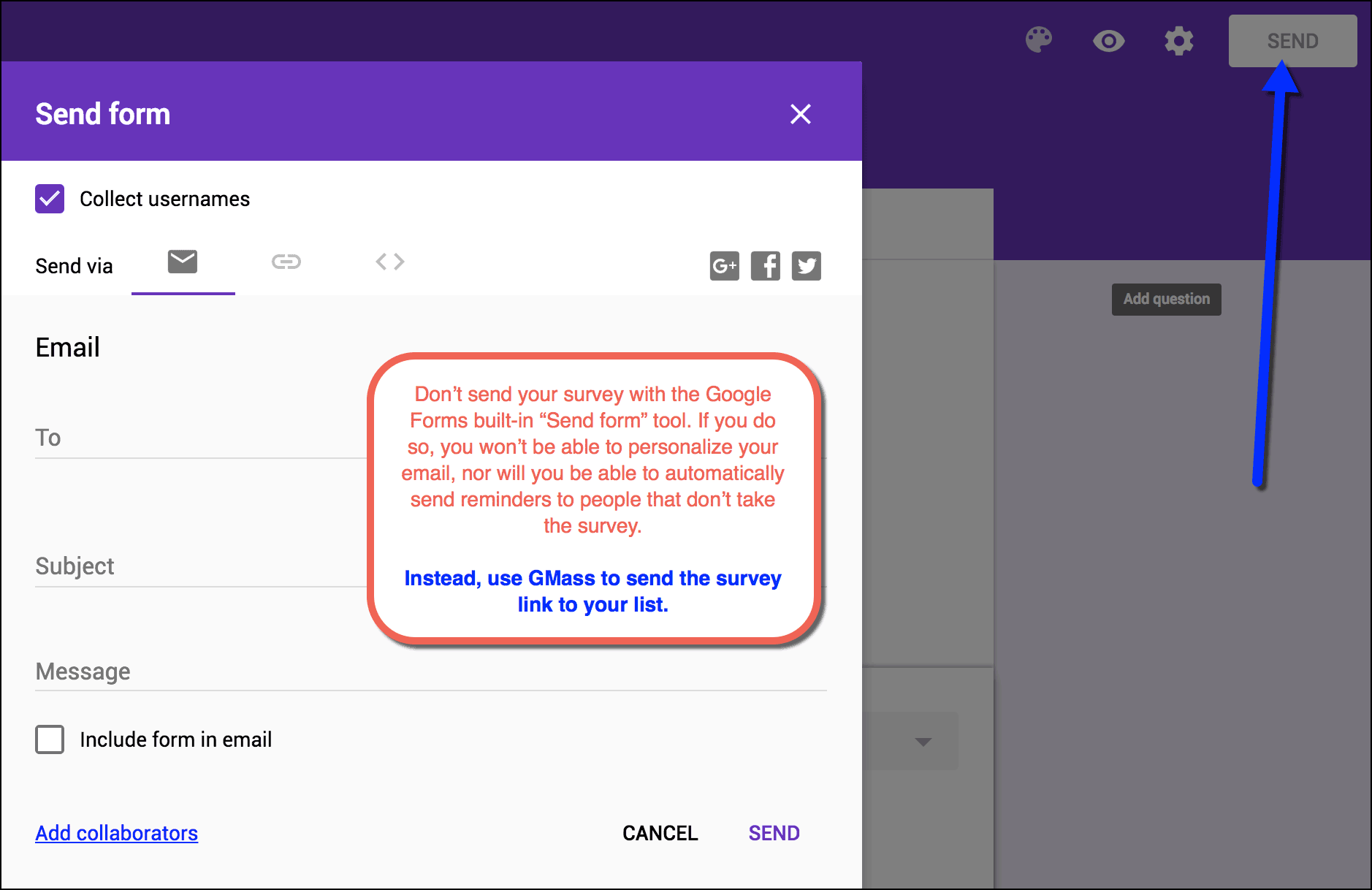
Important Note: Google Forms also provides the option of sending your survey for you to a list of email addresses, but don’t use that function, because then you can’t personalize or send a follow up email!
1. Create an email campaign containing your survey link
As with any other GMass campaign, you can set your recipients directly in Gmail by pasting all the addresses in the To field or by using the Google Sheets integration. In this example, I’ll just paste my recipients into the Gmail Compose window.
Compose a simple email with your survey link and a description of your survey to get your prospects immediately interested.
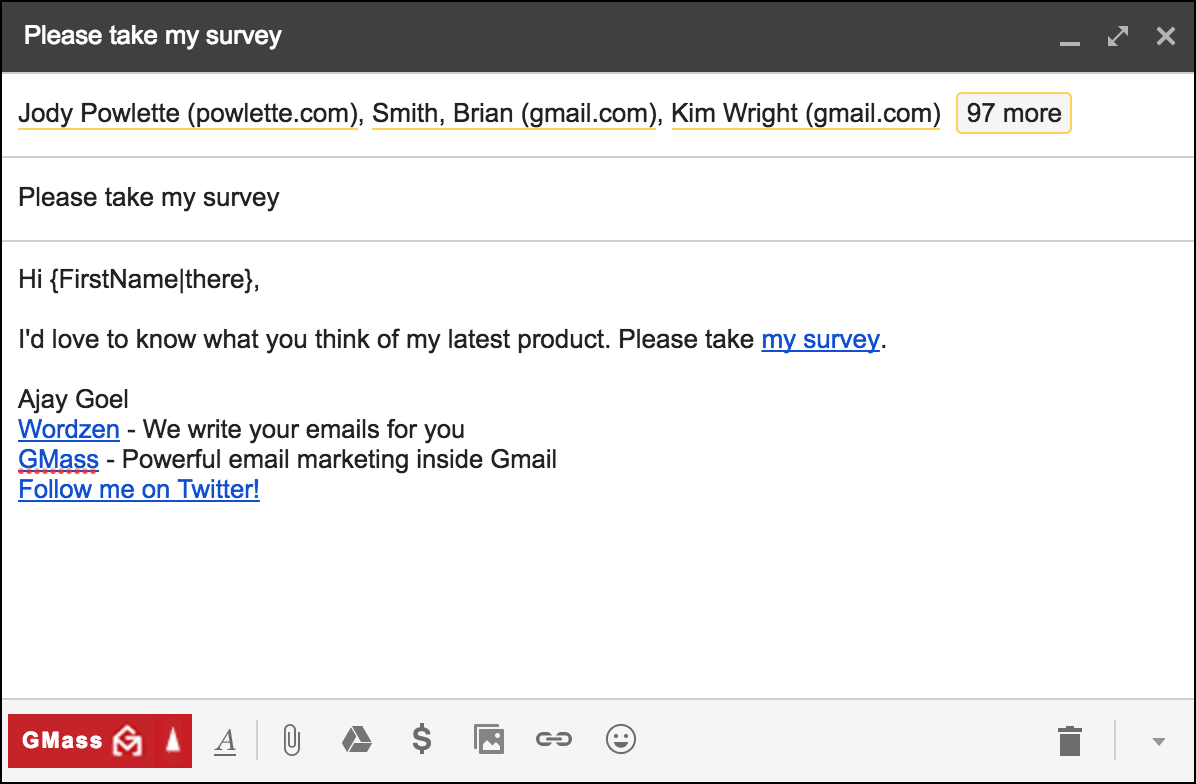 Important Note! When creating the campaign, ensure that the anchor text for the survey link is not a URL. In a bid to avoid phishing filters, GMass does not track clicks for URLs where the anchor text is also a URL. As a result, if you link to your survey with the survey’s URL as the anchor, the link will not be tracked. In this example, I use the anchor text of “my survey” to link to the actual Google Forms URL.
2. Setup Auto Follow-ups based on who didn’t click
Your survey is only as valuable as the number of prospects who take it. GMass gives you the ability to automatically follow-up with recipients who do not click the survey link contained in your email message. This ensures you get the highest number of survey takers possible.
To use this feature, first you must set GMass to track clicks for your campaign. This setting allows GMass to track when respondents click links (with proper anchor text) in your campaign. From the Settings box for your campaign, check the box labeled Track Clicks.
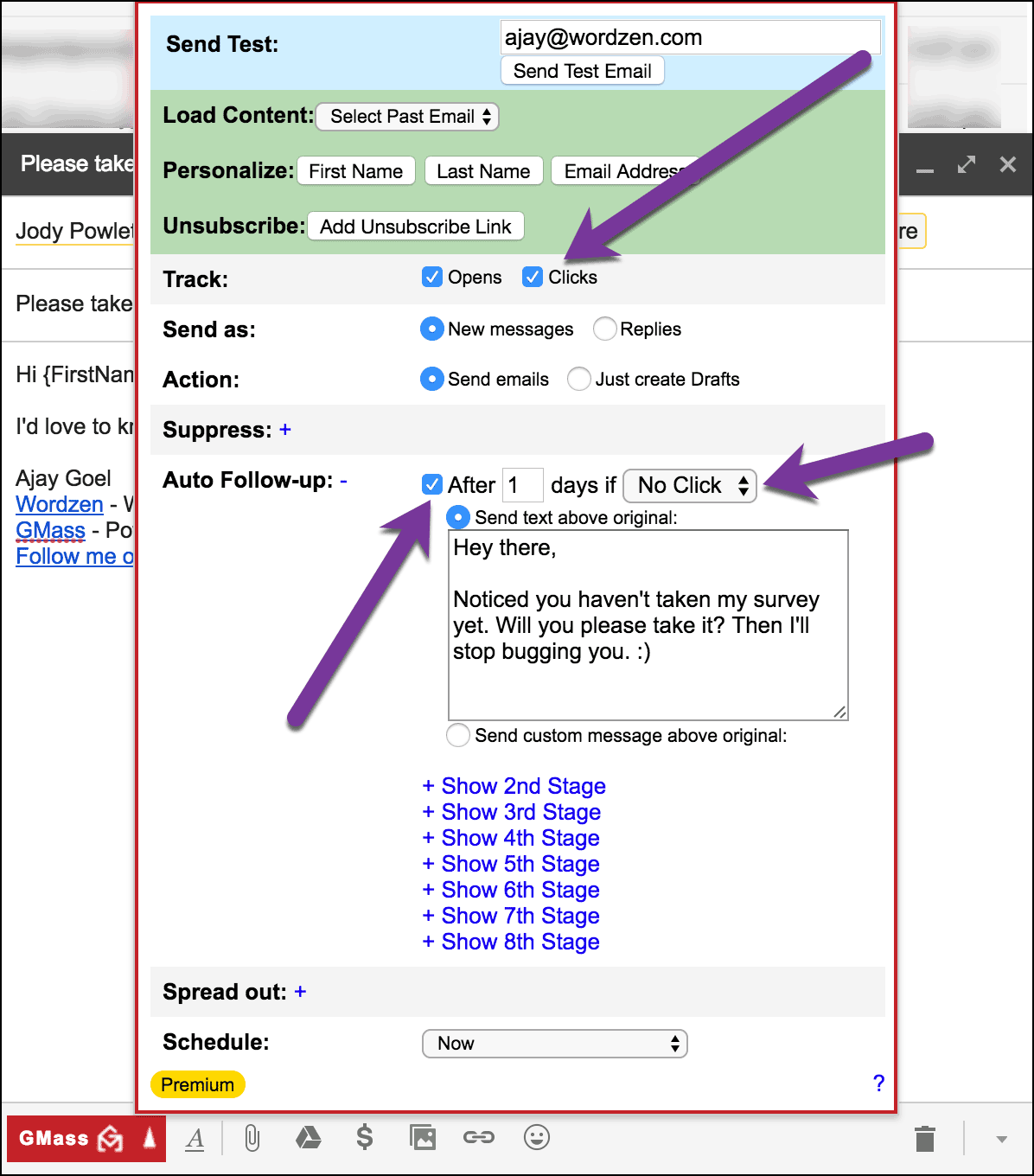 When configuring your auto follow-ups, you will see the No Click option in the drop-down menu for each follow-up Stage. Here you can set a custom reminder to be emailed to prospects who do not click on your survey link within a stipulated period. Optionally you can add Stage 2 and subsequent follow-ups to keep pinging people to take the survey. This is how you maximize the number of people that take your survey. Once you complete this setup, you can send your campaign by hitting the GMass button.
Technically, in this scenario we are assuming that if they didn’t click the link, then they didn’t take the survey, which will hold true for everyone. There may be people who did click the link, but still didn’t take the survey. Those people would not get the auto follow-up email.
Collecting Survey Responses via Google Sheets
If you didn’t link your survey to a Google Sheets spreadsheet when you set up the survey, no problem — you can do it now. As responses trickle in, you can view them by navigating to the Responses tab for your survey in Google Forms.
From here, click on the spreadsheet icon to export the responses to a Google Sheets spreadsheet. For simplicity, it is best if you choose the “Create a new spreadsheet” option, instead of adding the data to an existing spreadsheet.
After people take your survey, your spreadsheet will start to populate with people’s answers.
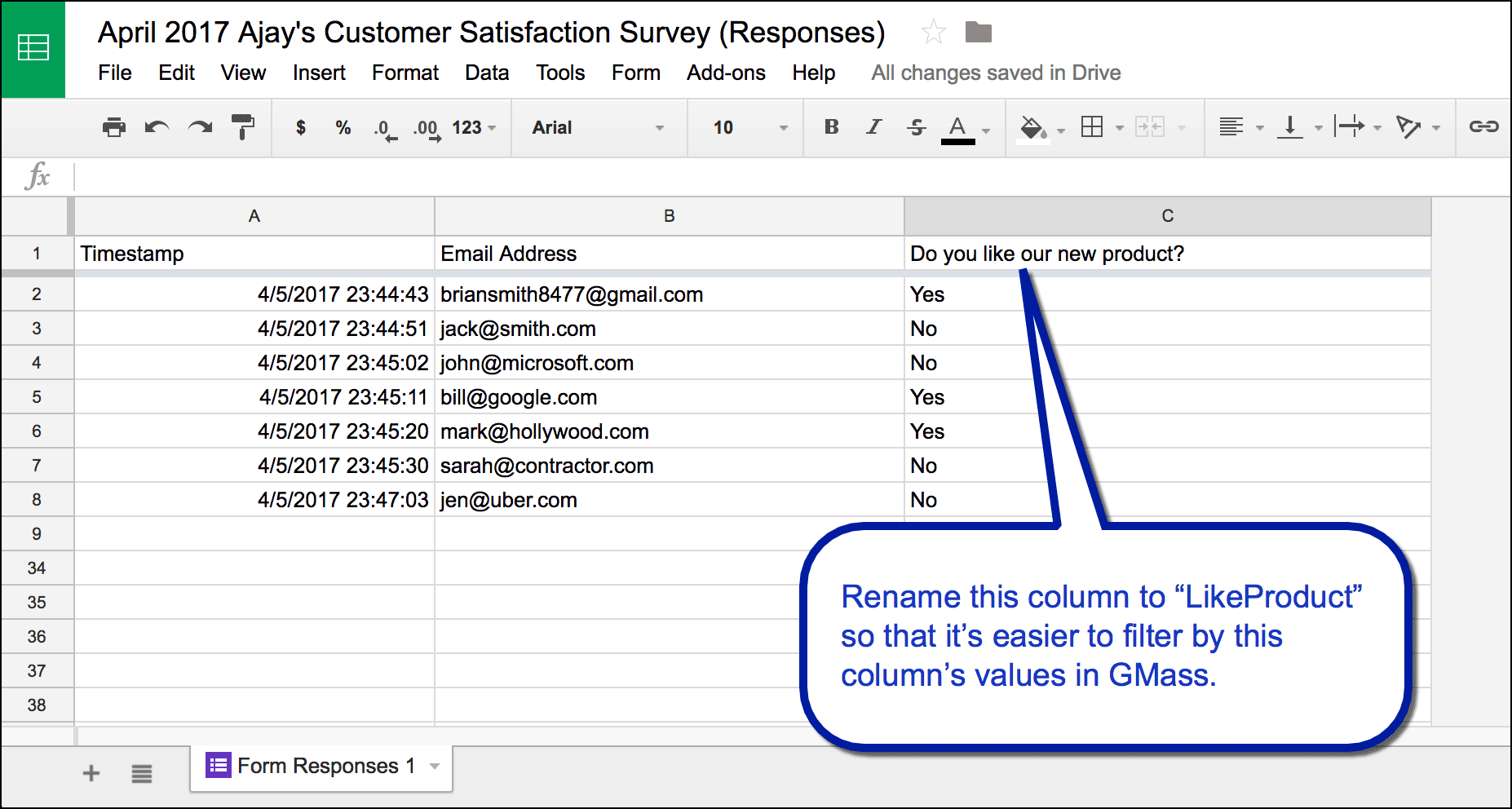
After collecting survey responses, you can use GMass to follow up with people that answered a question a certain way. Before we do that though, rename the column for the question you’re targeting to something simple, so that it’s easy to filter off of in GMass.
Using GMass to follow up based on specific answers
You can now send a new mail merge campaign from the spreadsheet which collected survey responses, selecting only the respondents that answered in a particular way. In this example, we’ll email everyone who said they didn’t like the new product to ask them how it can be better.
1. Connect the Survey Responses spreadsheet to GMass
Click the red spreadsheet icon next to the search bar in Gmail.

2. Set GMass to send to only selected rows of the spreadsheet
Next, select the spreadsheet containing the responses from your survey.
GMass lets you send campaigns to selected email addresses using criteria that you define.
Right under the selection dropdown for Google Sheets, you will notice a Filter Rows box; this is where you can set these parameters.
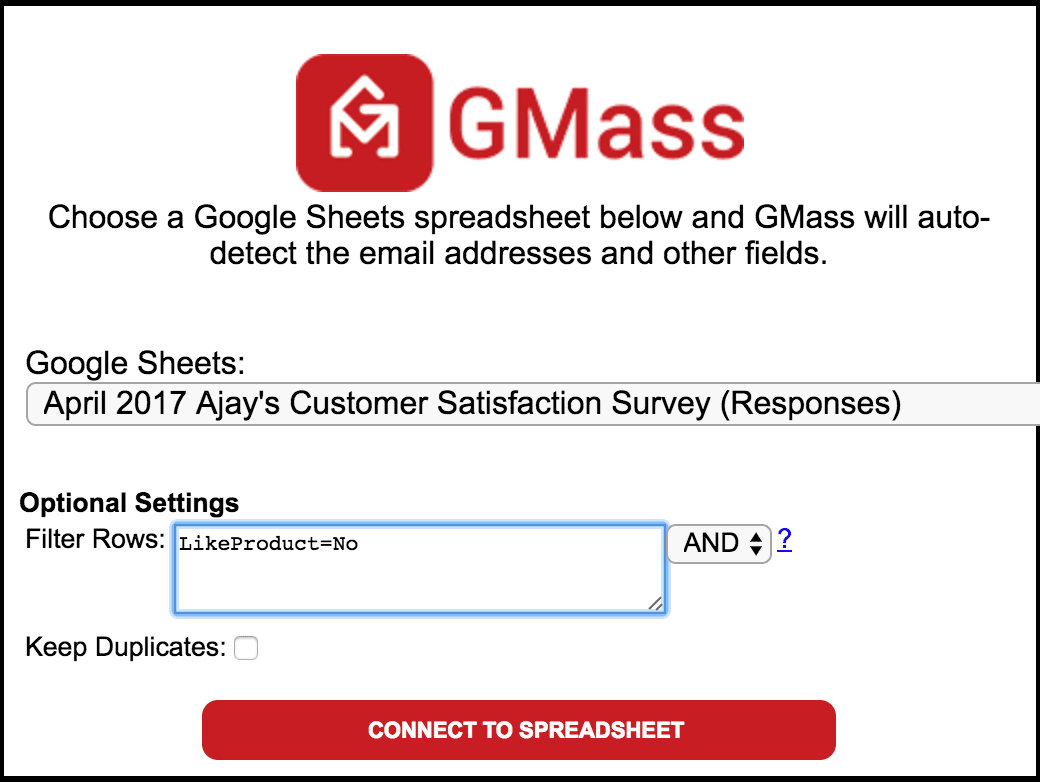
For my sample campaign, I will send a follow-up campaign to those who responded “No” to the question “Do you like our new product?” in my survey:
In the spreadsheet, there’s a Yes/No column titled “Do you like our new product?” which I have renamed to LikeProduct for convenience.
To send a campaign to those who responded “No” I have to specify the criteria in one line, in the format:
ColumnName=Value
For our sample survey, the new parameter would become:
LikeProduct=No
Also, you could send out a similar campaign to the respondents that answered “Yes” by substituting “No” for “Yes.”
Get even fancier by making this a daily repeating campaign
The spreadsheet will continue to populate with rows as people take the survey. You can configure your campaign to people where LikeProduct=No to be a daily repeating campaign, so that every day, an email goes out to any new people that answered “No” to that question. That way you won’t have to send more email campaigns whenever a new batch of people take the survey. Read more about automation with Google Sheets and daily repeating campaigns.
Further Reading
For a variety of other possible parameters and varied combinations, check out this detailed guide on sending to selected spreadsheet rows.
Make sure your links are tracked
Sending a mail merge campaign using Google Sheets
How to set auto follow-up emails based on who didn’t click
How to set auto follow-up emails in general
How to send daily emails to new rows of a Google Sheets spreadsheet
Only GMass packs every email app into one tool — and brings it all into Gmail for you. Better emails. Tons of power. Easy to use.
TRY GMASS FOR FREE
Download Chrome extension - 30 second install!
No credit card required

Ajay is the founder of GMass and has been developing email sending software for 20 years.
Hello friends I knew very recently I want know about it more.
Check out: https://www.gmass.co/blog/resources-for-gmass-beginners/
I am using Google Forms to collect surveys from hiring managers on 90 hire quality. I had one manager who had 3 new hires and I sent three different survey emails but for some reason, she only received one email. I am assuming Google form is assuming the email is duplicated so just sends one email only. The goal is to get an accurate report on all responses.
Hello team,
I sent a Google form to a customer to fill in the information and get an email with the order steps. However, after my customer filled in and submitted the form, he received three identical emails in a row. Normally, he should only receive one. What is the reason for this, and what changes do I need to make?
Hi Libby, I’m not sure with your specific case as there are all sorts of quirks that might make that happen along the process. If you fill out a support ticket we can take a look.