
As an enhancement to our popular auto follow-up email feature, you can now configure auto followups to send to recipients that didn’t click a link in your email, in addition to the regular options of didn’t reply, didn’t open, and everyone. You can also choose to send to everyone who didn’t reply or click.
Why would you want to have auto follow-ups based on not clicking?
You send a link to a survey or an email poll that you want your recipients to click on and take. If they didn’t click on it you know they didn’t even look at the survey. So in this case, you might have an auto follow-up email sent 1 Day after to those that didn’t even click the link.
When configuring your auto followups, you will see the new Didn’t Click option in the dropdown menu for each followup Stage.
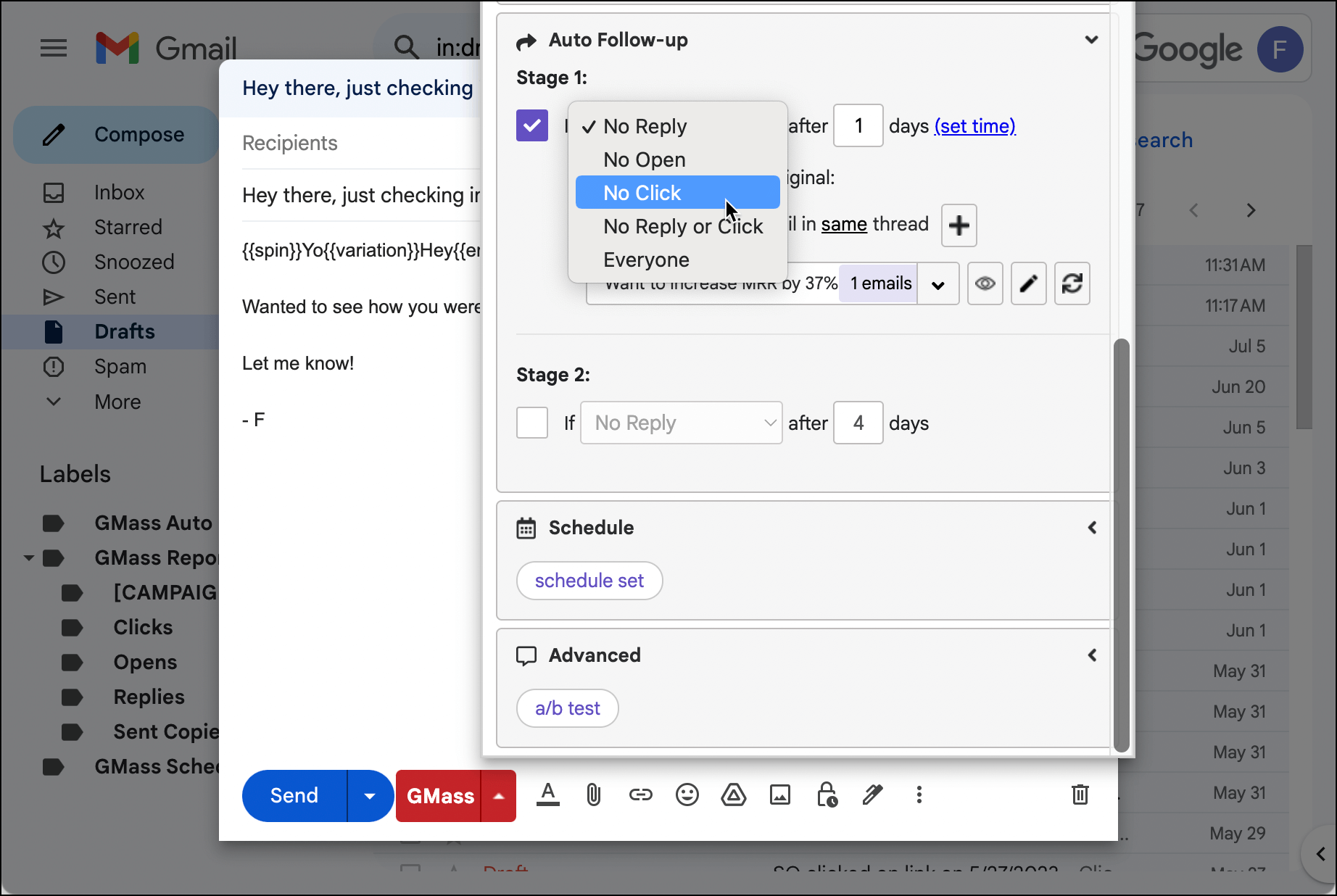
There are a few important points to know when using the “No Click” option:
- You must turn on Track Clicks for GMass to know who clicked and who didn’t.
- For now, you can’t specify which link must be clicked remove a recipient from the auto follow-up sequence. Any tracked link that is clicked will remove the recipient from the sequence.
- Remember that a link only has click tracking applied to it if its anchor text is NOT a URL. Meaning if you’re linking to Google, this link will not be tracked: Go to www.google.com. But this link WILL be tracked: Go to Google.This is to avoid phishing detectors. See this article for more information on which links GMass tracks and why.
And as with all the “sequence stoppage” triggers, you can always double check your campaign’s calendar view to make sure the people who’ve clicked are removed from future emails in the sequence.
GMass is the only tool for marketing emails, cold emails, and mail merge — all inside Gmail. Tons of power but easy to learn and use.
TRY GMASS FOR FREE
Download Chrome extension - 30 second install!
No credit card required

Ajay is the founder of GMass and has been developing email sending software for 20 years.
Hey Ajay,
First of all, gotta say I absolutely love this service, I now have several accounts on your premium plan and can’t live without this app!
I just have some things about auto follow-up that would be nice to see. One, this is pretty weird but my follow-ups that are saved actually transfer from each account. I find this strange because they are completely different emails, different Gmass subscriptions, on different gsuites, and often times even on different IPs. Don’t know how that’s possible, but maybe something to look into.
Also, one feature request that would be incredible would be that the auto follow-ups are saved to the campaign. So when you autofill a campaign email, you don’t have to rewrite the auto follow-ups as well.
Thanks again for this incredible service! Keep it up.
If I get lots of bounces and the notification ends up only in my inbox (or the GMASS bounce folder) do I have to remove the bounces from auto-followup manually so I don’t continue to hit those bad addresses ?
Clicks aren’t tracking in my recent campaigns (past week or two) . . . please advise.
Hey Ajay + team, I’ve been using GMass for a few years now and absolutely LOVE it.
Since starting with GMass, I’ve always wondered one thing; I usually set my auto follow-ups to send based on ‘no open’, but would love to ALSO include those who *did* open but didn’t click…
(I’m guessing there’s a good reason for this, but…) Is there a reason that there isn’t an option to base an auto follow-up on ‘no open + no click’? OR perhaps this is because by selecting ‘no click’, it automatically includes those who also didn’t open, because by default they wouldn’t have clicked a link?
Would love an answer to this mystery!