
One button to send any kind of email campaign
GMass lets you send newsletters, announcements, cold email campaigns, and transactional email from inside Gmail.
What brings you here?
Describe what you're trying to send, who you're trying to reach, or the problem you're trying to solve. We'll point you toward the GMass setup that makes sense.
400,000 active users
From solo operators to people at some of the most recognizable companies in the world, GMass shows up in a lot of inboxes. Including some very familiar ones.
...and guess what?
Shhh!Other email service providers use us too...
...but do they like us?
You don't have to take our word for it. Read what people actually wrote where they installed or reviewed GMass.
We never ask people to write positive reviews. These reviews are organic.
Newsletters, announcements, cold email campaigns, and transactional email
Start with what you're sending. GMass handles each use case with the right settings and safeguards.
Send to 50...or 50 million
The same basic workflow works at radically different scales. A tennis league, a daily outbound operation, and a company-wide announcement can all start from the same Gmail Compose window.
Edge cases, handled
The weird things that happen five minutes before — or five minutes into — a campaign are where ten years of product decisions start to matter.
Not for everyone
GMass isn't a Step 1, enter a campaign name; Step 2, enter your subject line kind of tool. We give it to you all at once.
If you want a wizard that reveals one setting at a time, GMass may feel like too much. If you want the controls right there when you need them, that's the point.
Let's talk about deliverability
We guarantee 100% of your email will go to the Inbox, you'll get a 80% open rate and a 50% reply rate!
Our mantra is simple: deliverability is a shared responsibility. You control some of the things that determine where your email lands. GMass is responsible for others. The best results happen when both sides do their part.
Teeny tiny learning curve
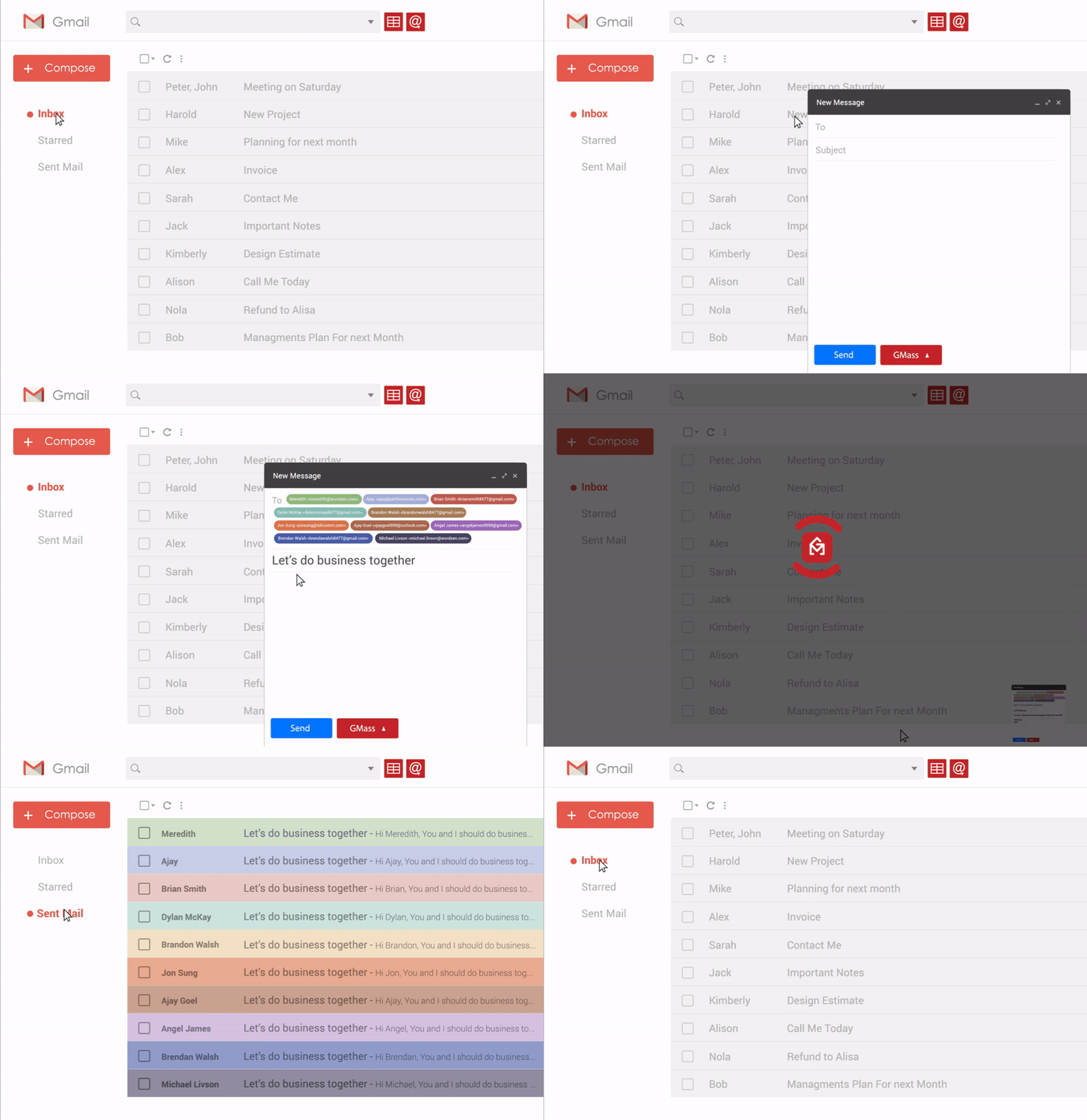
If you know how to use Gmail, then you know how to use GMass.
- Open Compose.
- Add recipients.
- Write your email.
- Instead of clicking Gmail's blue Send button, click the GMass button to send it as a campaign.
There’s much more you can do when you want it — personalization, mail merge fields, follow-ups, analytics, deliverability tools, and more. But sending a GMass campaign can be as simple as these four steps.
At least 20% better than your current platform
Not ten times better. Just better in the ways that matter every day — clearer dashboards, better analytics, faster sending, and lower cost.
AI where it's useful. Your where it's not.
Don't use AI to write your campaigns -- everyone will know. But use it to improve it and understand it.
Hi there,
Our Fall Collection goes live tomorrow at 9 AM with limited-release outerwear, updated essentials, and early-access pricing for subscribers.
We’d love to see you there.
- Ava
Your campaign is image-heavy. Consider reducing the number or file sizes of images and keeping more of the message as live text.
Your DMARC policy is set to p=none. After confirming all legitimate senders pass authentication, consider moving toward quarantine or reject.
Several links redirect through different domains. Use a consistent branded tracking domain and avoid unnecessary URL shorteners or redirect chains.
This domain’s recent sending volume is much lower than this campaign. A more gradual ramp-up may help mailbox providers build confidence in the traffic.
A love affair with Google Sheets
Google Sheets isn't a bolt-on integration in GMass. It's at the center of how lists and personalization work.
Connect a Sheet and each row becomes a recipient, while each column can become a merge field. Names, companies, custom sentences, dates, URLs — whatever you keep in your Sheet can flow straight into each email.
Because GMass reads directly from Google Sheets, your campaign can stay connected to the data you're already working with instead of making you export, import, and maintain another copy of your list.
| FirstName | Company | CustomLine | BookingLink | |
|---|---|---|---|---|
| julia@acme.co | Julia | Acme | Noticed your launch... | gmass.co/demo |
| omar@north.io | Omar | North | Saw your new hiring page... | gmass.co/demo |
| mia@upland.ai | Mia | Upland | Your newsletter caught my eye... | gmass.co/demo |
Hi thereFirstName,
a short custom intro goes hereCustomLine
I thought GMass might be a good fit for your team.
If you're curious, here's a link: insert linkBookingLink
— Ajay
Skip this section if you're not a developer
On second thought, with AI and vibe-coding, everybody's a developer, so don't skip
A 5-pronged approach to integrate your app with GMass.
POST /api/campaigns
campaign finished → your app
GMass → CRM
Sheet row → campaign
smtp.gmass.co
We are our own biggest user
We’ve sent over 50 million emails with GMass, to run GMass.
We run the email infrastructure for all of our companies on GMass. We use it for announcements to our users, cold email to prospects, and transactional messages like “Thanks for subscribing,” “Why did you cancel?” and “Your email campaign has finished sending.”
That means we depend on GMass for the same kinds of email our customers do — every single day.
Inventing email for 10+ years
GMass has been building and iterating since 2015. Here are a few of our inventions.
Send transactional messages from the same Google account you already use.
Use Google delivery when it fits and SMTP infrastructure when it doesn't.
Tracking approaches designed to survive common blocking techniques.
Compose where you already write email, then add GMass controls directly there.
Links that look good when you hover over them.
AI tells you what's working, what's bouncing, and how to fix it.
Search your Gmail account for anything and build a list off it.
It looks like a simple button — but there's a lot behind it.
Our own DKIM stack, an SMTP server farm, unlimited stage sequences, SSL certificates, complex image rendering, conditional logic, and deliverability tools sit behind that button.
- One button
- Inside Gmail
- Campaign engine
- Personalization
- Conditional logic
- Scheduling
- SMTP server farm
- IP management
- Throttling
- Retry logic
- DKIM
- SPF & DMARC
- SSL / TLS
- Reputation monitoring
- Opens
- Clicks
- Replies
- Bounces