
One button to send any kind

GMass lets you send newsletters, announcements, cold email campaigns, and transactional email from inside Gmail.
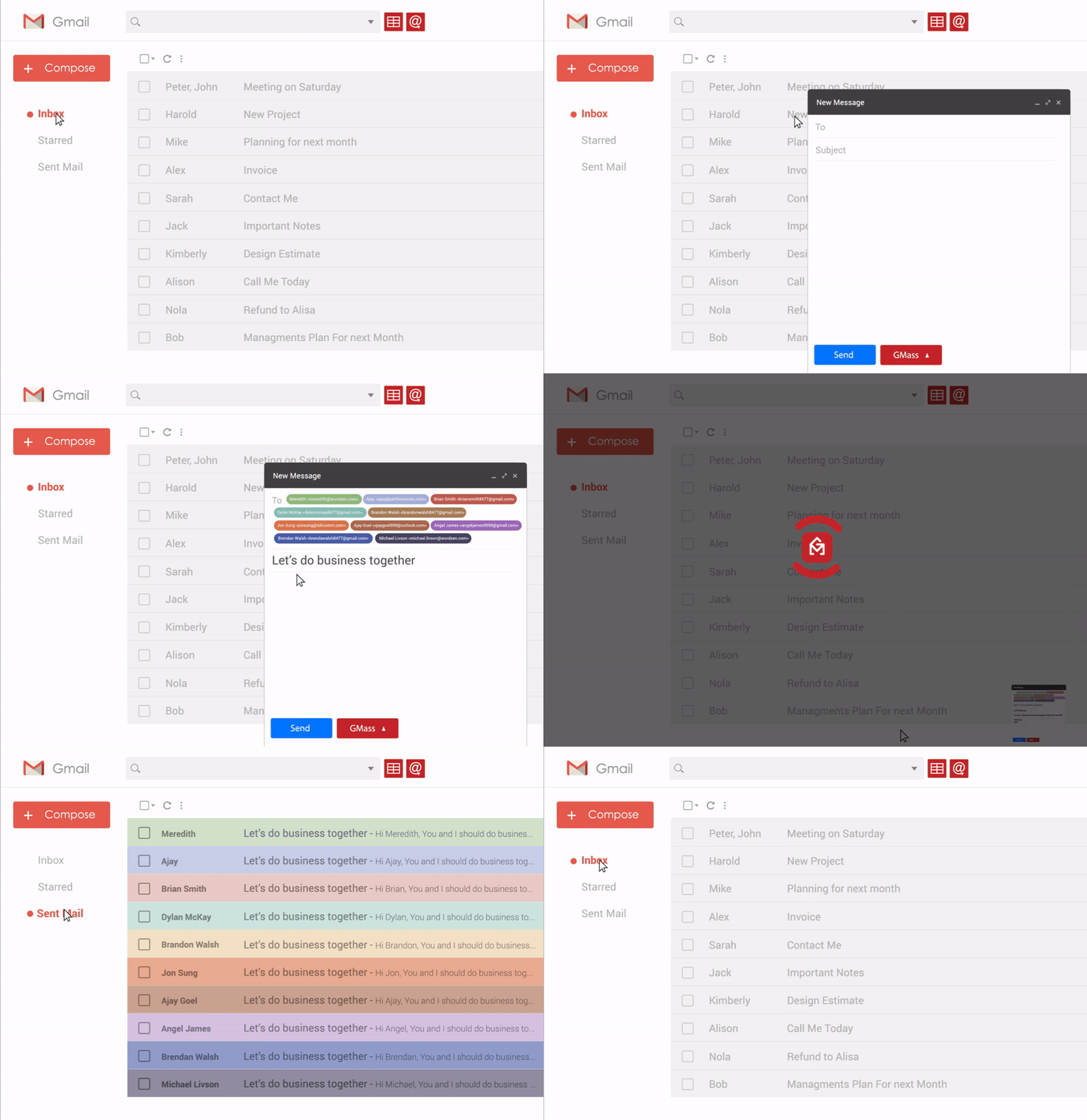
GMass product demo
Install GMass

What brings you here?

Describe what you're trying to send, who you're trying to reach, or the problem you're trying to solve. We'll point you toward the GMass setup that makes sense.

What are you trying to do?
Example 1 of 7
AI will answer here and point you to the right workflow, feature, or setup.

400,000 active users

From solo operators to people at some of the most recognizable companies in the world, GMass shows up in a lot of inboxes. Including some very familiar ones.

Uber
has used GMass

...and guess what?

Shhh!

Other email service providers use us too...

SendGrid
has used GMass

...but do they like us?

You don't have to take our word for it. Read what people actually wrote where they installed or reviewed GMass.

We never ask people to write positive reviews. These reviews are organic.

Newsletters, announcements, cold email campaigns, and transactional email

Start with what you're sending. GMass handles each use case with the right settings and safeguards.

New Message
From
GMass Weekly <newsletter@gmass.co>
To
42.3K Subscribers
Subject
GMass Weekly: 3 ways to improve deliverability
Hi there, This week we're sharing three practical ways to improve deliverability, a breakdown of why some campaigns land in Promotions, and one smart tracking setup you may not be using yet. Read the full newsletter below. - The GMass team
NewslettersNewsletter
Open tracking
Click tracking
Unsubscribe link
Auto follow-ups
None
Send updates and insights to a large audience in one step.

Send to 50...or 50 million

The same basic workflow works at radically different scales. A tennis league, a daily outbound operation, and a company-wide announcement can all start from the same Gmail Compose window.

New Message
From
Coach Maya Patel <maya@courtsideclub.com>
To
50 Recipients
Subject
Saturday doubles lineup
Hi team, Here are Saturday's doubles pairings and court assignments. Please arrive by 8:45 AM so we can get everyone warmed up and on court by 9. - Maya
Recipients
50
50 people
Campaign queued
A small group. Same workflow.

Edge cases, handled

The weird things that happen five minutes before — or five minutes into — a campaign are where ten years of product decisions start to matter.

01

You change the Sheet five minutes before send

You scheduled a campaign to contacts in Google Sheets. Right before it sends, you edit names, companies, or other data in the Sheet.

GMass picks up the latest Sheet data before sending
Scheduled campaign · 5 minutes to sendWatching Sheet
Google Sheet
RowFirstNameCompany 2JuliaAcme 3Omar → Omar S.North → Northstar 4MiaUpland
Campaign preview
Toomar@north.io
SubjectQuick question for Northstar
BodyHi Omar S., I noticed...
↻ Latest Sheet values synced before send
02

You change your mind after the campaign starts

The campaign is already sending when you notice one word in the subject you want gone. You edit the subject and save it.

GMass pauses, grabs the new subject, and resumes automatically
Campaign sending · 1,842 / 5,000 sentSending
Subject
Our amazing new product is live
Campaign progressLive
Pause sending
while subject changes
Resume with
new subject
03

Google says you’re over your sending limit

Google starts bouncing messages because the account hit its limit. GMass analyzes the campaign and user profile, recognizes a legitimate opt-in sender, and changes the delivery path.

GMass reroutes the campaign through high-performance SMTP
Delivery monitoringLimit detected
Google bounce: Daily sending limit exceeded
AI
Campaign & account analysisOpt-in campaign history looks legitimate. Engagement and account history are consistent with a real sender.
Google deliveryLimit reached
smtp.gmass.coHigh-performance SMTP
04

You actually want to send duplicates

You’re a teacher emailing parents. Two siblings are in your class, so the same parent address needs two separate emails — each personalized with different information about a different student.

GMass can intentionally send both personalized messages
Class roster · Parent updatesDuplicates allowed
Student roster
StudentParent email Ella Cartersam.carter@example.com Noah Cartersam.carter@example.com Maya Lewislewis.family@example.com
Keep both rows
Two separate emails
To: sam.carter@example.comElla: Great progress in reading this week. Here’s what we’re working on next...
To: sam.carter@example.comNoah: His science project is due Friday. Here are the remaining requirements...
05

You decide later that non-responders need a follow-up

Your campaign has already gone out. After seeing who replied, you decide the people who stayed silent should get one more message — even though you never set up an automatic sequence.

Launch a one-time follow-up only to people who didn’t reply
Campaign complete · 500 recipientsReplies tracked
Sent500
Replied162
No reply338
Ava ✓ replied
Marcus · no reply
Sofia ✓ replied
Daniel · no reply
Follow up to non-responders
One-time follow-up · 338 recipients
SubjectRe: Quick question
Just following up in case my last note got buried. Is this worth a quick conversation?
06

You want the last campaign’s settings, but not its content

You’re launching a brand-new campaign, but the open tracking, click tracking, unsubscribe settings, and follow-up setup from your last send are exactly what you want again.

Load the previous campaign’s settings only and leave the new content blank
New campaign from existing campaignSettings only
Last campaign
SubjectSummer program registration is open
BodyEnrollment details, pricing, and FAQ...
Load content
Load settings
New campaign
Subject and message stay blank so you can write something new.
Open trackingLoaded
Click trackingLoaded
Unsubscribe linkLoaded
Follow-up stagesLoaded
07

You pause the main campaign, but still want follow-ups to go out

You want to stop new people from entering the main sequence, but everyone who already got the first message should still receive the scheduled auto follow-ups.

Pause the main campaign in a way that keeps follow-ups running
Campaign controlsFollow-ups still active
Main campaignPaused
Auto follow-upsContinue sending
Main campaign
Paused
New recipientsNo additional people enter the main sequence.
Primary sendThe top-level campaign is on hold.
Existing follow-up queue
Still sending
Stage 1Sent to recipients who already got the first email.
Stage 2Scheduled to go out on time.
Stage 3+Continue normally unless you stop them too.
08

You want a 100-stage onboarding campaign

Your onboarding isn’t just a welcome email and two reminders. You want a long-form educational sequence that keeps teaching, nudging, and re-engaging users over time.

GMass supports unlimited auto follow-up stages — even a 100-stage onboarding sequence
Onboarding sequence builderUnlimited stages
AudienceNew users
Sequence typeOnboarding
Auto follow-up stages100
Stage 1Welcome + quick start
Stage 2Set up your account
Stage 3Import your contacts
Stage 4Send your first campaign
Stage 5Tips to improve replies
Stage 100Advanced optimization + long-term re-engagement
09

You want images to send like a normal Gmail message

You paste or insert an image into your message and expect it to behave like an ordinary Gmail email — not depend on some separately hosted image URL.

GMass can embed the image content directly into the email message
Gmail-style image sendingEmbedded image content
New Message
To1,200 Customers
SubjectHere’s the new workspace
Hi there,
We just redesigned the workspace. Here’s a quick look:
Image inside message
Hope you like it.
How GMass sends the image
Embedded in the emailThe image content travels with the message itself.
Externally hosted imageNo separate image host is required for this behavior.
Image content packaged into the outgoing email
10

You want to track every link except one

Click tracking should stay on for the campaign, but one specific URL needs to remain exactly as you wrote it — no tracking redirect, no rewritten destination.

Track the campaign normally while excluding a single link from click tracking
Campaign linksClick tracking ON
1 / 10

Not for everyone

GMass isn't a Step 1, enter a campaign name; Step 2, enter your subject line kind of tool. We give it to you all at once.

If you want a wizard that reveals one setting at a time, GMass may feel like too much. If you want the controls right there when you need them, that's the point.

GMass Settings
The controls are already here.
Tracking
Open trackingSee who opened your campaign
Click trackingTrack clicks on links
Automatic follow-ups
Follow up if they don't reply4 stages
Stage 12 days laterJust bumping this up in your inbox.
Stage 23 days laterAny thoughts on this?
Stage 35 days laterStill worth a conversation?
Stage 47 days laterLast try — promise.
Schedule
Now
Choose date
Choose time
Campaign scheduled for Aug 25 at 9:30 AM

Let's talk about deliverability

We guarantee 100% of your email will go to the Inbox, you'll get a 80% open rate and a 50% reply rate!
Our mantra is simple: deliverability is a shared responsibility. You control some of the things that determine where your email lands. GMass is responsible for others. The best results happen when both sides do their part.

Deliverability is a shared responsibility
Where will your emails land?
Inbox
Spam
Your responsibility
Your SPF/DKIM/DMARC setup
Your list and who you send to
Your domain and sender reputation
Your message, offer, and how recipients react
Whether people actually want the email
What GMass does for you
Monitor your SPF and report when it's broken
Serve your tracking domain with SSL and monitor it
The "Spam Solver" lets you iterate over your email until you hit the Inbox
A personalized To line -- what is that?!
Embedded image content

Teeny tiny learning curve

If you know how to use Gmail, then you know how to use GMass.

  1. Open Compose.
  2. Add recipients.
  3. Write your email.
  4. Instead of clicking Gmail's blue Send button, click the GMass button to send it as a campaign.

There’s much more you can do when you want it — personalization, mail merge fields, follow-ups, analytics, deliverability tools, and more. But sending a GMass campaign can be as simple as these four steps.

New Message
To
Subject

At least 20% better than your current platform

Not ten times better. Just better in the ways that matter every day — clearer dashboards, better analytics, faster sending, and lower cost.

20%Better

20% better looking dashboard

It should be fun to watch your campaign send.
Campaign report · New product announcementSending now
Sent8,214
Opens2,793
Clicks684
Replies91
Live opens just now
Live clicks just now
30%More accurate

30% more accurate analytics

More signal, less noise. Better filtering of bot opens and a clearer read on what actually happened in your campaign.
Raw open rate41%includes noise
Cleaned open rate34%human-driven opens
40%Faster

40% faster workflow

Typical platforms make you set up the campaign. GMass lets you send your first one in under 60 seconds because most of the setup is already handled.
Typical platform~30 minutes
  • Upload a list
  • Enter a campaign name
  • Enter a subject
  • Enter a message
  • Review everything
  • Set up DKIM
  • Confirm your email address
  • Test your message
A whole setup process before you can send
GMassUnder 60 seconds
  • Click the Google Sheet you want to use
  • You're already authenticated with Google
  • SPF and DKIM are already set up with Google
  • You're already familiar with composing an email in Gmail
Less setup. More sending.
50%Less cost

50% savings

If you’re going to send a lot of email, the platform cost matters. GMass is built to be more economical without feeling stripped down.
Current platform$250per month
GMass$200per month
1 / 4

AI where it's useful. Your where it's not.

Don't use AI to write your campaigns -- everyone will know. But use it to improve it and understand it.

Campaign draft
Ava Chen <ava@northstarstyle.com>
100K Recipients
The Fall Collection drops tomorrow

Hi there,

Our Fall Collection goes live tomorrow at 9 AM with limited-release outerwear, updated essentials, and early-access pricing for subscribers.

We’d love to see you there.

- Ava

Prompt
Applied
Campaign analysis
Sent8,420
Open rate34%
Replies3.8%
Bounces2
Inbox placement test
Inbox 14 of 20 test emails
Spam 6 of 20 test emails
1
Image-heavy message

Your campaign is image-heavy. Consider reducing the number or file sizes of images and keeping more of the message as live text.

2
DMARC is report-only

Your DMARC policy is set to p=none. After confirming all legitimate senders pass authentication, consider moving toward quarantine or reject.

3
Too many redirecting links

Several links redirect through different domains. Use a consistent branded tracking domain and avoid unnecessary URL shorteners or redirect chains.

4
Volume jumped quickly

This domain’s recent sending volume is much lower than this campaign. A more gradual ramp-up may help mailbox providers build confidence in the traffic.

Campaign settings
SpinMax
Quick idea for {{Company}}
Hi {{FirstName}}, I noticed your team is expanding. I thought GMass might be useful for your outbound campaigns. Want me to send over a few ideas?
Julia · AcmeMessage #1Original
Quick idea for AcmeHi Julia, I noticed your team is expanding. I thought GMass might be useful for your outbound campaigns. Want me to send over a few ideas?
Marcus · NorthstarMessage #2SpinMax
An idea for NorthstarHey Marcus, I saw your team is growing. GMass could be a useful fit for your outbound emails. Want a few ideas?
Sofia · BrightPathMessage #3SpinMax
Thought for BrightPathHello Sofia, noticed BrightPath has been expanding. I think GMass could help with your outbound campaigns. Happy to send a few ideas if useful.
Daniel · LuminaMessage #4SpinMax
One idea for LuminaHi Daniel, looks like the Lumina team is scaling up. GMass may be a good match for your outbound work. Want me to share a couple of ideas?
Same meaning. Slightly different wording for each recipient. The first message stays verbatim.

A love affair with Google Sheets

Google Sheets isn't a bolt-on integration in GMass. It's at the center of how lists and personalization work.

Connect a Sheet and each row becomes a recipient, while each column can become a merge field. Names, companies, custom sentences, dates, URLs — whatever you keep in your Sheet can flow straight into each email.

Because GMass reads directly from Google Sheets, your campaign can stay connected to the data you're already working with instead of making you export, import, and maintain another copy of your list.

S
Google SheetRows become recipients. Columns become merge fields.
Email FirstName Company CustomLine BookingLink
julia@acme.coJuliaAcmeNoticed your launch...gmass.co/demo
omar@north.ioOmarNorthSaw your new hiring page...gmass.co/demo
mia@upland.aiMiaUplandYour newsletter caught my eye...gmass.co/demo
The point isn’t import/export. It’s that your list, your merge fields, and your send all stay connected to the same live data.

Skip this section if you're not a developer

On second thought, with AI and vibe-coding, everybody's a developer, so don't skip

A 5-pronged approach to integrate your app with GMass.

API Read and control GMass programmatically.POST /api/campaigns
Webhooks Push GMass events to your app in real time.campaign finished → your app
Zapier Connect GMass to thousands of apps without code.GMass → CRM
Sheets API Use Google Sheets as the live data layer behind sends.Sheet row → campaign
SMTP Relay Send application email through GMass over SMTP.smtp.gmass.co

We are our own biggest user

We’ve sent over 50 million emails with GMass, to run GMass.

We run the email infrastructure for all of our companies on GMass. We use it for announcements to our users, cold email to prospects, and transactional messages like “Thanks for subscribing,” “Why did you cancel?” and “Your email campaign has finished sending.”

That means we depend on GMass for the same kinds of email our customers do — every single day.

Feature announcement
New Message
From
Ajay from GMass <ajay@gmass.co>
To
GMass Users
Subject
New GMass Feature: Better click tracking
Hi there, We just launched Friendly Click Tracking. Now, when someone hovers over a tracked link in your email, they see a clean, recognizable destination instead of an ugly tracking URL. You still get the click analytics you expect — your links just look a lot more like normal links. — Ajay

Inventing email for 10+ years

GMass has been building and iterating since 2015. Here are a few of our inventions.

Transactional email service integrated with Gmail

Send transactional messages from the same Google account you already use.

Hybrid deliverability between Google and SMTP

Use Google delivery when it fits and SMTP infrastructure when it doesn't.

Open-tracking that can't be blocked

Tracking approaches designed to survive common blocking techniques.

Integration into Gmail's native Compose window

Compose where you already write email, then add GMass controls directly there.

Friendly click-tracking

Links that look good when you hover over them.

Deep insights into stats

AI tells you what's working, what's bouncing, and how to fix it.

Build a list by searching

Search your Gmail account for anything and build a list off it.

It looks like a simple button — but there's a lot behind it.

Our own DKIM stack, an SMTP server farm, unlimited stage sequences, SSL certificates, complex image rendering, conditional logic, and deliverability tools sit behind that button.

GMass Send
  • One button
  • Inside Gmail
Application layer
  • Campaign engine
  • Personalization
  • Conditional logic
  • Scheduling
Sending infrastructure
  • SMTP server farm
  • IP management
  • Throttling
  • Retry logic
Security & deliverability
  • DKIM
  • SPF & DMARC
  • SSL / TLS
  • Reputation monitoring
Analytics
  • Opens
  • Clicks
  • Replies
  • Bounces

GMass works inside Gmail.

One button. A lot behind it.

Install GMass