
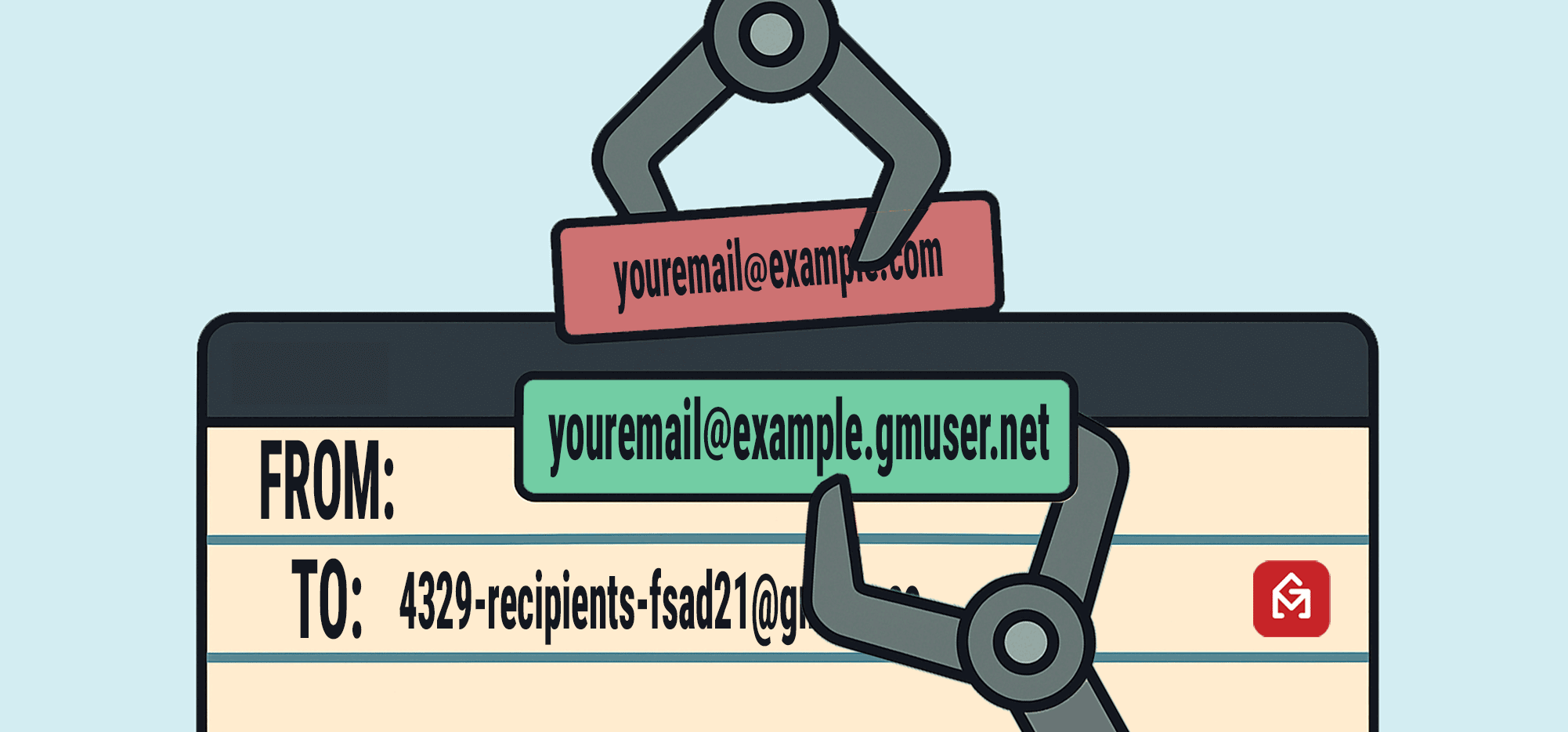
GMass’s From address replacement system is our way of making sure you can send high-volume campaigns through GMass using an SMTP service without failing DMARC authentication.
If there are acronyms in that sentence that you don’t know or that scare you, then good news: This is definitely for you.
But even if you do know those acronyms, there are still situations where this system will be extremely beneficial for you as well.
And you won’t find it on any email platform other than GMass.
In this article, I’ll explain the details behind why we created the From address replacement system, how and when you can use it (or not use it), and what happens when we replace your domain.
GMass’s “From Address” Replacement System: Table of Contents
- Quick Summary
- What Is the GMass “From Address” Replacement System
- Why We Created the “From Address” Replacement System
- How From Addresses Are Replaced for Your Account
- How to Turn On/Off the “From Address” Replacement System
- When Is “From Address” Replacement Automatically Turned On?
- Preventing GMass From Replacing Your From Address
- “From Address” Replacement with GMass
Quick Summary
- If you send campaigns using GMass’s SMTP service (or some third-party service) without DKIM on your domain, GMass will replace your From address to ensure you pass DKIM and DMARC.
- Personal Gmail senders (@gmail.com) who send large campaigns via SMTP will always need replacement (to satisfy Gmail/Yahoo sending rules and pass DMARC).
- An address like jefftheshipper@gmail.com would be replaced with jefftheshipper@jefftheshipper.gmuser.net.
- Google Workspace users using GMass’s SMTP server will get the replacement if DKIM isn’t set up.
- An address like jeff@shipperteam.com would be replaced with jeff@shipperteam.gmusers.net.
- Replies still go to your real address (we force Reply-To to your original).
- To prevent replacement, set up DKIM (GMass detects it automatically) — or disable it in your dashboard if your scenario allows.
What Is the GMass “From Address” Replacement System
GMass’s From address replacement system is a behind-the-scenes technique we use to make sure you pass authentication when you send through GMass’s SMTP servers (or, in the case of Gmail.com users, your own SMTP server).
With this system, we replace your sending domain with a different one to ensure you pass DKIM+DMARC alignment.
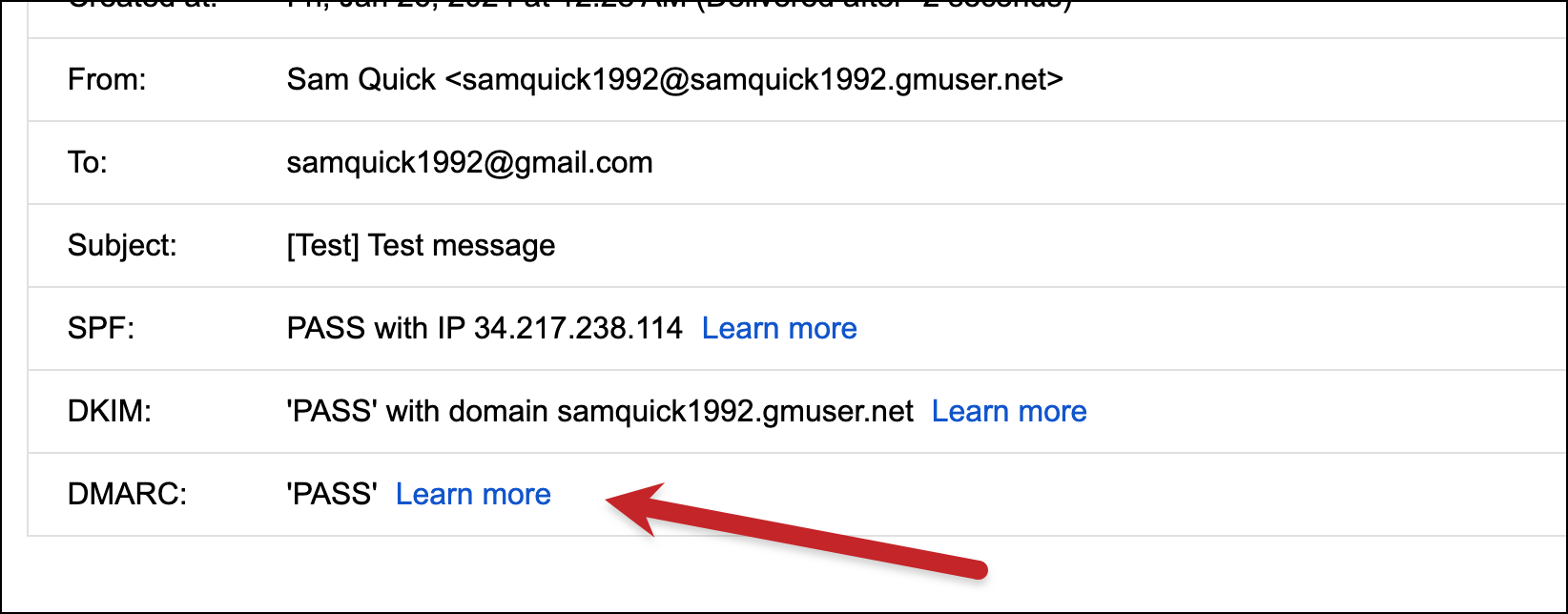
So if your email address is jeff@shipperteam.com, you don’t have DKIM set up for your domain, and you send a campaign using GMass’s SMTP server — we’ll automatically set up a new domain and send your campaign from jeff@shipperteam.gmusers.net.
Also, if your email address is jefftheshipper@gmail.com, and you send a campaign using a SMTP server, we’d replace your sending domain with jefftheshipper@jefftheshipper.gmuser.net.
It’s unlikely many, if any, recipients would notice the swapped sending domain — and even fewer would care. But that way, you’ll be all set on the DKIM and DMARC front and won’t fail authentication. (Which can cause deliverability issues.)
The process here is complex on our end, but requires no work on your end.
It’s our way of making sure you can send your large-scale campaigns without any trouble no matter what type of email address you have and no matter your level of technical expertise.
What happens “under the hood”?
When GMass replaces your domain, here’s how it works:
- We automatically generate your personal subdomain at gmuser.net if you’re using GMass’s SMTP or gmusers.net if you’re a Gmail.com user with your own.
- We create, publish, and activate a DKIM key and DMARC record for that subdomain.
- We rewrite the From address of your campaign to that new subdomain so DKIM aligns with DMARC and you pass authentication.
- We also force the Reply-To to your original address so replies land in your normal inbox.
And again, you don’t have to do anything to make any of this happen.
Why We Created the “From Address” Replacement System
GMass’s From address replacement system serves three main purposes:
- Making sure Gmail.com users can send high-volume campaigns using SMTP servers without issues.
- Making sure Google Workspace users who are non-technical can send campaigns without problems when using GMass’s in-house server.
- Making sure if you send using email aliases, you don’t accidentally fail authentication.
For Gmail.com users sending via SMTP
Originally, we set up the From address replacement system to help a specific subset of GMass users: Free Gmail.com users who were sending large campaigns over SMTP.
With GMass, you can break Gmail’s limits to send thousands (or tens of thousands) of emails a day by sending through a SMTP server.
But it’s impossible for Gmail.com users to set up DKIM on their sending domain — since the sending domain is gmail.com, and Google isn’t going to give you DNS access.
That also means it’s impossible for those users to achieve DKIM/DMARC alignment. And when Google and Yahoo rolled out their new bulk sender rules in early 2024 requiring high-volume senders to have a DKIM record and pass DMARC, we needed a fix.
So in those cases, we automatically replace the sending address (youraddress@gmail.com) with our sending domain (youraddress@youraddress.gmuser.net or youraddress@youraddress.gmusers.net).
We set up DKIM and DMARC for that sending subdomain we’ve created for you, so your campaigns will achieve alignment and pass.
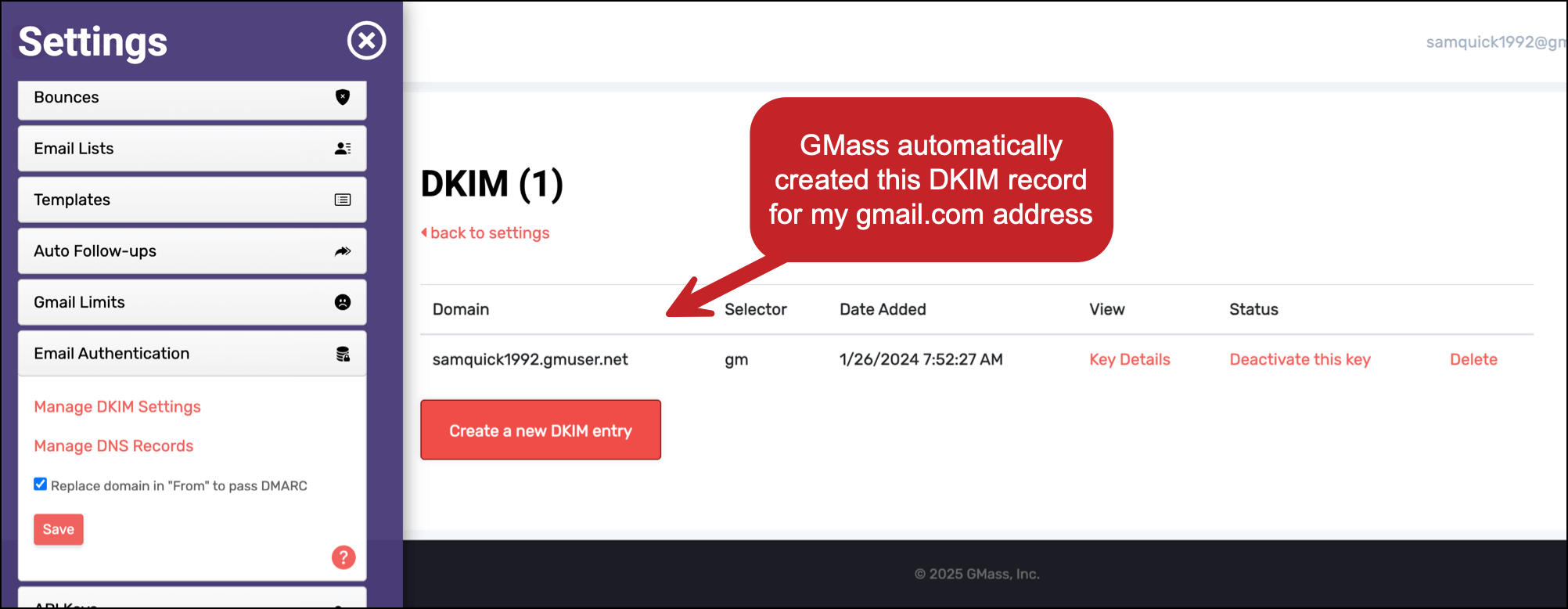
It’s good for deliverability, it keeps you compliant with the big email providers, and it doesn’t require any extra steps on your end.
For Google Workspace users using GMass’s SMTP server
Soon after we created the From address replacement system for Gmail.com senders, we found another key situation to employ it: For our Google Workspace users who didn’t have DKIM set up on their domain and wanted to send high-volume campaigns using GMass’s SMTP server.
(GMass has an in-house SMTP server for opt-in campaigns. GMass users can ask to push a single large campaign through that server, or apply in advance to be able to use that server on an ongoing basis.)
If you use your own domain with Google Workspace and GMass (e.g., you@yourdomain.com) and you haven’t set up DKIM or DMARC, you’ll fail the authentication checks.
We’ve found that less technical users don’t want to set that up (it requires editing DNS records) — or don’t even know about setting it up. Also, some folks don’t have access to their domain’s records, if, for example, it’s your company’s domain.
If you’re sending over your own third-party SMTP server, skipping DKIM is your prerogative. It’s not recommended — and we even have a guide to setting up DKIM through GMass to help you — but again, it’s your responsibility.
However, when you use GMass’s in-house SMTP server, we’re extra protective of its deliverability for you and all users. That’s why we’re more stringent about DKIM.
So we would be forced to reject people who applied to use our SMTP server (either to push out a single campaign or use it long-term) if they didn’t have DKIM set up. This was brutal for non-technical users and not the experience we wanted to provide.
This became an even more common situation once we introduced instant sending server approvals.
So now, in these cases, we can also use the From address replacement to help you pass authentication.
For anyone using email aliases
There’s a third case where we also use the From address replacement system, and that’s for senders using aliases.
If we can’t confirm the alias address has DKIM set up (often if it’s a gmail.com alias), we’ll use replacement. I’ll get more into this later in the article.
How From Addresses Are Replaced for Your Account
GMass will use slightly different variations based on the SMTP server you’re using.
GMass SMTP users
For anyone using the GMass SMTP server to send, your replacement address will be on the gmuser.net domain.
So if you’re jeffsmith@gmail.com, your replacement address would be jeffsmith@jeffsmith.gmuser.net.
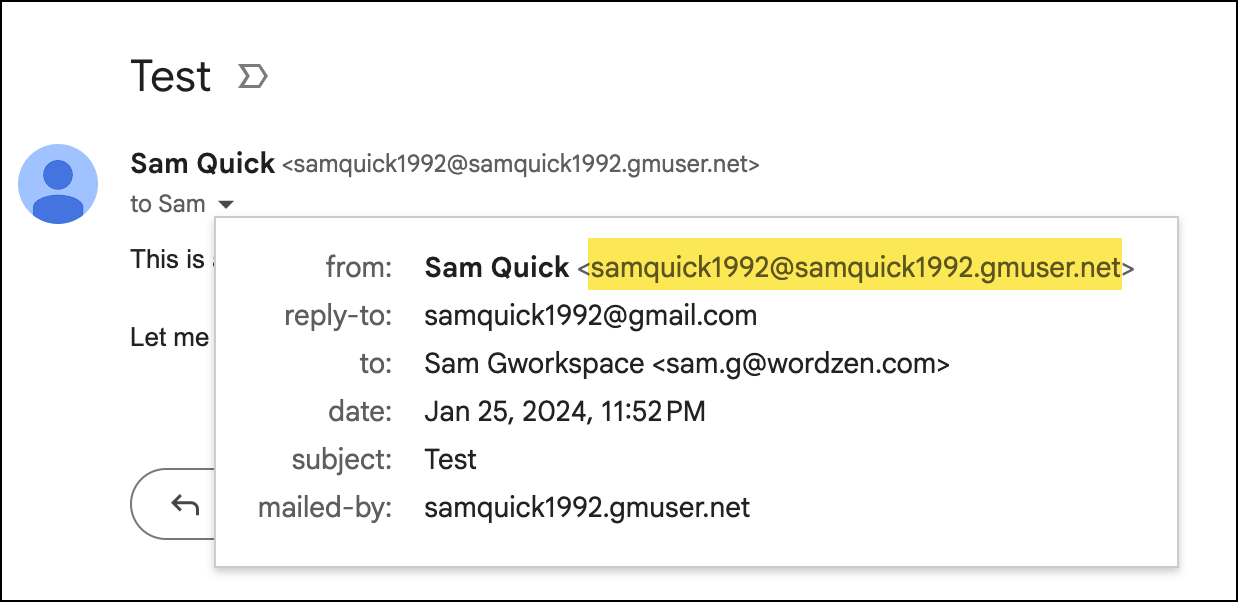
If you’re jeff@smithcompany.com, your replacement address would be jeff@smithcompany.gmuser.net.
And if you’re using an alias of jeff@smithalternative.org, your replacement address will be jeff@smithalternative.gmuser.net.
If you have a dot in your Gmail address, like jeff.smith@gmail.com, we will exclude that so your address will still be jeffsmith@jeffsmith.gmuser.net.
Gmail.com users sending through third-party SMTP servers
In this situation, if we use From address replacement, you’ll be on the gmusers.net domain.
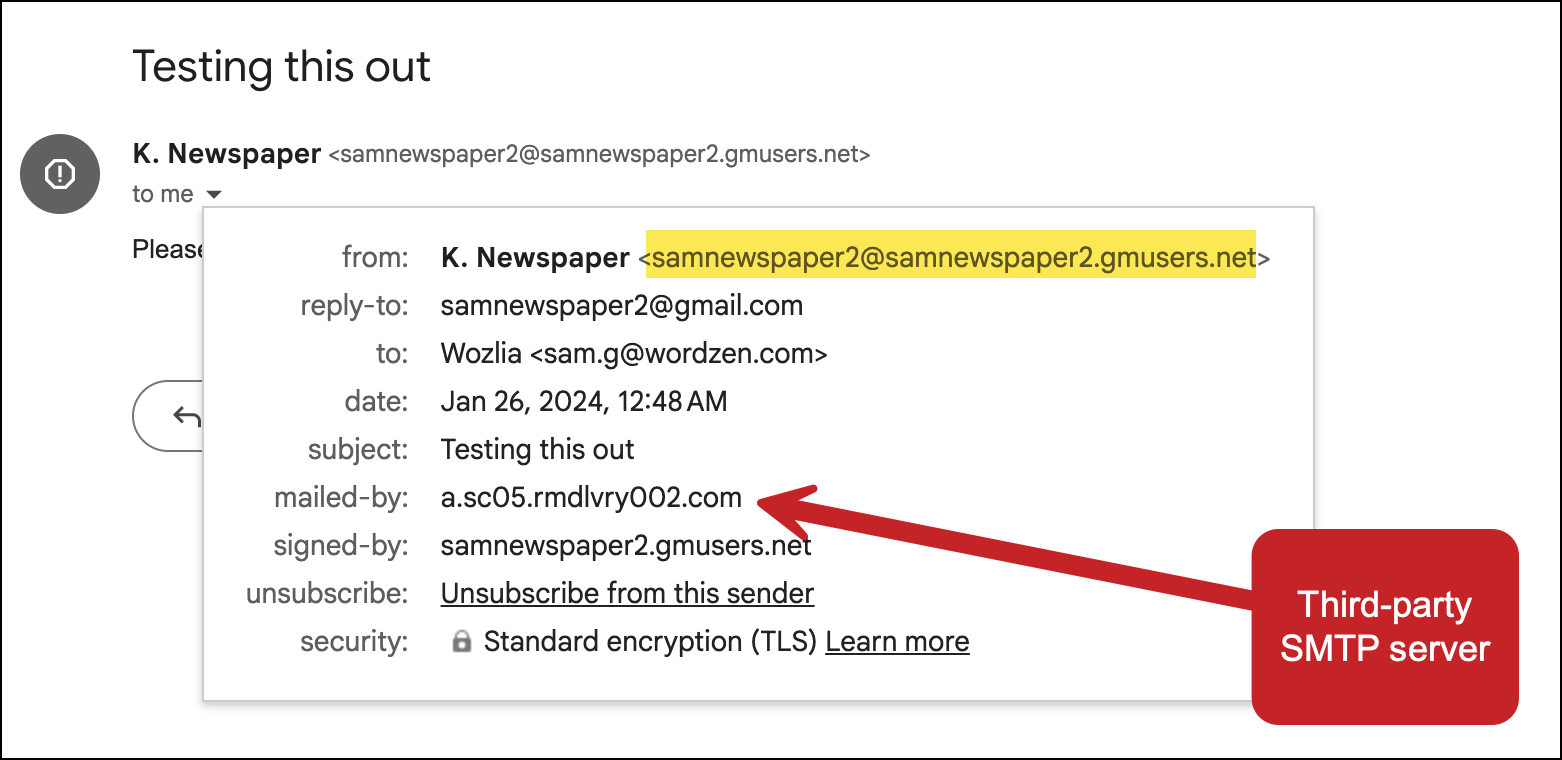
This will also be the case if you’re using an alias address that’s a gmail.com address.
What the recipients see
If your recipients look close, they may notice the slightly-different From address. Most won’t.
And for Gmail senders, the domain may even be a credibility boost, since you’re no longer outwardly sending with a free gmail.com address.
How replies work
GMass forces Reply-To to your original email address or your alias (unless you intentionally set a different Reply-To in the campaign).
That way, replies will land in your regular Gmail inbox and you can correspond from there.
In the rare case that a mailbox ignores the Reply-To, GMass will route emails that go to your replacement address to your inbox.
How bounces work
Bounce notifications will go to your replacement address. Our server automatically forwards them to your inbox and logs them.
GMass’s bounce management still applies — in the future, if you try to email those addresses, GMass will automatically suppress those messages.
How to Turn On/Off the “From Address” Replacement System
The From address replacement system is designed to help your deliverability and do so with the least friction possible.
However, we know some people might not want it. So here’s what you can do if you want to turn it on.
Why you might want to turn on (or leave on) From address replacement
We will automatically use From address replacement if your situation requires it.
You can optionally turn the setting off. But we really recommend leaving it on for the sake of your deliverability.
Why you might want to turn off From address replacement
You might want to turn OFF the From address replacement if…
- You really don’t like the idea of GMass replacing your sending domain and think people will notice.
- You’re willing to risk the deliverability hit that can come from failing DMARC.
Note: For Gmail.com senders, whenever Google changes their DMARC policy from quarantine to reject, we will no longer allow you to turn off the replacement feature for SMTP sending.
Turning From address replacement on or off
You can choose to turn From address replacement on or off in the GMass dashboard.
In the dashboard, go to Settings and then Email Authentication.
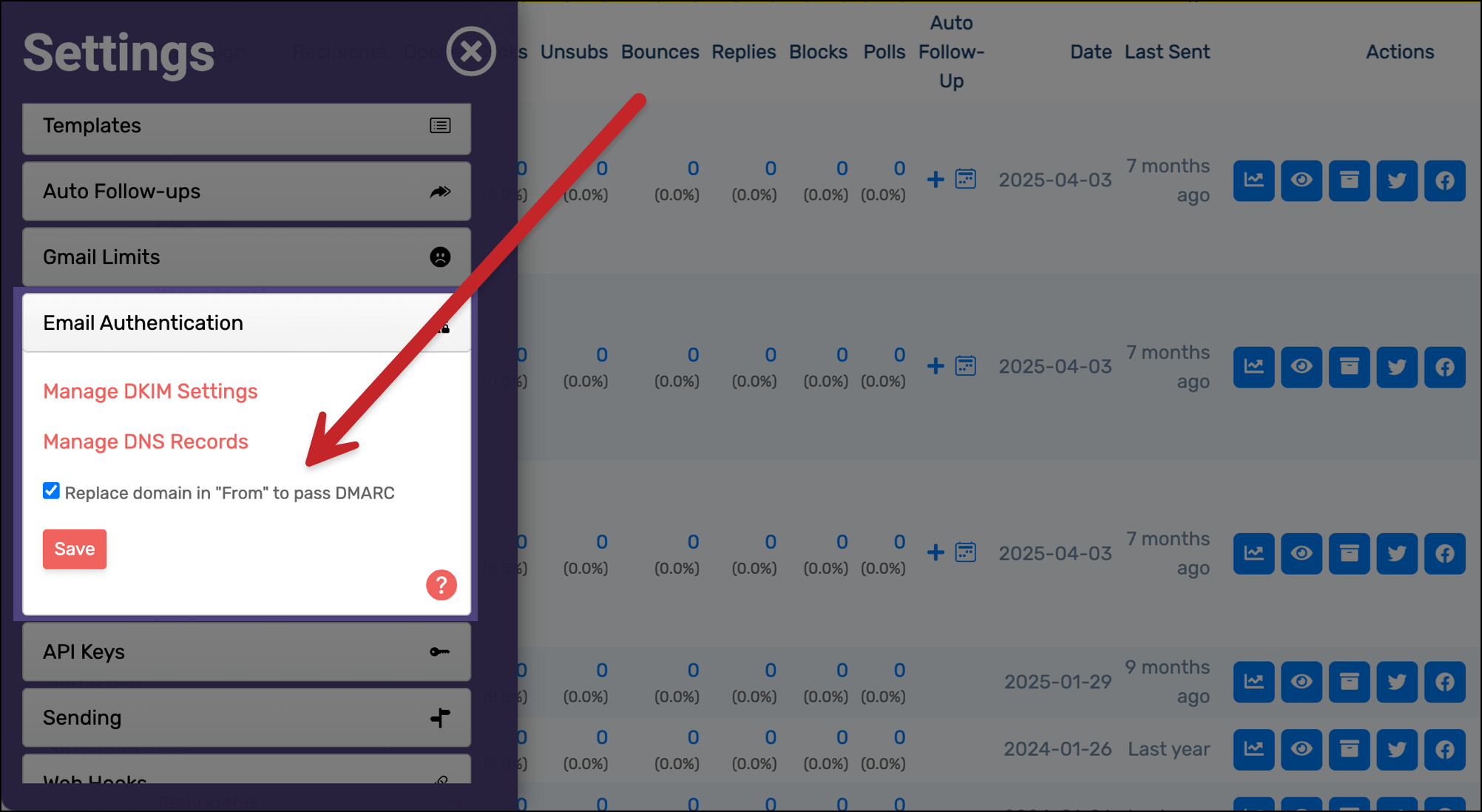
To turn this setting on, check the box. GMass will then use From address replacement in all applicable scenarios.
To turn this setting off, uncheck the box. GMass will still use From address replacement in mandatory situations, but will otherwise not replace your address.
Do note that you’ll fail DMARC in those situations. That might not be an issue, but it can lead to deliverability problems (and, if you’re a bulk sender, it will violate the Google/Yahoo policies).
When GMass will overrule your setting
Our goal is to respect your choice here on whether or not to use From address replacement.
So we won’t force it on if you’ve turned it off, with one exception: If you request to push a single campaign through GMass’s SMTP server and don’t have DKIM set up.
When Is “From Address” Replacement Automatically Turned On?
Here are the situations when From address replacement will automatically happen (or not).
In all scenarios, these automatic cases ensure you pass DKIM/DMARC.
But after reading through this, I think you’ll see it’s probably the easiest move just to set up DKIM if you can.
For Gmail.com senders
From address replacement automatically happens when you send via a SMTP server, whether it’s your own server or GMass’s in-house server.
(You can generally override this by turning off a setting in the GMass dashboard, as I discussed earlier. However, we do recommend using it.)
Using our replacement is the only way for you to pass DMARC.
Scenarios for Gmail.com senders
- If you send using GMass’s SMTP, From replacement is automatically turned on and used. This cannot be overruled.
- If you send using your own SMTP server, From replacement is automatically turned on and used. This cannot be overruled.
For Google Workspace senders
If you’re using our SMTP server and don’t have DKIM set up, we’ll automatically use From address replacement. (Though you can toggle this off in the dashboard.)
Often, this is good news: If you apply to use our in-house SMTP server, this means we no longer have to reject you over authentication issues.
Scenarios for Google Workspace senders (with no DKIM record) looking to push a single campaign through GMass’s SMTP
- If you have no DMARC policy or one set to p=none, and you’re not a bulk sender, you have the option to use From address replacement or send through the original address (even without DKIM).
- If you have a DMARC policy set to p=quarantine or p=reject, From address replacement will be automatic. (Or you can set up DKIM and send via your regular address.)
- If you are a bulk sender, From address replacement will be automatic. (Or you can set up DKIM and send via your regular address.)
Scenarios for Google Workspace senders (with no DKIM record) looking to use GMass’s SMTP server long-term
- From address replacement is automatic until you set up DKIM.
For senders using From aliases
The last automatic scenario: If you have From aliases connected in Gmail, since we can’t guarantee those aliases have DKIM set up, we’ll may use the replacement.
If you’ve set up DKIM for your aliases and GMass can detect it, we won’t use From address replacement.
Scenarios with aliases for Gmail.com accounts with GMass’s SMTP
- If you use another Gmail alias, From address replacement is automatic.
- If you use an alias with DKIM set up, the From address is not replaced.
- If you use a non-free Gmail alias and it has no DMARC or a policy of p=none, you can send using From replacement or with the original address.
- If you use a non-free Gmail alias and it has a DMARC policy of p=quarantine or p=reject, you can send using From replacement or with the original address.
- If you use a non-free Gmail alias to push a single campaign through GMass’s SMTP and you’re a bulk sender, you can use From replacement or the original address.
- If you use a non-free Gmail alias and are using GMass’s SMTP long-term, your From address will be replaced.
Scenarios for aliases with Gmail.com accounts and third-party SMTP servers
- If you use a non-Gmail alias to send through your own third-party SMTP, your address will not be replaced.
Scenarios with aliases for Workspace users with GMass’s SMTP
- If you use a gmail.com address as an alias, From address replacement is used.
- If you use a non-free Gmail alias that does not have DKIM set up, From address replacement will be used.
- If you use an alias that’s not a free gmail.com account, and it has DKIM set up, From address replacement will not be used.
Scenarios with aliases for Workspace users with third-party SMTP servers
- If you use a gmail.com address as an alias, From address replacement is used.
- If you use an alias that’s not a free gmail.com address, From address replacement is not used.
Again, when it comes to aliases and all these permutations, it really just makes more sense to take the five minutes to set up DKIM if you’re using your own domain and have the option to do so.
Preventing GMass From Replacing Your From Address
Don’t want GMass to replace your from address?
Here’s what you can do.
#1. Turn off From address replacement in the dashboard
As I described earlier, you can turn off From address replacement in the dashboard.
BUT… there are still scenarios I laid out where we have to override that and replace it anyway. And when we don’t, you’ll fail DMARC.
So it’s an inelegant and incomplete solution.
Which is why the real answer is…
#2. Set up DKIM
If you’re on Google Workspace, it’s as simple as setting up DKIM and DMARC for your domain. (Here’s a quick guide to setting up DKIM and here’s one for DMARC.)
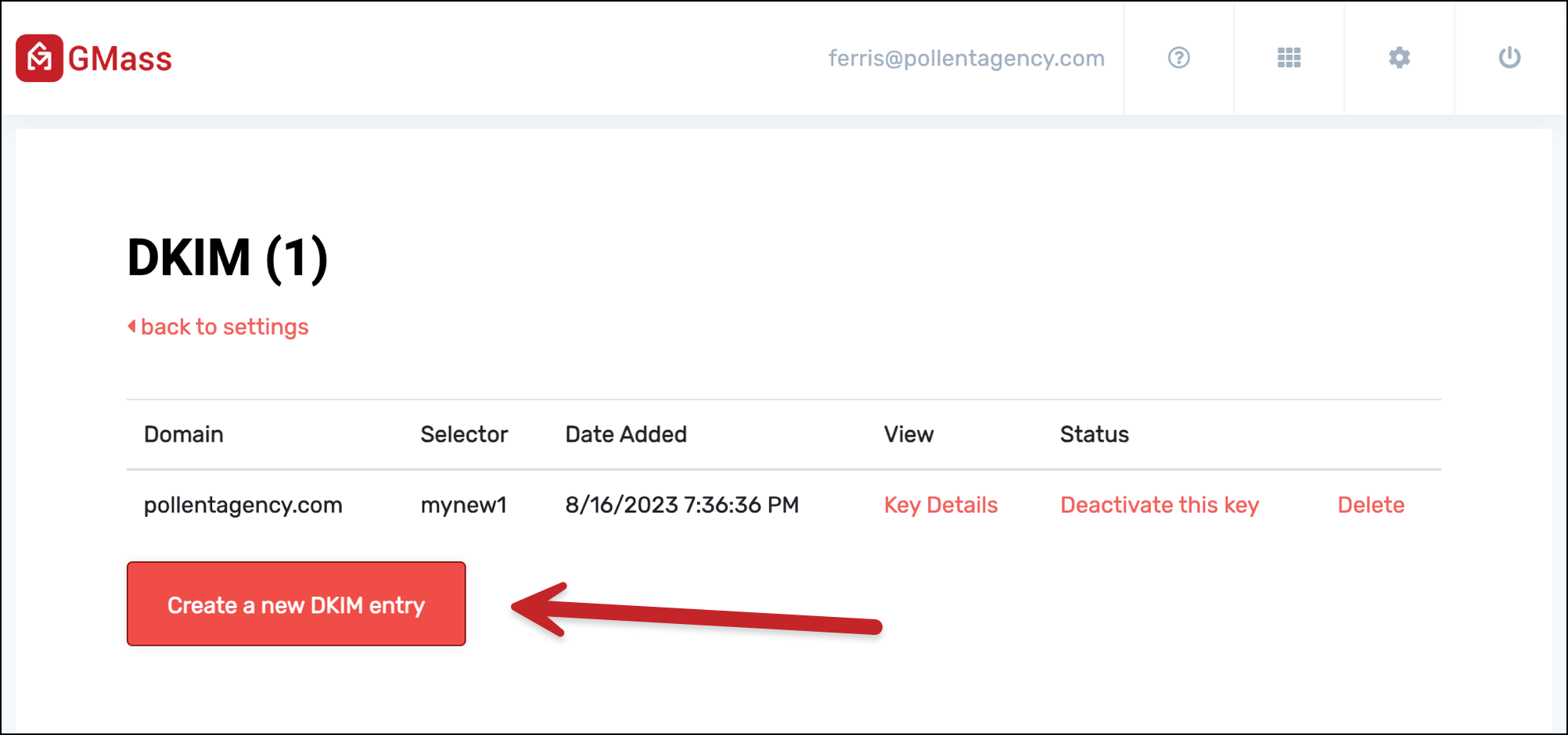
Once it’s in place and working, we won’t need to replace your domain anymore.
#3. If you’re a Gmail.com user, move to your own domain
Migrate away from the free gmail.com address and go to Google Workspace with your own domain. Then you can set up DKIM and DMARC and hit alignment.
“From Address” Replacement with GMass
GMass’s From address replacement is our way of making sure your emails pass authentication — even if you don’t have DKIM set up or you’re using a free gmail.com account.
As far as we know, we’re the only people in the industry using this solution and, as a result, the only people who are making sure you can send your campaigns of any size from any address without any issue.
If you’re not a GMass user yet, you can give it a try for free. Just download the Chrome extension to get started.
You’ll be up and running in a matter of minutes. And if you need to send larger campaigns, as you can see, we’ll make sure they go off as smoothly as possible regardless of your technical level or email address.