
Yes, you can send 10,000 emails with Gmail. (Or 50,000. Or 100,000. Or 1,000,000.)
But you’ll need a little help..
Because normally, if you’ve got a list of a few thousand people (or tens of thousands) and you want to email them straight from your Gmail account, you’ll hit a wall fast.
Gmail only lets you send up to 500 emails a day from a free gmail.com account, or up to 2,000 a day from a Google Workspace account. Go over that and Google starts blocking the messages.
GMass is the Gmail mail merge and mass email tool that helps you break Gmail’s limits. (All totally within the terms of service too.)
GMass is a Chrome extension that transforms your Gmail/Google Workspace account into a mass-email sender: you write your campaign the way you’d write any normal email inside Gmail, and GMass can help you deliver it to a list far bigger than Gmail’s limits would normally allow.
There are a few different ways GMass helps you send your 10,000 emails or more. In this guide I’ll walk you through all of them so you can pick the one that’s best for you.
Send 10,000 Emails with Gmail: Table of Contents
- Quick Answer: The Fastest Way to Send 10,000+ Emails from Gmail
- Other Great Ways to Send 10,000 Emails Through Gmail
- The Proof: Real High-Volume Campaigns Sent Through Gmail
- Gmail’s Sending Limits, Explained
- For the Sake of Completeness: Other Less Popular/Effective Ways to Send 10,000 Emails in Gmail
- Sending Bulk Email Without Getting Blocked
- Ready to Send 10,000 Emails Through Your Gmail Account?
Quick Answer: The Fastest Way to Send 10,000+ Emails from Gmail
The fastest way to send 10,000+ emails from your Gmail account is by using GMass’s sending server.
Let me explain:
Gmail’s daily limit is based on the number of emails you send the normal way: Hit Send, email goes through Gmail’s native sending server (without you ever realizing this is the pipeline).
But Google actually allows you to use other sending servers with your account. The emails still go through your Gmail account (they’ll be in your Sent folder and all that) — but you’re using someone else’s infrastructure to actually send the messages. Again, this is all behind the scenes so you won’t know the difference.
And when you use a sending server, you can send as many emails through Gmail as you want.
So… how do you actually DO this?
The GMass Chrome extension facilitates it in two ways:
- It enables you to actually use sending servers with your Gmail account
- GMass actually has its own sending servers for this, so you don’t have to go through the technical process of setting up your own.
And here’s how the process works:
- You create a campaign in GMass with a large list
- You send it
- GMass instantly assesses your account to determine if you’re eligible to send through the server (as long as you’re sending opt-in emails, you should be good to go)
- Your emails go out.

(Want to take care of that approval process before you send? You can also apply in advance.)
That’s it. No technical setup on your end, no delays, and nothing you will even notice.
What if you’re sending cold email?
As I said above, GMass’s sending server is for people sending permission-based emails.
But what if you’re sending cold outreach?
GMass has a sending server for you as well. It’s called ColdSMTP, and it’s a dedicated SMTP server for cold emailers.
What does this cost?
All GMass subscribers are eligible to send through the dedicated sending servers.
In addition, there’s a small usage fee for sending over SMTP on top of your plan; 50 cents for every 1,000 emails. (Your first 10,000 emails sent through the in-house sending server are included.) Check out the GMass pricing page for details.
Again, though, this is by far the easiest way to break Gmail’s limits and send 10,000+ emails through your Gmail account.
Check out the GMass pricing page to pick a plan. You can use GMass’s in-house sending server on all plans!
Other Great Ways to Send 10,000 Emails Through Gmail
Using GMass’s in-house sending servers is the fastest and easiest route to send 10,000 emails, but it isn’t the only route.
Depending on your situation, another method may fit better.
Here are some other options, and when each one makes sense.
MultiSend: inbox rotation across multiple accounts
Every Gmail and Workspace account has its own daily sending limit.
But if you have 10 accounts, each one has its own sending limit.
So one way to break Gmail’s limits is to distribute your campaign across multiple accounts. Instead of trying to send 10,000 emails through one account, you could send 1,000 emails each through 10 accounts.
Doing that manually, though, is a whole lot of work and a whole lot of logistics.
Inbox rotation is the solution. That’s a technique where your sending platform (like GMass) automatically distributes your campaign across a whole bunch of connected accounts. It handles the whole process automatically, and has a unified inbox where you can monitor all the replies and analytics in one spot.
GMass’s inbox rotation feature is called MultiSend, and it’s part of the Professional plan.
This is the best fit when you’d rather keep sending through Gmail accounts versus routing your campaign through a separate server.
Using your own SMTP server
Earlier in this article, I covered the process for using GMass’s own sending servers to break Gmail’s limits.
You can also connect your own third-party SMTP server (or multiple SMTP servers) to GMass to send your large campaigns.
This is good if you want your own sending server (for your emails only), or if you want to tinker with the technical side of things. You also may go this route if you’re a cold emailer without enough sending history to get onto GMass’s ColdSMTP.
GMass subscribers on every plan can connect third-party SMTP servers. The same overage pricing does apply that I discussed earlier: First 10,000 emails send through SMTP are included, then 50 cents for every 1,000 emails beyond that.
Multi-day distribution: send at your daily limit, automatically
If you’d rather keep everything inside Gmail’s normal sending limits, GMass can spread one large campaign across multiple days for you.
Connect a Google Sheet with your recipients, write your message in Gmail, and hit the GMass button. GMass will start sending until it detects you’ve hit Gmail’s limits. Then the sending pauses, and 25 hours later, GMass resumes sending. (See our article on timing for more.)
This process continues until your whole campaign has been sent.
This method works best when your emails are not time-sensitive. If you need to send 500,000 emails in an hour, you should use a commercial emailing service built for high-volume speed. GMass isn’t optimized for raw speed — it’s optimized for deliverability.
Controlling the pace
GMass automatically sends the maximum your account allows per day — up to 500/day for regular Gmail or up to 2,000/day for Google Workspace — but you can override that with the Speed setting in the Settings box. Set your own daily number if you want to leave room in your quota for everyday email.
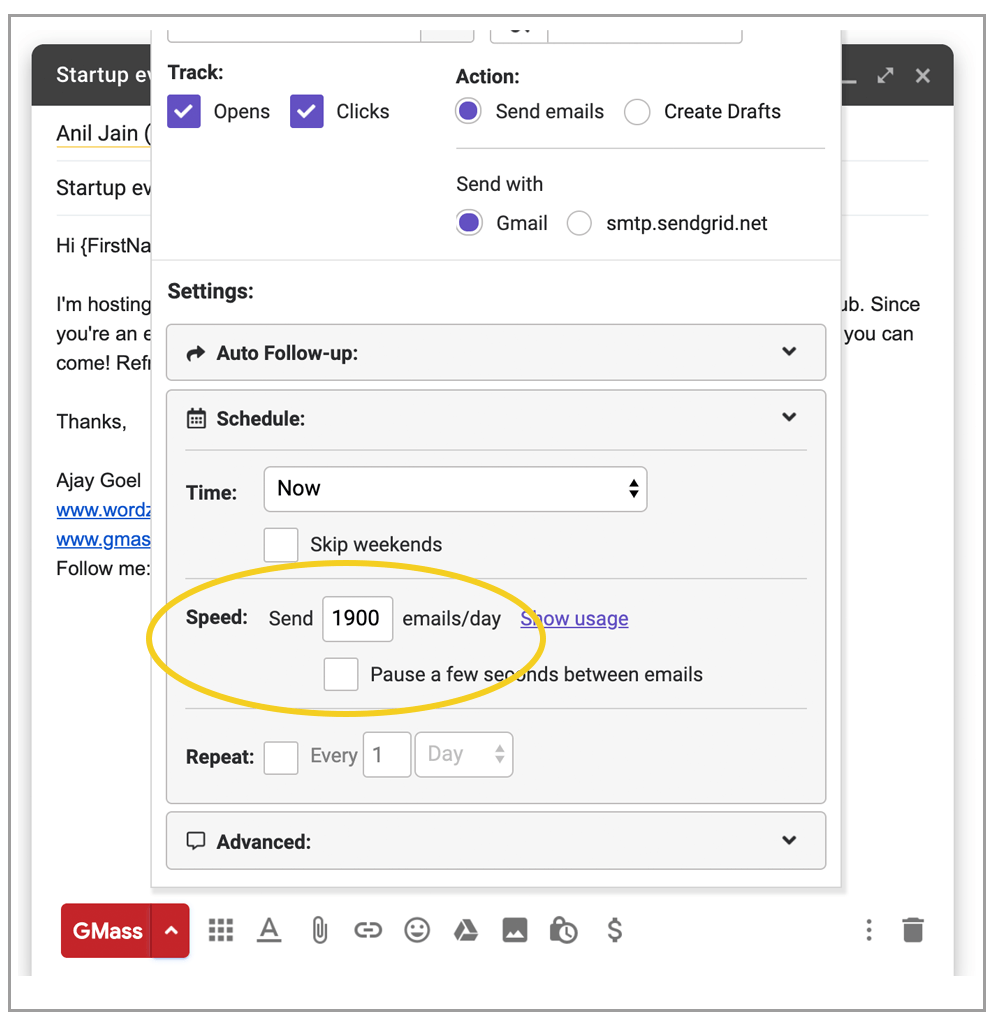
Why send fewer than the maximum? If you also send regular one-to-one email from the account, leave yourself room — set your campaign to 450/day instead of 500, or 1,900 instead of 2,000, so you keep a buffer for everyday correspondence.
However… GMass counts your other sending and adjusts.
If you’re a Google Workspace user sending a single mass email to 8,000 people, GMass sends up to 2,000/day over 4+ days.
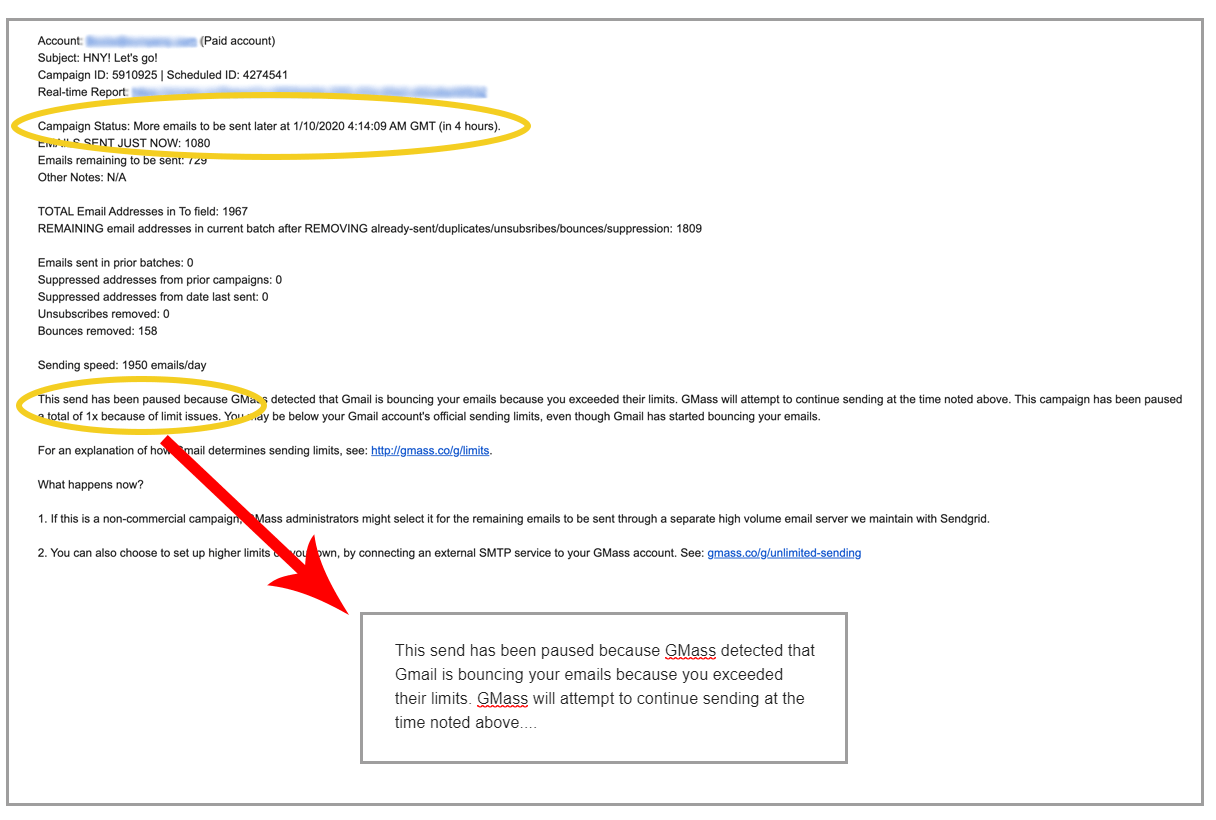
But if you also send other email during those days (e.g., one-to-one replies, or campaigns from any other tool), GMass counts those against your limit before each batch and throttles your campaign accordingly so you don’t trip your Gmail quota. For example, if you’ve sent 100 regular emails in the last 24 hours, GMass sends 1,900 in that day’s batch instead of 2,000. After each batch you get a report showing how many sent, when the next batch goes out, and an explanation for any throttling.
The Proof: Real High-Volume Campaigns Sent Through Gmail
These are real GMass campaigns from about a week ago (we delay the list so opens, clicks, and replies have time to accumulate).
They show what high-volume Gmail sending looks like in practice: individual campaigns reaching from tens of thousands up to hundreds of thousands of recipients, sent through the methods above.
| From Address | Subject | Recipients | Open Rate | Replies | Date |
|---|---|---|---|---|---|
| mktg@xxxxxxxx.travel | D______r O___: U______g J______s & D________s | 67,333 | 30.4% | 0 | October 19 |
| funding@xxxxxx.team | 🌍 F__e c____s w___h b_____g | 49,547 | 8.8% | 0 | October 19 |
| marketing@xxxxxxxxx.ca | {__________, S__e on y__r b______s m____e p___e e_______! U_______d 5_+ s___d – No s___d t________g | 46,136 | 15.2% | 236 | October 19 |
| info@xxxxxxxxxxxxxxxx.com | B_____: A_A E________t D____, G_n Z D______t & a $_B M______e F___d S____e | 28,148 | 10.9% | 11 | October 19 |
| tim@xxxxxxxxxxxxxxxxxxxxxxxx.com | {__________e I_S C_s - no c___, no c____________________r r_____l C__, h______: 4__5 f__e I_S c__________d s____} | 25,575 | 14.3% | 2 | October 19 |
| josh@xxxxxxxxxxxxxxxxxx.com | {_________________, W__t w___d a 3__k L__e of C____t do F_r Y__? | 24,155 | 3.4% | 11 | October 19 |
| plentysales001@xxxxx.com | {____t N____, | 23,829 | 14.6% | 18 | October 19 |
| we-care@xxxxxxxxxx.info | J__n o_r C________! | 17,782 | 35.4% | 0 | October 19 |
| jeremy.teixeira@xxxx.eu | R___________n de v_s c______s d_______e et h____e d_s c___s 2__7 (___S E______) | 16,656 | 0.5% | 80 | October 19 |
| marketing@xxxxxxxxx.ca | {__________, S__e on y__r b______s m____e p___e e_______! U_______d 5_+ s___d – No s___d t________g | 14,171 | 35.4% | 17 | October 19 |
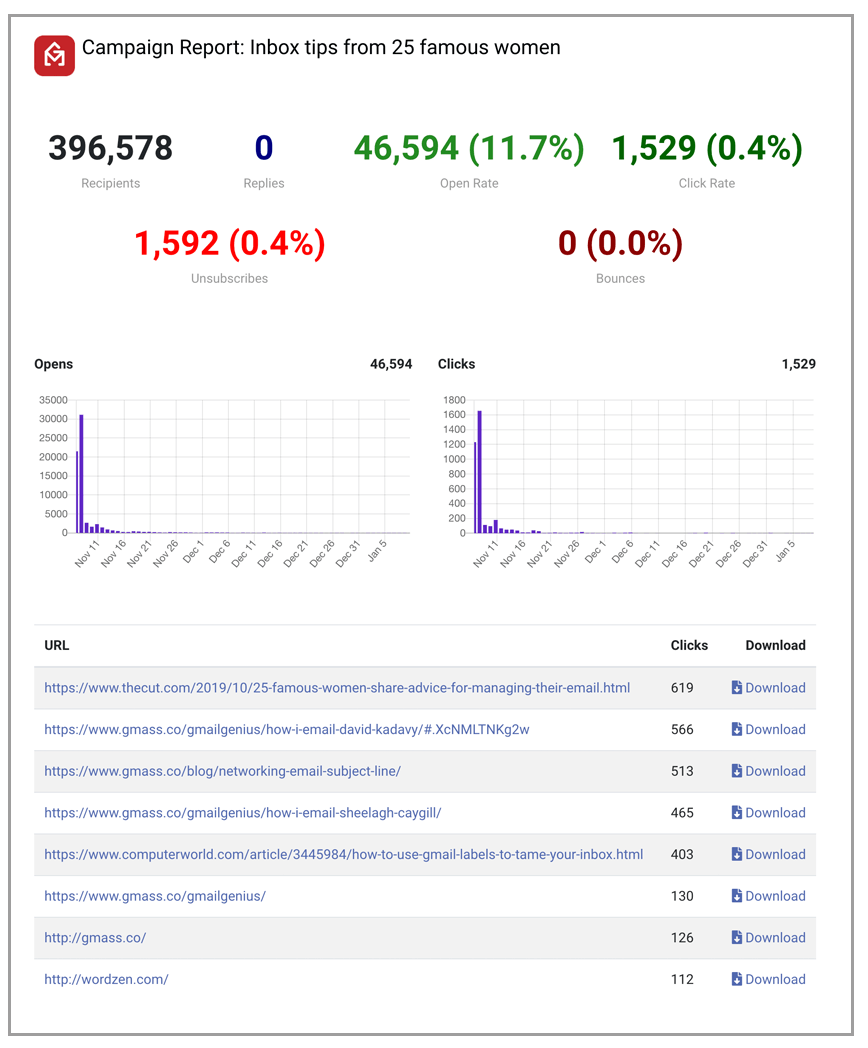
Like every campaign sent through GMass, these come with full analytics on opens, clicks, unsubscribes, bounces, and replies. Each segment can feed a follow-up campaign or export to a CRM like Salesforce or HubSpot. Here’s a report from a campaign of roughly 400,000 emails sent through Gmail via SendGrid:
Gmail’s Sending Limits, Explained
Everything I’ve covered so far is about getting past Gmail’s limits.
Here’s how those limits actually work, which is useful whether you’re planning a campaign or just trying to understand why Google blocked a send.
How many emails can you send from Gmail per day?
For individual Gmail accounts, the daily send limit is up to 500 emails per rolling 24-hour period. Most personal users never notice it. Note that Google counts each recipient as a separate email, so one message to five people counts as five.
For Google Workspace accounts (formerly G Suite), the daily limit is up to 2,000 emails per rolling 24-hour period, per email address. If you’re one person sending normal email, you won’t hit it — but a bulk campaign to a large prospect list will, because one email addressed to 5,000 recipients counts as 5,000.
Here’s Google’s official guide to Gmail’s sending limits.
How sending limits are counted
Google counts every recipient as a separate email, and the daily maximum applies to all the email you send that day, not just your bulk campaigns.
So if you send four individual emails to your boss on different topics, two test versions of your campaign, and then include your boss in the final campaign, that’s seven emails (4 + 2 + 1). Send a meeting reminder to 85 members of your cycling club, and that’s 85.
This is one of the reasons why many people keep a separate account just for bulk sending. (The other: They don’t want to risk the deliverability on their primary email address if one of their bulk sends winds up with a bunch of spam reports.)
Pushing hard against these limits in a short window can also trigger temporary blocks even when you’re under your daily cap, so it’s best to ramp up gradually rather than spike your sending.
How many recipients does Gmail allow?
- Free Gmail account: up to 500 emails per 24 hours
- Paid Google Workspace account: up to 2,000 emails per 24 hours
- Free trial period: Workspace trial accounts are held to 500-email maximums until the account converts to paid and clears a waiting period.
- Email alias: using an email aliasdoesn’t change your limits. Your primary address and all its aliases share one daily limit (up to 500 for Gmail, up to 2,000 for Workspace).
If you repeatedly try to exceed these limits, your account may be suspended for up to 24 hours. You can still receive email and use other Google services during that window — you just can’t send.
Gmail BCC limit: how many can you BCC?
When you CC or BCC an address, Google counts each unique address as a separate email, exactly like the To line.
In other words: there’s no numerical advantage to moving names to CC or BCC
Some senders use BCC to email a group without exposing everyone’s addresses. It works, but it’s a holdover from before affordable email marketing services existed. (What once cost $1,000+/month in the earliest days of such services now costs a small fraction of that.)
With GMass, even though you put many addresses in the To line, each email sends individually and each recipient sees only their own name. Plus you can (and should) customize each message using mail merge personalization. That’s the better practice, and it improves everything from deliverability to results.
How well does Google enforce the limits?
After analyzing over a million email accounts that have sent through our platform, we know that Google sometimes gives you your full quota (up to 500/day for Gmail, up to 2,000/day for Workspace), sometimes decreases it, and sometimes increases it.
That’s right: an account with a strong reputation sending clean campaigns can occasionally send more than 500 or 2,000/day without suspension or bounces. See our breakdown of the factors we believe Google takes into account when setting your true sending limit.
Regardless, though, I wouldn’t exactly count on poor limit enforcement as a strategy.
For the Sake of Completeness: Other Less Popular/Effective Ways to Send 10,000 Emails in Gmail
Alright. We told you the best and most popular ways to break Gmail’s limits.
Here are their cousins who weren’t invited to the family reunion but they still gossiped about during dinner.
Multiple accounts (the manual way)
You can establish more than one authorized Gmail or Google Workspace account, each with its own limit (yourname@gmail.com, yourname1@gmail.com, yourname@yourdomain.com, and so on) to expand capacity.
And then you can manually divide up your list and send from each address.
Essentially, you’re doing the GMass MultiSend inbox rotation technique I discussed earlier — only you’re doing it all manually. (And you aren’t having the unified replies/analytics.)
I haven’t seen many people stick with the manual method for more than a few campaigns before they realize it just makes sense to let the software handle this for them.
Google Groups
Google Groups is a legacy Google feature (and it sure does wonder why its parents took Google Reader and Google+ to that farm upstate and never brought them back).
Groups can work as an exception to the per-message limits if your recipients are genuinely connected to one another: a team, a club, an interest group.
You can put up to 100 addresses in a group, and an email to that group counts as one email against your limit, though it’s delivered to all 100. Your account has an upper limit of 3,000 external addresses per day, so this only works if you stay under that. It also means managing groups: 30 groups of 50 reaches 1,500 people as 30 “emails,” but that’s 30 groups to administer. It doesn’t fit most campaigns, but it’s an option for the right audience. (Here’s how to create a Google Group in Gmail.
Pasting 10,000 addresses into the To field
Sure, you could paste 10,000 addresses into the To field. It won’t work with regular Gmail, but it will work with GMass (you don’t have to use a Google Sheet for your contacts).
If you’re sending non-personalized email — or only personalizing with first/last name from your Gmail contacts — you can paste all your addresses straight into the To field. It can slow the Gmail interface down, but we ran the experiment and found the Gmail Compose window can hold up to 50,000 addresses.
Sending Bulk Email Without Getting Blocked
Here are a few habits keep your mass email out of trouble:
1. Set up authentication. This isn’t optional: Google’s bulk sender guidelines require it. Make sure you’ve set up SPF, DKIM, and DMARC to authenticate your emails. (Sending through a gmail.com address? Use GMass’s from address replacement technique to pass.)
2. Send worthwhile content so recipients don’t mark you as spam. A few spam complaints can route your future email to junk and dent your sender reputation.
3. Validate your addresses before sending. Undeliverable emails hurt your reputation, and on a list of 2,000 it’s common for dozens to have gone bad. (GMass has built-in email address verification included.)
4. Don’t spam. Short-term gains from cutting corners get erased by long-term penalties from spam monitors.
5. Check your sending IP’s reputation. A shared server with a bad neighbor can drag your deliverability down.
6. Check your “From” reputation. If your address is already known to filters as a junk sender, start clean.
7. Check if you’re going to spam. Use GMass’s Spam Solver tool to test your campaign before you send. It will let you know your inbox vs. spam rate and help you improve your email until it’s going where you want it to go.
Ready to Send 10,000 Emails Through Your Gmail Account?
So, again… YES, you can break Gmail’s limits to send 10,000+ emails through your Gmail account.
Sending high-volume campaigns from Gmail means managing Gmail’s limits, and GMass gives you several ways to do it:
- Send through GMass’s own server with instant approval. The fastest and easiest route.
- MultiSend inbox rotation. To distribute one campaign across multiple sending accounts.
- Connect your own SMTP service. If you’ve got the technical chops and want more control over your large-scale sends.
- Multi-day distribution. Don’t mind your campaign taking a little longer? Distribute it over the course of a few (or many) days.
In order to use the campaign, do you have to be logged on 24hrs, or will it really automatically send them each day without you being logged in? Thanks!
I am trying to send emails from my personal account by Gmass, but it only saves in draft and nothing happens.
I spotted a trouble: the GMass Report periodically report that by 4 different email addresses (locate in different places in the world) is clicked a link in the message, and this many time a day, and always the same 4 and at the same time!
The report – along few days – list hundred time the same thing.
You do NOT need to be logged in.
I'd like to know about this as well. Can IP addresses get "black-listed" ? Thanks!
Hello.
I think Gmass is exactly the tool i'm looking for (great app !!!), but before I start using it I just want to know precisely a couple of things.
I intend to send around 1000 mails "divided" on chunks of approximately 100 / day.
1. After I set all the parameters do I need to log every day on the google mail account in order to help "the miracle happen". I mean if I dont "see" the account daily, the daily job will be delayed to the next day after i log in?
2. How do I verify that the 100 mails have been sent on a day. Do I have to look on "Sent mails"? Are they sent at the same hour or spread in 24 hours?
Thank you.
Best regards,
Puch
Seed your email list with your email address at the beginning and end of your list and check your emails everyday to see if your list has been sent to you twice a day, for each day of mailing.
Yes. If you go to the "GMass Scheduled" label and open up the email campaign that is scheduled, GMass will tell you the status of that campaign (how many emails have sent, how many remain to be sent, how many times the campaign has been processed). You can also make changes to the schedule and the campaign from here as well. Just click the GMass button after making changes.
Are you sure you don't have the "Just create drafts" option checked?
No offense taken. Generally if you're not sending spam, and people aren't reporting your email as spam, there is very little chance Google will suspend your account.
hi ajay,
i hv paid gmass account, but still i cant send more than 300 emails
Not every Gmail account can send to the full “official” limits. Other factors, like the age or reputation of the account, can affect your sending limit. See: https://www.gmass.co/blog/how-many-emails-can-you-really-send-with-gmass-and-gmail/
Also consider using SMTP sending to avoid sending limits altogether: https://www.gmass.co/blog/unlimited-mail-merge-sending-gmail/
Hello Maya
Maya Tell me.I want to send 2000 mail daily from my Gmail account. so I have to pay for it or not?
I need help sending 13000 emails. I want to send as bcc and can be spread out over time. I have a file for google.csv as well as contact.csv-can you help me please?
1. You do NOT need to log in every day once you have scheduled your email campaign. The emails will send per the daily schedule regardless of whether you're logged in or not.
2. You can look in your Sent Mail folder, or you can find the campaign in "GMass Scheduled", click on it, and the yellow status bar above will tell you the sending status of the campaign.
thank you very much for your answer.
like i said it exactly what i need.
please tell me if the schedule can be made on intervals smaller than one day… I mean 10 / mail hourly. I'm asking that because some spam filter "cut" the mails directed to a specific server and looks identical…
(if the mails are sent on ONE BY ONE or in small groups the question has no sense)
Thank you
yes it will send the left out email exactly after 24hrs time.
I am considering a mechanism like that, although I don't know if that will help much. You still won't be able to exceed your account's quota, even if you slow down the rate of email transmission. The deliverability with GMass should already be really high, because you're sending from Gmail's servers.
I received a lot of unable to send from a small list of contacts, the gmail account is setup using an alias could this be an issue as the smtp is that of the domain and not googles? plus I noticed a reference to sendgrid.net ?
Andrew — please email me at https://www.gmass.co/support/form with the Gmail account you're using and the Campaign ID, if you have it. Then I can look up exactly what is happening with your account.We do use Sendgrid to send certain notifications to our users, like when a campaign is done sending. All sending of your actual campaigns is done through your Gmail account though, not through Sendgrid.
I have a google apps account with a limit of 2,000 emails per day. If I have a list of 50,000+ email addresses, will it take 25 days to get sent? or will the emails stop getting sent at 10,000?
same with me
I've recently subscribed to the GMASS service as I thought it would be a good solution for my relatively small outreach (just over 1400 emails) to which I send emails to once or twice a month. Initial test on 10 people worked great. However, my first attempt at sending en mass to the 1400+ 3 weeks ago was disappointing. Not sure if I'm doing something wrong: In the To: field I put the gmail contact group that has the 1400, names and followed the instructions to set up and send the email. After 5 days I checked the campaign which showed that emails were only sent to 500 emails. If I understand correctly how GMASS works, all 1400+ emails should have been sent automatically within 3 days. Would appreciate it if someone can get back to me, otherwise I'll have to cancel my subscription.
Hi there,There are a lot of factors that can affect this, including the type of account and the age of the account. The way that you configured the settings may have been the issue.Will you email me at https://www.gmass.co/support/form? I'd be happy to look into this for you!
How does this feature work along automatic follow ups?
E.g. I want to contact 1,000 people, sending 100 emails per day. I want to also add 3 follow ups per person (one each 3 days). So in total, that would be 4,000 emails.
If I set the limit of spreading out 100 per day, I am thinking:
a) It will email 100 NEW people per day. Then, on day 4, it will send 100 emails to a new batch PLUS 100 follow up emails to the first batch. On day 10, this will mean 400 emails (100 to batch 10, 100 follow up to batch 7, 100 follow up to batch 4, and 100 final follow up to batch 1). Is this how it works since the feature is blind of other campaigns?
b) Will this feature cut down follow up emails to ensure the limit of 100 is kept every day?
c) Something else?
It would be great to clarify which of the 3 above is the correct answer. I am using a brand new Google Apps account, and I want to make sure I don’t go over the limits.
Regards,
how will i come to know the quota? like if i send now some 48emails and nxt few minutes i need to send more emails how will i come to know the limit remaining??
You can click the “Show Usage” button in the Settings panel.
https://www.gmass.co/blog/new-feature-check-your-gmail-accounts-quota-and-sending-ability/
Can I copy hundreds of email addresses at a time and paste them into the BCC box?
That isn’t how GMass works. Please see: https://www.gmass.co/blog/clearing-up-the-confusion-between-the-to-and-the-ccbcc-address-fields/
Can I send 3 separate emails with 2000 recipients per email in one day? I would send a total of 6000 emails that day, with 200 emails containing one message, another 2000 emails containing another message, and another 2000 emails containing another message. All 6000 emails, however, must be sent on the same day, and preferably around the same time that day. Is that possible? How much would I have to pay for this feature?
The sending limit is something that is enforced by Gmail, not by GMass. According to Google, regular Gmail accounts are officially limited to 500 emails per 24 hours, while G Suite accounts are limited to 2,000/day.
There’s some more information about these limits here:
https://www.gmass.co/blog/how-many-emails-can-you-really-send-with-gmass-and-gmail/
You can configure your account with an external SMTP server if you’d like to send unlimited emails without Gmail-imposed sending limits. See: https://www.gmass.co/blog/unlimited-mail-merge-sending-gmail/
Hi, I have a question. 🙂
I have paid gmass plan. I added my domain email adress to gmail, to send and recive mails directl in it.
I tried to send mass mail (300 recepients) with my domain adress and it worked.
But now I’m wondering, how to send unlimited mails with my own domain? Do I need to set up external smtp (like sendgrid, which I added to my gmail adress), or can I just ask my server provider to allow me to send more emails and will work?
Will it also work now, that I added sendgrid to gmail and send with my domain adress?
I hope you can help! 🙂 It is really the best app ever.
I if I have a list of over 300,000 people I want to send an annual report would I be able to increase the sending limit per day to 10,000 and send it to all 300,000 within 30 days
My issue is to find a method where I can address two persons i.e. Good morning “Albert & Evelyn”. This becomes of great importance when dealing with clubs, church or other groups where both persons are addressed. Is there a method to do this.
Hi Gary,
You can do personalization using mail merge with a Google sheet. You can have 2 columns, the first one is a name or names and the second column the email address.
name email
Albert & Evelyn albertandevelyn@gmail.com
You can then set your personalization as Good Morning {name} and in the email they receive will show as Good Morning Albert & Evelyn.
You can read more about personalization using mail merge here: https://www.gmass.co/blog/mail-merge-personalization/
helpful …..
i want to send 2000 mails per day of same format to 2000 different mails is it possible with this?
and i want to know that what are the limits if mails bounces.
i want to send it from my gmail account.
Hi Yadav,
Google Apps accounts are officially limited to 2,000 emails per day whilst Gmail accounts are limited to 500 emails per day, we have noticed over time that there are other factors that affect the send limits for an account. Age is a huge factor in this, as Google limit accounts to lower sending capacity until the account establishes its credibility. This is a measure to prevent scammers and spammers from opening accounts and sending at full capacity.
There’s some more information about these limits and factors here: https://www.gmass.co/blog/how-many-emails-can-you-really-send-with-gmass-and-gmail/ ( https://www.gmass.co/blog/how-many-emails-can-you-really-send-with-gmass-and-gmail/ )
We have a website and we have G suite business account and we want integrate that account with our website so can send bulk emails around 3000 to 4000 per month so i want to know is it possible to integrate with website and send bulk emails around 500 per day and it will not bounce ?
Hi Jinal,
Although Google Apps accounts are officially limited to 2,000 emails per day,we have noticed over time that there are other factors that affect the send limits for an account. Age is a huge factor in this, as Google limit accounts to lower sending capacity until the account establishes its credibility. This is a measure to prevent scammers and spammers from opening accounts and sending at full capacity.
There’s some more information about these limits and factors here: https://www.gmass.co/blog/how-many-emails-can-you-really-send-with-gmass-and-gmail/ ( https://www.gmass.co/blog/how-many-emails-can-you-really-send-with-gmass-and-gmail/ )
We recommend that in situations like yours, users ‘warm up’ their account by sending smaller campaigns over time to establish a reputation for the account and the domain. We don’t want your behaviors to flag Google’s spam detectors and cause bigger problems for you down the line. The more you use your G Suite to send and receive, the more it garners reputation and sets usage behavior resulting in slowly increasing Google imposed sending limits.
But given that you’ll be using a G Suite account which has a better sending reputation in comparison to free Gmail accounts, being able to send a total of 3000 to 4000 emails per day should not be an issue. For non-commercial, low-volume campaigns, we also tend to push these through via our SendGrid account to ensure a timely delivery.
Hi, I am working on a codeigniter project where i need to send email notification or newsletter to existing users of my site in one time can gmass help me on this.?
Hi Amit,
You can use GMass to automate the sending of your email notifications or newsletters by creating a spreadsheet for each category. If you can have your project automatically add new rows to those spreadsheet (depending on what action was taken) then you can set GMass to automatically send to new rows added to the spreadsheet. Please see https://www.gmass.co/blog/new-feature-recurring-automated-email-campaigns-with-gmail-and-google-sheets/ for a complete tutorial on how to achieve this.
Let’s say i use a google sheet that has 5000 emails and I start a spread out campaign and start with 100 email/day. Can I make changes to the amount of emails sent throughout the campaign?Like lets say after the second week i’d like it to be 200/day 3rd week 300/day and so on.
Hi Steve,
Yes, just open the draft and then set the limit per day in your GMass settings then click the GMass button to save.
Hello, my instructor says that I can send up to 10,000 emails per day. But, my research says that G Suite can only send 2,000 per day. But, my instructor said that a bulk of recipients is considered 1 send. So, is it true that I can send up to 10k in 24 hours due to 1 bulk of recipients being considered 1 of 2000 emails sent? Or 10k is really just 1 command of sending 10k emails over 96 hours?
Hi,
We need to forward past emails with pdf attachments (from 1st April 2018 onwards) to our company account. Usual there are 2500-3000 emails till date that need to be forwwarded. Can we use you application to achieve this ?
Panash
can i start sending with my paid gmass now? how many can i send pay day? is it up to the said 10,000 email addresses?
Hi Rollins,
Unfortunately, we’re not showing an active subscription under the email address you posted your comment on. Please contact our support team at https://www.gmass.co/blog/how-to-get-support-from-the-gmass-team/
Thanks, Marvin Quinsaat your gmass tool is very nice. before I am using gmass tool daily I am spending a lot of money on email marketing. please keep on updating for email marketing.
This is what I was looking for sending emails as initial stage of business in order to create brand awareness we are looking to send cold emails, I think Gmass tool will surely do this job, But we have gone through mail relay i think they also offer bulk emails, can you suggest which we need to OPT for? Anyways thank you for information.
Hi Fehmeez,
As part of our ongoing efforts to improve GMass, we are now sending campaigns through if users hit their Google imposed sending limit through our own SMTP that we maintain with SendGrid. https://www.gmass.co/blog/gmail-sending-quota-still-send-your-campaign/
However, we suggest to connect your own SMTP account to prevent your email account from constantly hitting against its sending limit.
How can i get SMTP to send more than 30k email
Hi,
You would need to subscribe to a third party SMTP service such as SendGrid.
Hi,
You’ll need to subscribe to a third-party SMTP service such as SendGrid. Once subscribed, you can follow the instructions found here: https://www.gmass.co/blog/sendgrid-smtp-account-configuration/ to configure it and connect it to be used by GMass.
I am unable to see the spread out option. Has it been removed? If so, what is the alternative to spread out emails over a few days? Help would be appreciated! Thanks.
Hi Prerit,
You should see the spreadout option under your GMass settings under the section Scheduled. You’ll see the field box where you can limit the number of emails GMass sends for a specific campaign per day.
Hi Ajay,
Is there an option to Edit or design email using HTML code editor?
Hi Chinmay,
Yes, please see https://www.gmass.co/blog/use-custom-html-in-gmail-compose-window/
Are you able to send zip files and exe files this way? I know gmail does not allow such files?
Hi Eugene,
The file attachments also need to follow Gmail policy so if you’re unable to attach the files through the Gmail interface then you wouldn’t be able to send through GMass either.
My company has to use the smtp-relay.gmail.com facility to send multiple documents (ie, statements) automatically from our ERP package but Gmail imposes a limit of 130 recipients per licence. We have sufficient licences but we now get a further restriction limiting the amount of mail we can send in a 10 minute window.
Will Gmass work here and how?
Hi Phil,
Please contact our support team directly by following the instructions found here: https://www.gmass.co/blog/how-to-get-support-from-the-gmass-team/
You know the Spam Solver tool within GMass? It tests where your emails go when sent from Gmail.
I want to test where my e-mails go when sent from my attached Sendgrid account.
I have a pro GMass subscription.
I dont want to use Gmail to send email at all because I keep getting banned. I only want to use Sendgrid with Gmail/GMass as the delivery service.
That is why I only want to use Spam Solver to test if I’m landing in the inbox when using SendGrid.
Can anyone help?
Hi Daniel,
Yes, you would need to select the SMTP option in your GMass settings prior to clicking the Spam Solver button.
Is it possible to send mass emails with pdf attachments made from Word files (not Google docs files)?
Hi DUncan,
Yes, please see https://www.gmass.co/blog/mass-email-with-personalized-attachments/
I created a small Java program. When I execute it, then it sends emails for my customers.
The emails are a nice responsive emails.
I use in my Java code the default SMTP email sending with Google credentials.
1, Is it possible to send my custom HTML email gmass?
2, Can I use gmass with API call?
Feel free to get in touch with me in person.
I agree with you
Hi Team,
Firstly, I loved your product. It’s a blessing for every email marketeer.
I’ve got a small query;
I’m on a paid plan for both gsuite and gmass yet the software could only send around 200 mails in 24 hours.
I had around 1000 recipients yet it reached an early limit.
Please help me fix this issue.
Best,
Yash
Hi Yash,
Thank you for the kind words! We appreciate every single one.
As for your inquiry, the sending limit is something that is enforced by Gmail, not by GMass. According to Google, regular G Suite accounts are supposed to be limited to sending a maximum of 2,000 emails per day. But other factors like the age of the account, content of the Campaign, or reputation of the domain can affect your sending limit.
There’s some more information about these limits here:
https://www.gmass.co/blog/how-many-emails-can-you-really-send-with-gmass-and-gmail/ ( https://www.gmass.co/blog/how-many-emails-can-you-really-send-with-gmass-and-gmail/ )
You can configure your account with an external SMTP server if you’d like to send unlimited emails without Gmail-imposed sending limits. See: https://www.gmass.co/blog/unlimited-mail-merge-sending-gmail/ ( https://www.gmass.co/blog/unlimited-mail-merge-sending-gmail/ )
Is there any difference of sending limit between Standard Plan and Premium plan? if yes then please send the update sending limit for standard plan and premium plan so that we can able to choose the plan at the earliest.
hi dear,
for your gmass mail paid plan, for each paid plan, how many emails can be sent? can you clarify?
i know 500 limits for gmail account and 2000 limits for g suite account, but i want to know for your paid plans, your quantitiy limits?
Hi Tony,
The GMass subscription plan you choose doesn’t have an effect on the sending your account is able to per day. The sending limit is something that is enforced by Gmail, not by GMass. As you’ve mentioned, you’re correct that regular Gmail accounts are limited to a maximum of 500 emails per day while Workspace accounts are limited to sending a maximum of 2000. But other factors like the age of the account, content of the Campaign, or reputation of the domain can affect your sending limit and varies from one account to another.
If I want to send 500 emails, but the limit is 50 per day, will gmass automatically send 50 today, another 50 tomorrow, another 50 the day after tomorrow and so on until day 10 all the emails will be sent?
Can this be done by free version?
Hi,
You’d be able to see the logged sent emails in your Sent Folder.
Usual account on gmail has limits in 100 recipients https://developers.google.com/apps-script/guides/services/quotas and not 500.
Meanwhile, paid Worksuite accounts can send 2000 emails perday
Confirming comment above about limit of 100 outgoing emails per day with GMail as of 11/11/24. I have two GMail accounts, one 20 years old the other only a week old, and both were limited to 100 emails per day, not 500 as I read on various sites including Google Help.