
We’ve introduced a new enhancement to our popular auto follow-up feature which will send sequential follow-up emails in stages to people until they reply (or open, or click, or “reply or click“). Now you can set your auto follow-ups so that if you’re sending email to multiple people at a company or organization, if any one person at the organization replies, the follow-ups to everyone at that organization will stop. This option is useful if you’re cold emailing multiple people at an organization with the goal of getting just one of them to reply. If your goal is to get everyone at an organization to reply, you would not want to use this setting. This setting is OFF by default and needs to be turned ON if you wish.
This setting works by examining the domains of your recipients and stopping email to any domain that matches the domain of anyone that’s responded, with the exception of popular consumer domains.
For example, let’s say you’re cold emailing to pitch your corporate catering services, and your original email goes to 3 employees at Uber as well as 2 @yahoo.com addresses:
jack@uber.com
jane@uber.com
joe@uber.com
brian@yahoo.com
ben@yahoo.com
After your initial email, nobody responds. Your Stage 1 auto follow-up then goes out 3 days later, and jane@uber.com responds and ben@yahoo.com responds. Because jane@uber.com responded, the auto follow-ups to jack@uber.com and joe@uber.com will now also stop, if this setting is on. However, brian@yahoo.com will still continue to receive auto follow-ups because yahoo.com is a consumer domain, so the fact that ben@yahoo.com responded doesn’t affect brian@yahoo.com.
Because this setting works based on domain matching, if, for example, you had sam@uber.net on your list, sam@uber.net would continue receiving the auto follow-ups because uber.net is a different domain than uber.com. FYI, this is just an example, and it turns out that uber.net isn’t even owned by the real Uber.
When you activate this setting, it applies to your entire account, meaning it will apply to all campaigns with “no reply” auto follow-ups sent from your account. You can’t set this on a per-campaign basis. Also, it does not apply to auto follow-ups that are sent based on opens, clicks, or to ALL — it only applies to auto follow-ups that are based on replies.
To toggle this setting on and off:
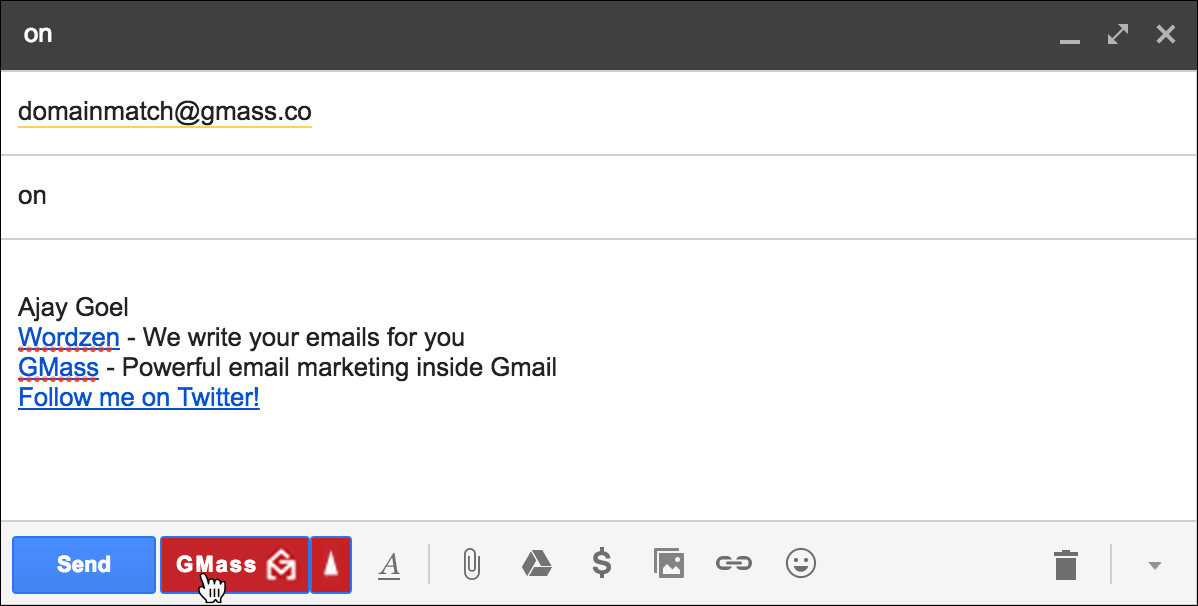
- Click Compose to launch a new window.
- Set the To field to domainmatch@gmass.co.
- Set the Subject to the word on or off.
- Leave the Message blank.
- Hit the GMass button. Do not hit the Send button.
Email marketing, cold email, and mail merge all in one tool — that works inside Gmail
TRY GMASS FOR FREE
Download Chrome extension - 30 second install!
No credit card required

Ajay is the founder of GMass and has been developing email sending software for 20 years.
I’m really like is game
What exactly will be the mail body in the auto follow-up mail ?
Will it be the exact same body as in the original mail or something else? Please specify. Thanks!
You decide what is in the body of your Auto Followup email. It is customized in the GMass Settings Box. See: https://www.gmass.co/blog/new-feature-automatic-follow-up-emails-until-you-get-a-reply/
I like this.
2 question stacks
1)
how do i use this for specific campaigns?
do i just turn it on and all of my auto-followups move to domain based replies?
do i need to relaunch old campaigns for this to work?
2)
how can i send auto-response to an existing thread (of normal, non-Gmass emails) without sending a new message?
Hi Zohar,
1. Unfortunately, you can’t turn this off and on for specific campaigns. At its current state, it is applicable to all your campaigns or none.
2. You can send them as replies. Please see https://www.gmass.co/blog/send-email-campaign-as-reply-to-recent-conversation/
I wonder if someone unsubscribed using the unsubscribe button will he or she receive followups?
No, they will not. Since unsubscribing adds their email to your unsubscribes list that prevents future emails (main campaigns and follow-ups) from being sent through GMass.
It is unclear to me regarding the number of days in the follow-up stages. For example:
Stage 2 – after 2 days if no reply (this is clear)
Stage 3 – after 3 days if no reply
Is stage 3, 3 days after stage 2? Or is it 3 days after the original email was sent? So 5 days later? I’ve tried to find this in the blog to no avail.
Thank you!
Hi Irene,
The days will always be based on the original email.
For example, your original email was sent March 1 and a 2 day follow-up was sent on March 3. For Stage 3 – it would be sent on the 4th. (3 days after when the initial email was sent).
Hi,
Is there a way to turn off auto-replies to “similar” matching domains, such as if a recipient uses a helpdesk to reply?
E.g. I send an email to example@company.com, and then receive a reply from info@company.zendesk.com.
Currently (even with domain matching ON, and the reply I received from the help desk) does this mean that my campaign will auto-follow up to example@company.com? –
//Linda
This is awesome and I didn’t know I could do this.
1 question – if I get one response from @gmail.com will all the @gmail.com recipients stop getting them? Too many people have gmail 😛
Can anyone tell me how to remove a particular person from auto-follow up list? Do I need to remove the credentials from the Google Sheet manually or some setting has to be done on Gmass? Please help me.
Hello,
Will this still work if someone replies from an email that wasn’t on the original list?
I email:
jack@uber.com
jane@uber.com
joe@uber.com
However, dave@uber.com responds. Will this still stop the auto follow ups? It reads like it should i just want to be sure.
Thanks so much
Hi
In my email campaign
If I DONT want to send email to one of people, how do i set ?
IN Advance-Suppression: Don’t send to:xxx and then write into the email address which i don’t want to send ?
Hi Victor,
You can add a suppression list at the time you schedule a campaign. This way when the campaign processes, addresses in your suppression list will be suppressed from being send emails for this campaign. To learn more, please see https://www.gmass.co/blog/use-a-google-sheets-spreadsheet-as-a-dynamic-email-suppression-list/
Hi Marvin,
If I send a mass email send, and I receive an auto-respond email from someone with the email domain, does it stop the auto follow-up to all other emails with the same domain when auto domain-match is ON?
Hi Marvin,
If I send a mass email send, and I receive an auto-respond email from someone with the email domain, does it stop the auto follow-up to all other emails with the same domain when auto domain-match is ON?
Domain matching
Force prior conversation below message
Your auto follow-up settings have been saved.
Can you add auto-follow up for a campaign you already sent? Thanks
What if I add and remove emails from my spreadsheet several times a day?
– Will the new leads be added to the campaing automatically
– will the removed leads stop receiving the remaining emails in their sequence if I take them off the spreadsheet?
The when Someone said a blog, I am hoping that this doesnt disappoint me approximately this place. Come on, man, Yes, it was my choice to read, but I just thought youd have something fascinating to mention. All I hear is a bunch of whining about something you could fix in the event you werent too busy interested in attention.
What your saying is absolutely genuine. I know that everybody must say the same matter, but I just think that you set it in a way that everybody can understand. I also enjoy the images you set in right here. They fit so nicely with what youre attempting to say. Im certain youll get to so a lot of individuals with what youve received to say.
Wohh exactly what I was looking for, thanks for putting up.
Transactional emails nurture customer relationships.
There are certainly a couple more details to take into consideration, but thank you for sharing this information.
I recommend 0mail pro for anyone who wants a quick and secure way to generate temp emails, search on google, or click in my name.