

Our goal at GMass is to have the most accurate open rates in the industry. We’re pretty sure we do — but there’s always room to get even better.
Open tracking hardening is our newest technique to make sure the open rate you see in your analytics is as accurate as it can possibly be.
This feature replaces emails in your Sent folder with identical copies that won’t trigger false opens.
Don’t want the backstory on open rate tracking? Jump right down to the explanation of this feature.
Open Tracking Hardening: Table of Contents
- Quick Summary
- The Problem with Self-Opens in Open Tracking
- How Open Tracking Hardening Works
- Who Should Use Open Tracking Hardening
- How to Turn On Open Tracking Hardening
- The Quest for the World’s Most Accurate Open Rates
Quick Summary
- Open tracking hardening prevents you from accidentally triggering opens on sent emails when you check them in your Gmail Sent folder.
- It does this by replacing each message in your Sent folder with an identical copy — just with the open tracking pixel removed.
- This process will slow down your sending speed by ~4 seconds per message.
- It’s meant for low-volume campaigns (<500 messages) to increase open tracking accuracy.
The Problem with Self-Opens in Open Tracking
Open tracking in email works by including a tiny invisible image in your email, generally referred to as an open pixel. This is true at GMass and every single other email sending provider.
Anytime someone opens your email, that pixel loads which lets us know there’s been an open.
However, it’s possible for YOU to trigger the pixel in an email you’ve sent, so you’re accidentally the one recording those opens.
Why self-opens happen (and why they’re so hard to avoid)
Open tracking is a simplistic but effective mechanism: load an invisible image, record an open.
The problem is your email client doesn’t care who’s doing the loading. An open is an open.
As a result, most email sending platforms show you inflated open rates.
At GMass, we have various measures in place to prevent false opens, like our Tracker Blocker extension (a companion Chrome extension which prevents you from triggering your own open pixels) and removing the open pixels from bounce notifications.
But…
Tracker Blocker only works inside Gmail, in Chrome, on your desktop. Once you go elsewhere — Apple Mail, mobile Gmail, Outlook, any mail app on your phone — there’s nothing to stop the pixel from firing.
And we know lots of senders regularly open campaign emails in their Sent folder to double-check what they wrote, grab a link, or confirm a detail. On mobile, every single one of those gets logged as an open.
That’s one of the ways you can end up with inflated open rates.
With a large-scale campaign, these false opens are generally smoothed out by real data.
But if you’re sending smaller campaigns where one or two false opens distort the story or you’re relying on open rate accuracy for A/B testing or sequencing — in those cases, false opens can be quite damaging.
How Open Tracking Hardening Works
Open tracking hardening is a process we use to strip out the open pixels in your Sent folder so you won’t inadvertently trigger an open as you review messages you’ve sent.
The process of replacing your open pixels
GMass still sends your emails normally, with the real open-tracking pixel embedded for each recipient. That pixel is not affected in any way during this process.
Then GMass does a behind-the-scenes shuffle with the copies of those emails in your Gmail Sent folder:
- It pulls the sent copy of your message from Gmail using the Gmail API.
- It deletes that original sent message.
- It inserts a new, identical-looking sent message in your Sent folder — except this copy has a dummy pixel that can’t trigger an open.
Your recipients get the real thing and has no idea any of this has happened. Your Sent folder gets the safe version. And you can tap that message on your phone, in third-party email clients, or anywhere else without corrupting your campaign analytics.
Important: This process will slow down your sending speed
To use open tracking hardening, every single message in a campaign requires:
- A standard Gmail API send…
- A fetch of the sent message…
- A delete…
- And a fresh insert.
That’s several API calls per email, and because of that intensive Gmail API choreography, turning this feature on slows sending to roughly one email every four seconds.
That’s before any throttling settings you might have configured to intentionally add pauses between your messages.
For campaigns under 500 recipients, this slowdown shouldn’t matter; you’re trading maybe a few extra minutes for improved open-rate accuracy.
But above that scale, that may create a bottleneck and make your campaigns take a lot longer to send than you’re expecting. (Plus, with large campaigns, a few false self-opens aren’t quite as problematic as they’d be with smaller campaigns.)
Who Should Use Open Tracking Hardening
This feature is primarily built for low-volume, accuracy-focused senders:
- Campaigns under ~500 recipients.
- Anyone who checks sent emails on their phone.
- Anyone relying on open rate for a crucial task like A/B testing, follow-up sequences that stop on open, or triggered emails.
- People sending PR pitches, investor updates, job outreach, partnership requests where one fake “open” can mislead you.
If your work depends on knowing exactly who opened and when, hardening is one of the only ways to eliminate an insidious source of false opens.
The situation where it still won’t catch an open pixel
Let’s say someone replies to your campaign and you open that thread in the Sent folder. The reply is threaded to the replaced email in the Sent folder.
However, the pixel will still fire from the email below the reply (aka the email the person opened and replied to) since that’s included in the thread.
This probably shouldn’t matter for your analytics — after all, for that person to reply, they had to open the email for real. And we don’t count repeat opens toward your open rate — just the original, real open.
Just know that in this case, you will trigger an additional open that open tracking hardening won’t block.
Why you might not want to use it
If speed matters, this isn’t for you.
For high-volume campaigns, time-sensitive blasts, event reminders, or promos with short windows — you’ll feel the slowdown.
In those cases, Tracker Blocker on desktop plus disciplined behavior around sent messages may be enough.
If you almost never open sent emails, or you already rely heavily on Tracker Blocker and rarely check email outside desktop Gmail, you may not need this at all.
And, of course, if you’re someone who turns off open tracking (like many folks in cold outreach), this feature won’t matter to you.
How to Turn On Open Tracking Hardening
Open tracking hardening is an account-level setting, not one you choose on a campaign-by-campaign basis. That means once it’s on, it will apply to all future campaigns. (You can always turn it off again in the future.)
Like all account-wide settings, you’ll find open tracking hardening in the GMass dashboard.
Open the Settings, then go to the Other section.
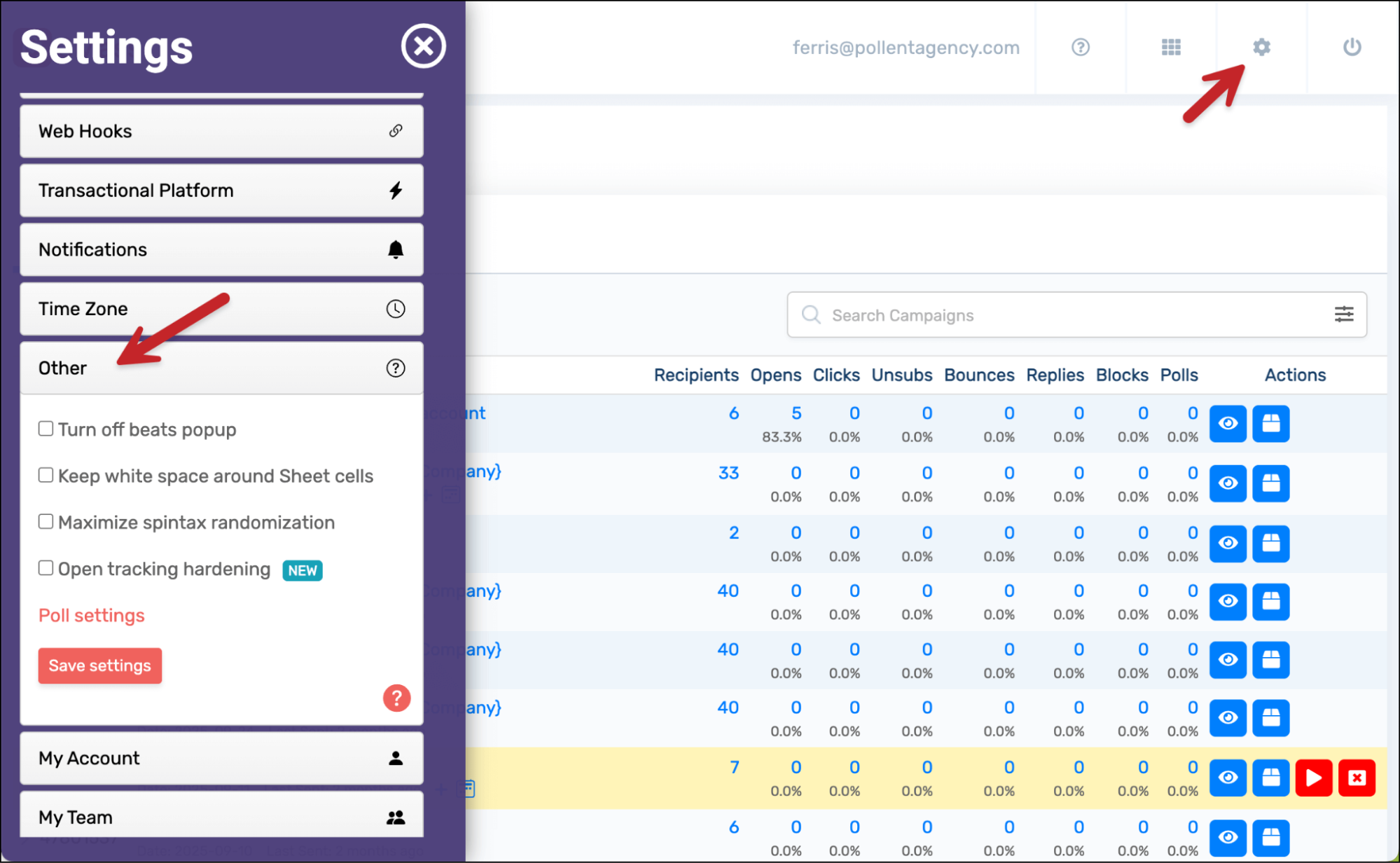
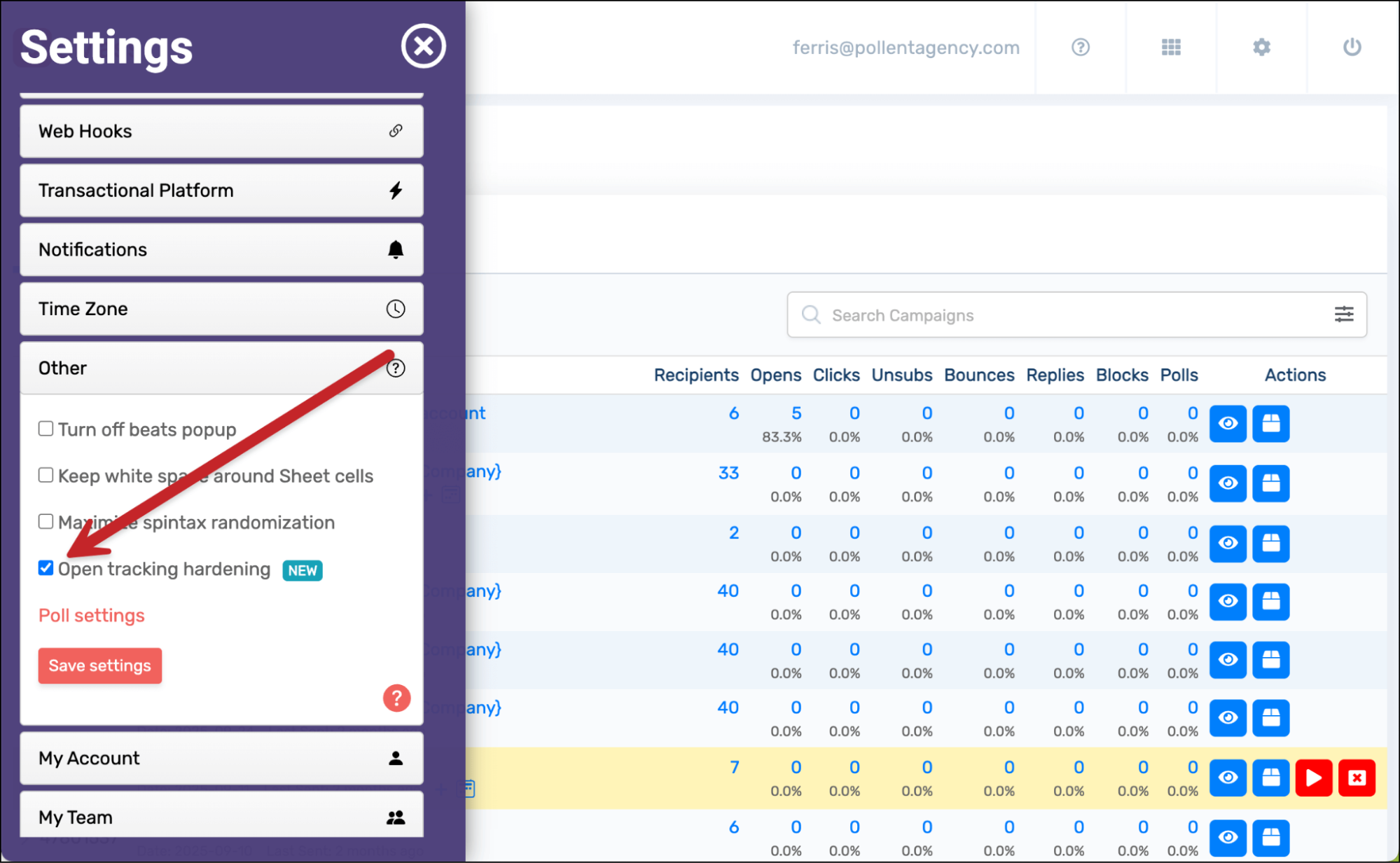
Check the box next to Open Tracking Hardening.
Click the Save settings button. If needed, grant GMass the required permissions (GMass needs delete access in Gmail, which we otherwise don’t ask for; obviously don’t worry, we’re not going to use this permission for anything except these pixel replacements).
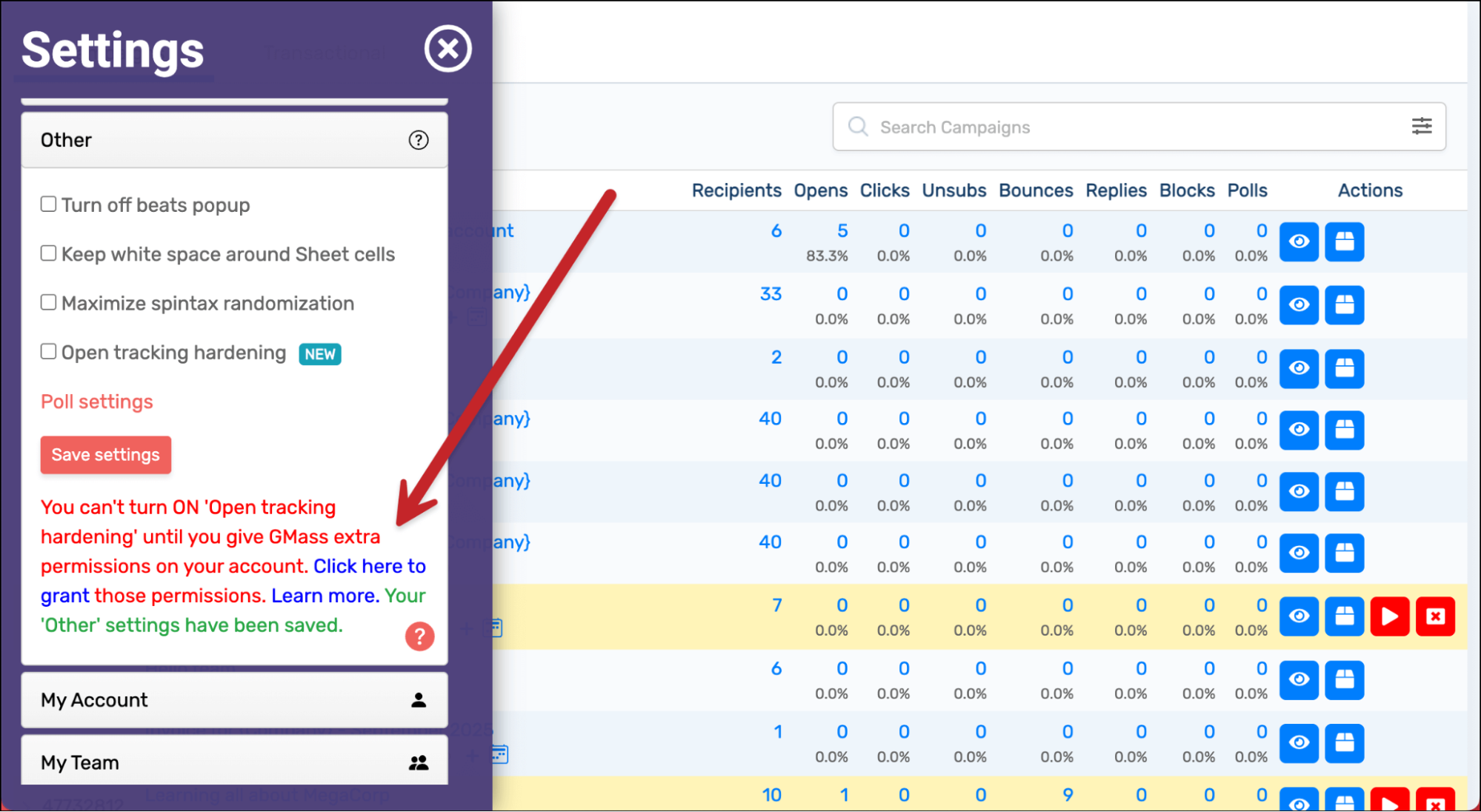
Once you’ve granted those permissions, open tracking hardening is ON for your account and the tracking pixel will be replaced in your Sent folder.
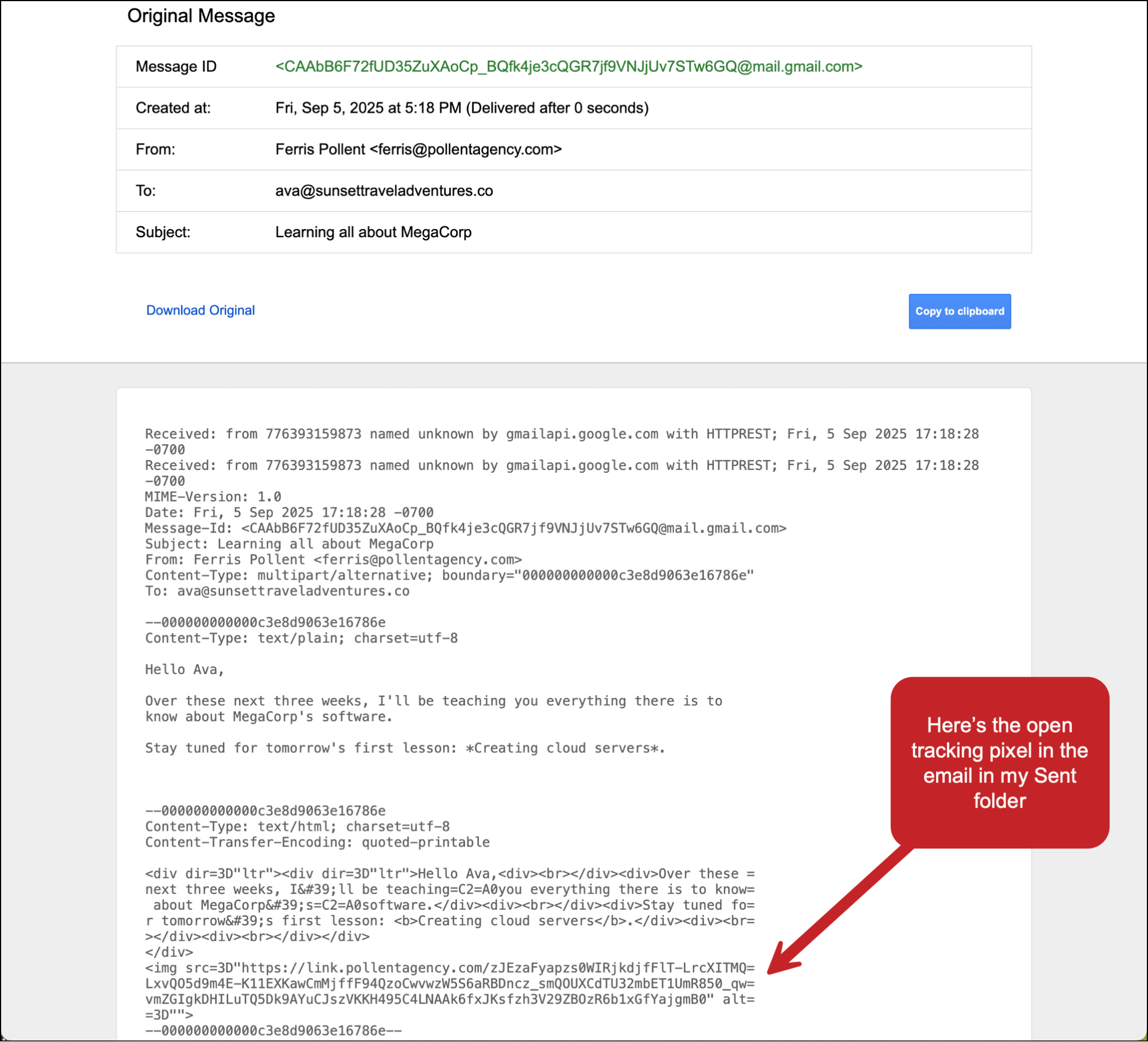
Here’s the result. I sent a GMass campaign to one of my other addresses with open tracking on. You can see the open tracking pixel in the recipient’s copy… but the pixel has been removed and replaced in my Sent folder.
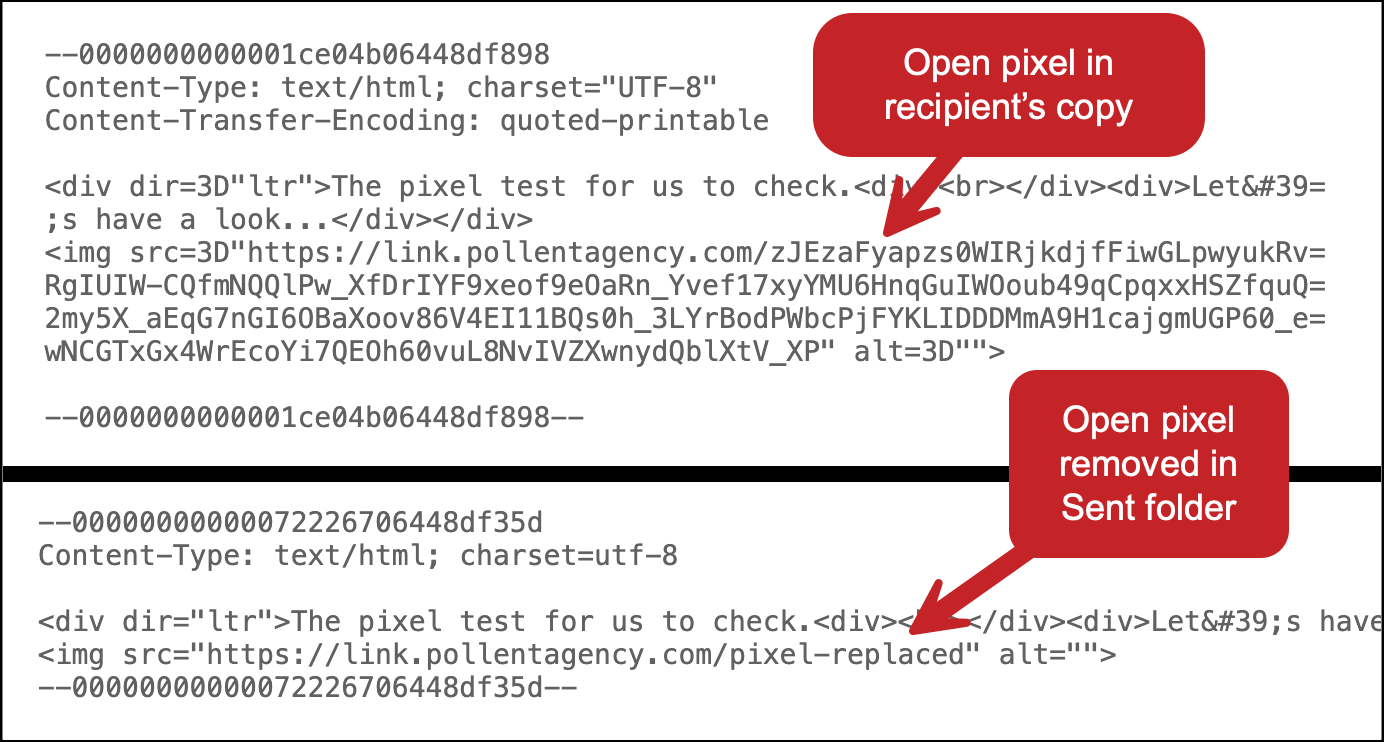
(Also, from my perspective, the sending delay caused by the replacement was imperceptible.)
The Quest for the World’s Most Accurate Open Rates
Open Tracking Hardening closes one of the last unavoidable gaps in open tracking.
It’s entirely possible you’ve been triggering false opens by checking sent messages without ever realizing it. And now, with Open Tracking Hardening, that won’t happen anymore.
And this joins our arsenal of tools to provide the most accurate open rates you’ll find anywhere:
- Separating out false opens from Apple and others.
- Removing the open pixel from bounce notifications.
- Tracker Blocker.
- And a whole lot more behind the scenes.
Obsessive open tracking accuracy is just one of the many — many — reasons why GMass is among the most popular email sending platforms in the world.
If you haven’t tried GMass yet, you can get started for free with no credit card required. Just install the Chrome extension and you can get rolling.
See why 400,000 people rely on GMass to send every possible type of email and give it an average of 4.8/5 stars across tens of thousands of reviews.
Send incredible emails & automations and avoid the spam folder — all in one powerful but easy-to-learn tool
TRY GMASS FOR FREE
Download Chrome extension - 30 second install!
No credit card required